
Helpful Guides
Generating RSA Key Pair
Generate Key Pair
openssl genrsa -out id_rsa 2048Extract Public Key to a File
openssl rsa -in id_rsa -pubout -out id_rsa.pub└─$ ls
id_rsa id_rsa.pub└─$ file *
id_rsa: OpenSSH private key (no password)
id_rsa.pub: OpenSSH public keyConvert .key and .crt Files from PEM to PKCS#12 (For Use on Windows)
Convert
openssl pkcs12 -export -name "corp.515support.com" -out corp.515support.com.pfx -inkey corp.515support.com.key -in corp.515support.com.crt- Certificates are often issued by CAs in the PEM format.
- Windows servers often use the PKCS#12 format, where keys are merged into a single file.
- The PKCS#12 format is an archival file that stores both the certificate and the private key.
- PKCS#12 files use either the .pfx or .p12 file extension.
Generate a Certificate Signing Request
Extracting Public Key to Generate CSR
openssl req -new -key id_rsa -out corp.515support.com.csrVerify the Certificate Request
openssl req -text -in corp.515support.com.csr -noout -verifyDisplay CSR
cat corp.515support.com.csrCopy CSR
Note: Make sure to copy everything including the header and the footer as seen below
-----BEGIN CERTIFICATE REQUEST-----
....
....
-----END CERTIFICATE REQUEST-----
Generate Self-Signed Certificate
Generate Certificate
openssl req -newkey rsa:2048 -nodes -keyout corp.515support.com.key -x509 -days 365 -out corp.515support.com.crtSSH (Port Forwarding)
Example Environment
- 192.168.0.5 - User1
- 192.168.100.10 - User2
- Running a web server locally on port 3000
- Located in another LAN only accessible through User1's machine
- 192.168.0.15 - Kali (Attack Box)
Dynamic Port Forwarding
ssh -D -N 9050 User1@192.168.0.5-Nruns the command with no interactive shell.- This will create a proxy on our local port 9050 (127.0.0.1:9050).
- Run commands through
proxychainsin a separate terminal.
Dynamic Port Forwarding: Example of Running Nmap via ProxyChains
proxychains nmap -sT 192.168.100.10- This forwards the scan through port 9050 and appears as though it came from 192.168.0.5.
Dynamic Port Forward (Turning Remote Machine into Forwarding Proxy)
Note: This will be run as a background process on the CONFLUENCE01 machine
ssh -N -D 0.0.0.0:9999 database_admin@10.4.50.215ssh -N -D <CONFLUENCE01_listening_interface>:9999 database_admin@PGDATABASE01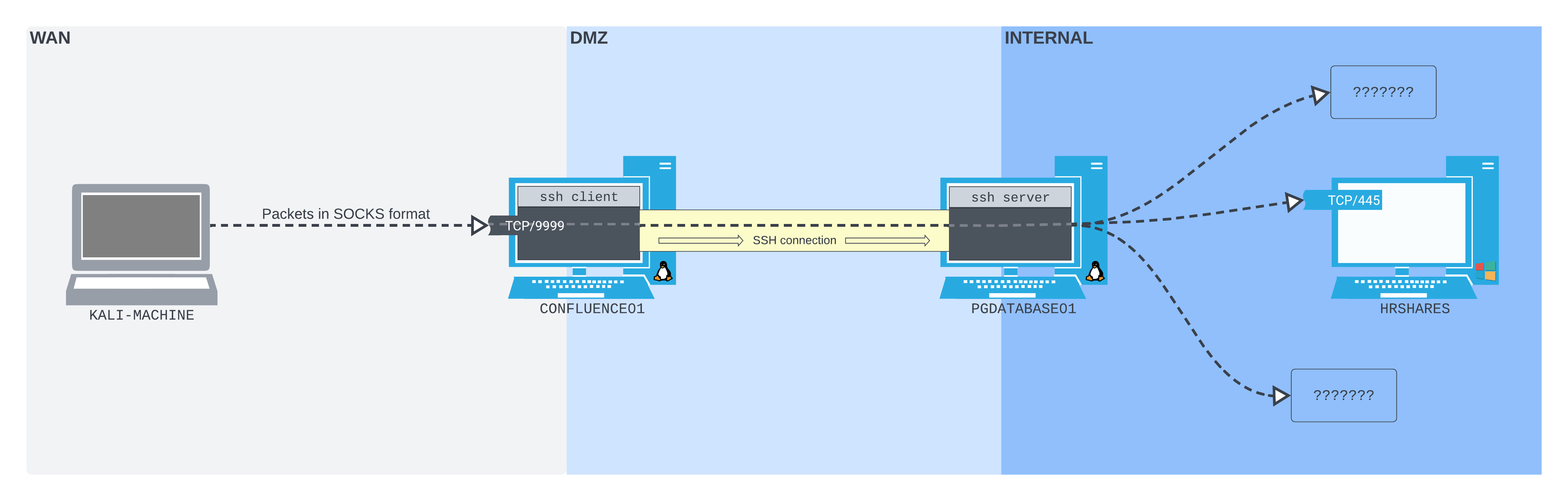
- This will bind a listener to port 9999 on the CONFLUENCE01 machine and forward all traffic through the SSH tunnel established with the PGDATABASE01 machine.
Local Port Forwarding
ssh -N -L 1234:localhost:3000 User2@192.168.100.10- This binds local port 1234 to remote port 3000 on User2.
- Open Firefox and go to
localhost:1234.
Local Port Forwarding Through Multiple Machines
Note: This involves 4 total machines: our machine, Confluence01, PGDatabase01, and the final machine.
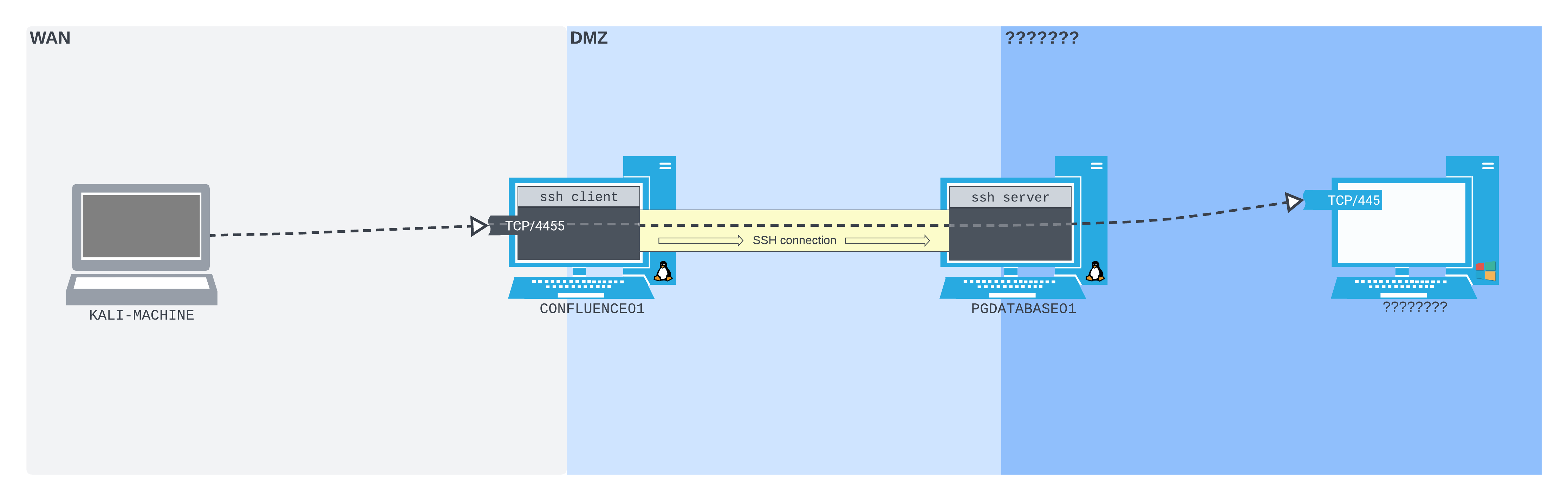
ssh -N -L 0.0.0.0:4455:172.16.50.217:445 database_admin@10.4.50.215- This is run on Confluence01.
- Connecting to port 4455 on Confluence01 is like connecting to port 445 on 172.16.50.217.
Remote Port Forwarding
ssh -N -R 127.0.0.1:2345:10.4.50.215:5432 kali@192.168.118.4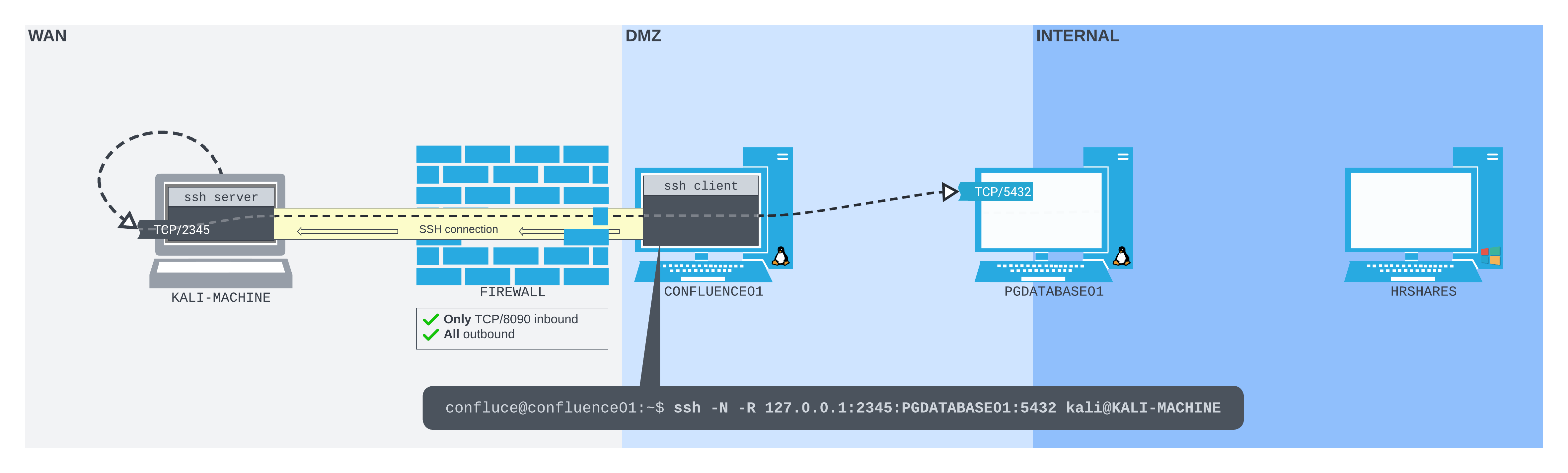
-Nsets no-shell.-Ris for remote port forwarding.127.0.0.1:2345is a local listener on port 2345.
Remote Dynamic Port Forward
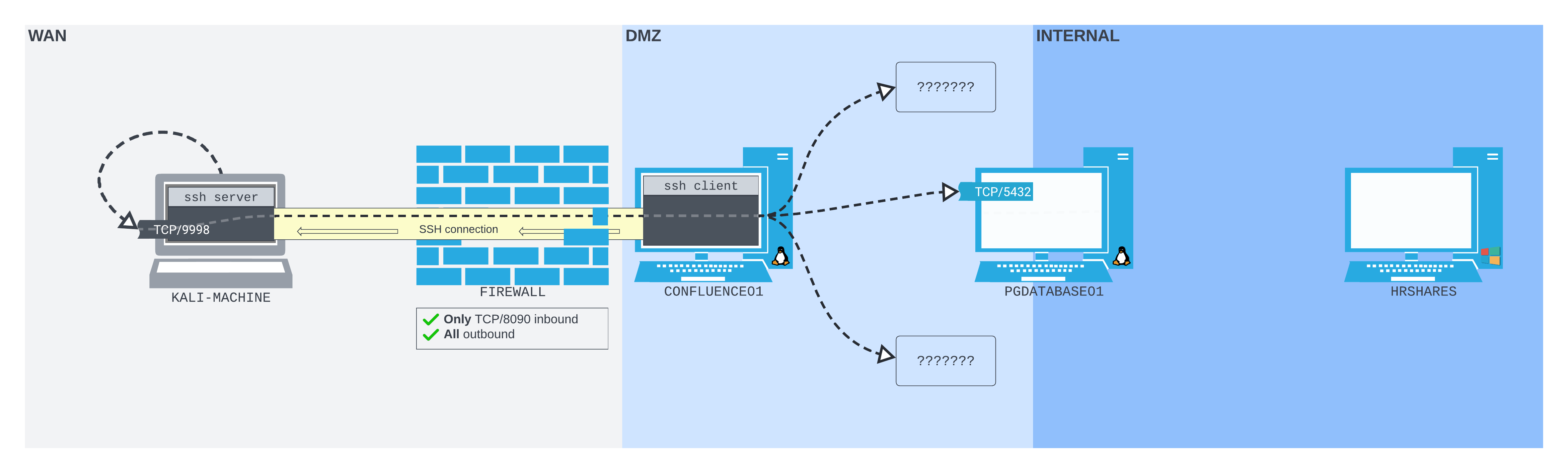
ssh -N -R 9998 kali@192.168.45.197ssh -N -R 127.0.0.1:9998 kali@192.168.45.197- Uses the same
-Roption as classic remote port forwarding. - Pass only the socket you want to listen on the SSH server.
- If you just pass a port, it binds to loopback by default.
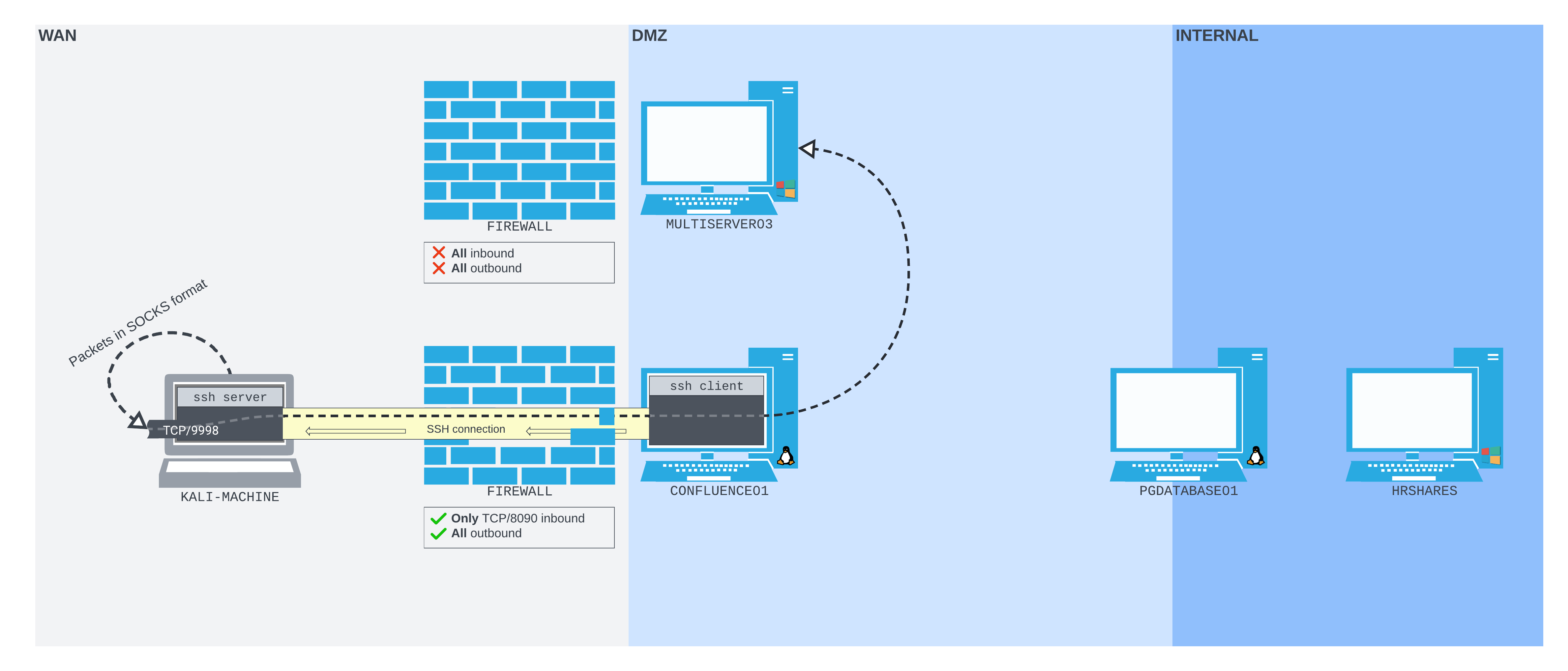
Host Jumping
ssh -J User1@192.168.0.5 User2@192.168.100.10- This creates a tunnel through the first computer and on to the second.
Example of Host Jumping && Local Port Forwarding
ssh -J User1@192.168.0.5 -L 1234:localhost:3000 User2@192.168.100.10- This combines a tunnel from our machine to machine 1 and binds local port 1234 to the remote port 3000 of machine 2.